Illustration of nested if statement, COBOL Programming

Assignment Help:

Illustration of nested if statement:

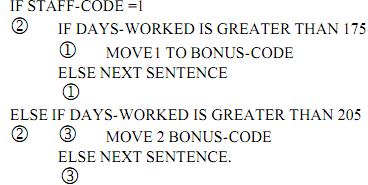
Consider the nested sentence which is as shown below:
1186_Illustration of nested if statement.png

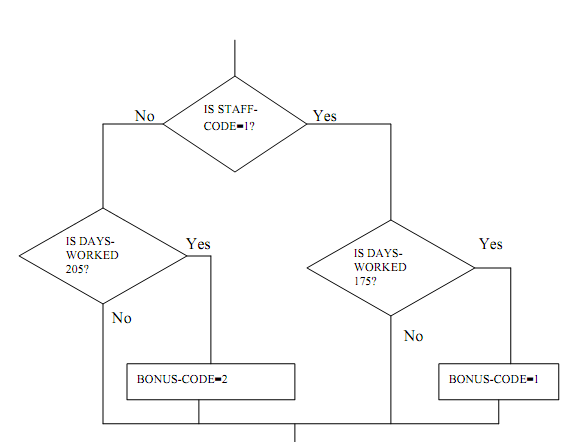
The IF-ELSE pairs in this sentence can be detected by applying the rule which is stated above. We point out the IF-ELSE relations by marking each pair with similar numbers within the circle. The sentence can now be easily acknowledged as an implementation of the following flow chart.
 

511_Illustration of nested if statement1.png

It can also be seen that while the last ELSE NEXT SENTENCE phrase can be dropped, it is not possible to drop the initial ELSE NEXT SENTENCE phrase. If this initial phrase is absent, the pairing of IF's and ELSE's will be disturbed. It is left as an exercise to confirm that the BONUS-CODE will then remain unchanged if the STAFF-CODE is other than the 1.

Though the similar action will be taken when STAFF-CODE is equal to 1, it is worthwhile to examine that this is as the condition in the last IF statement can never be true.

And hence, we examine the ELSE NEXT SENTENCE phrase is useful in many cases. The phrase also increases the readability. And hence, the use of the NEXT SENTENCE either in the then or else parts of an IF statement is suggested. The only exception can be when the

ELSE NEXT SENTENCE phrase is instantly followed by the terminating period of the IF sentence. This is because in this situation the ELSE should apply to the IF of the most inclusive IF statement of the nesting. And hence, the control will be transferred to the next sentence regardless of whether or not the ELSE NEXT SENTENCE phrase is explicitly involved.


Related Discussions:- Illustration of nested if statement

Use of evaluate statement, Evaluate is like a case statement & Evaluate  s...

Evaluate is like a case statement & Evaluate  stamenet can be used to replace nested Ifs. The difference b/w EVALUATE and case is that there is no 'break' is required for EVALUATE

Add and subtract corresponding, ADD and SUBTRACT CORRESPONDING: The CO...

ADD and SUBTRACT CORRESPONDING: The CORRESPONDING option can also used with the ADD and SUBTRACT verbs. The following are some of the formats of these verbs with the CORRESPON

Credit and debit sign - edit characters for numeric data, CR and DB (Credit...

CR and DB (Credit and Debit Sign): The two characters that is CR or DB symbol may appear only at the rightmost place of the picture. They are similar to the minus sign edit ch

File-control - input-output section, FILE-CONTROL: The FILE-CONTROL pa...

FILE-CONTROL: The FILE-CONTROL paragraph names each and every file and identifies the first medium through file control entries. The basic format of a file control entry is gi

Period or decimal point - edit characters for numeric data, .(Period or Dec...

.(Period or Decimal Point) : The period may be used to insert a decimal point and may not come into view more than once. Both the period and V cannot appear in similar picture

Sign condition - cobol programming, SIGN CONDITION:   The sign condit...

SIGN CONDITION:   The sign condition establishes whether or not the algebraic value of an operand is negative, positive or zero. The operand can be either the numeric identif

Start statement - indexed files, START STATEMENT: The START statement ...

START STATEMENT: The START statement places the files to the initial logical record whose record key satisfies the condition specified by the KEY phrase. The access mode shoul

Examples - edit characters for numeric data, Examples - Edit characters for...

Examples - Edit characters for numeric data: The following illustration illustrates the use of Z editing characters. The character b is used to indicate the space character an

Comma - edit characters for numeric data, , (Comma) : A comma, wheneve...

, (Comma) : A comma, whenever used in a picture, is considered as an insertion character and inserted wherever it become visible. There can be more than one comma in the pictu

File-control entries for the sequential files, FILE-CONTROL ENTRIES FOR THE...

FILE-CONTROL ENTRIES FOR THE SEQUENTIAL FILES: The characteristics of each and every files handled in a program are specified in the ENVIRONMENT DIVISION and DATA DIVISION.

Write Your Message!

Captcha
Free Assignment Quote

Assured A++ Grade

Get guaranteed satisfaction & time on delivery in every assignment order you paid with us! We ensure premium quality solution document along with free turntin report!

All rights reserved! Copyrights ©2019-2020 ExpertsMind IT Educational Pvt Ltd