Html 4.0 element, Computer Engineering

Assignment Help:

<LABEL>

<LABEL>, an HTML 4.0 element supported by Netscape6 and MSIE, defines a set of text which is associated with a specific form element. For illustration, code below indicates that phrase "send more information" is associated with "moreinfo" checkbox as checkbox is within the <LABEL> element:

<HTML>

<BODY>

<LABEL FOR="moreinfo">

Send more information

<INPUT NAME="moreinfo" TYPE=CHECKBOX ID="moreinfo">

</LABEL>

</HTML>

FOR attribute is required in above illustration. Value of FOR must be the same as value of ID in the form field that label applies to.

You can also associate a <LABEL> with a field which is not within its contents using the FOR attribute.

Attribute for <SELECT>

TABINDEX = integer

TABINDEX is supported by Netscape 6 and MSIE 4.x higher.

Usually, when user tabs from field to field in a form (in a browser which allows tabbing, not all browsers do) tab order is the order in which fields appear in HTML code.

Although, sometimes you want tab order to flow a little differently. In that scenario, you can number the fields using TABINDEX. Tabs then flow in order from one with the lowest TABINDEX to highest.

Code below explains this:

<HTML>

<BODY>

<TABLE BORDER CELLPADDING=3 CELLSPACING=5

BGCOLOR="#FFFFCC">

<TR>

<TD>name: <INPUT NAME="realname" TABINDEX=1></TD>

<TD ROWSPAN=3>comments<BR>

<TEXTAREA COLS=25 ROWS=5

TABINDEX=4></TEXTAREA></TD></TR>

<TR> <TD>email: <INPUT NAME="email" TABINDEX=2></TD></TR>

<TR> <TD>department: <SELECT NAME="dep" TABINDEX=3>

<OPTION VALUE="">...

<OPTION VALUE="mkt">Marketing

<OPTION VALUE="fin">Finance

<OPTION VALUE="dev">Development

<OPTION VALUE="prd">Production</SELECT></TD></TR>

</TABLE>

</HTML>
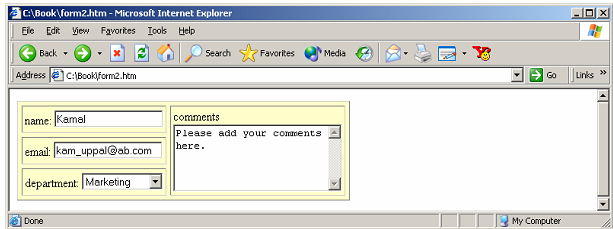
874_HTML 4.0 element.png

TABINDEX can be used with <A>, <INPUT>, <TEXTAREA>, and <BUTTON


Related Discussions:- Html 4.0 element

Number system, Number systems   Consider a decimal number:         ...

Number systems   Consider a decimal number:               7654.32   Short hand for:            7 * 103 + 6*102 + 5* 101 + 4*100 + 3*10 -1  + 2*10 -2   Likewise

Page directive include, What is the difference between, page directive incl...

What is the difference between, page directive include, action tag include? Ans) One difference is whereas using the include page directive, in translation time it is making t

Explain about octal numbers system, Q. Explain about Octal Numbers system? ...

Q. Explain about Octal Numbers system? An octal system has 8 digits signified as 0,1,2,3,4,5,6,7. For finding equal decimal number of an octal number one has to find quantity o

What is a daemon, What is a Daemon? A daemon is a method that detaches ...

What is a Daemon? A daemon is a method that detaches itself from the terminal and runs, disconnected, in the background, waiting for requests and responding to them. It can als

State the advantages of CMOS, State the advantages of CMOS. Ans. Su...

State the advantages of CMOS. Ans. Subsequent are the advantages of CMOS: Both n-channel and p-channel devices are fabricated on similar substrate. Low power di

Implement the logic of the following gates, Q. Develop a menu driven prog...

Q. Develop a menu driven program to implement the logic of the following gates. I. AND Gate II. OR Gate III. NOT Gate IV. Exit The user has option to give n number

Expression for boolean function in standard POSform, Write the expression f...

Write the expression for Boolean function for F (A, B, C) = ∑m (1,4,5,6,7) in standard POS form.                                   Ans: f (A,B,C )= ΣM (1,4,5,6,7) in standard POS

Determine the begin - end keywords, Determine the begin - end keywords ...

Determine the begin - end keywords Group several statements together. Cause the statements to be evaluated sequentially (one at a time) -> Any timing within sequential group

What are the features of prom, What are the features of PROM? They are ...

What are the features of PROM? They are programmed directly by the user. Faster Less expensive More Flexible

Give the example of spreadsheet, Give the example of Spreadsheet By sel...

Give the example of Spreadsheet By selecting cell C1 and dragging the formula down to C5 the below formulae will be replicated in C2 to C5: (A2*B2), (A3*B3), (A4*B4) and (A5*B5

Write Your Message!

Captcha
Free Assignment Quote

Assured A++ Grade

Get guaranteed satisfaction & time on delivery in every assignment order you paid with us! We ensure premium quality solution document along with free turntin report!

All rights reserved! Copyrights ©2019-2020 ExpertsMind IT Educational Pvt Ltd