Convert the rgb values for the colours, Computer Graphics

Assignment Help:

In computers, colours are created by blending different combinations of red, green and blue. These colours are normally specified as three two-digit hexadecimal numbers in html, photoshop, gimp etc. For example, Brown is specified as A62929 to indicate the proportions of red, green and blue required. For grey shades the three proportions will always be equal. Moreover FF indicates that the colour is fully saturated. Thus red is FF0000, green is 00FF00, and blue is 0000FF. This colour system is called RGB.

Other applications, such as MATLAB require the RGB colours to be specified in terms of the fraction of each colour required. In this case, the colour is specified by three numbers between 0 and 1, with 1 representing full colour saturation. For example, Brown in this system is given as (0.65, 0.16, 0.16); while red is (1, 0, 0); green is (0, 1, 0) and blue is (0, 0, 1). This representation is referred as the RGB colour fraction.

Given that different systems are used in different applications, it is important to be able to convert between the two representations. The largest number that can be represented by a two-digit hexadecimal number is 16 FF so we know that there are 255 possible shades that can be represented.  Hence, to convert the hexadecimal colour representation to a colour fraction, the following has to be done:

1.  Convert each hexadecimal colour number to its decimal equivalent.

2.  Divide each decimal by 255.

3.  Record each fraction as the colour fraction required for that colour. Converting from a colour fraction to the hexadecimal version is the reverse of the above.

To illustrate, let us consider Brown. Its shade of red is 16 A6. As a decimal this corresponds to 166. Hence, the fraction amount of red required is 166 255 0.65. Similarly for green the decimal equivalent of 16 29 is 41. Therefore, the green colour fraction is 41 255 0.16
. The blue colour fraction for Brown is also 0.16.

(a) Convert the RGB values for the colours below to their equivalent RGB colour fractions. Round your answers to two decimal places.
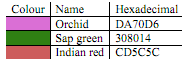
389_Convert the RGB values for the colours.png


Related Discussions:- Convert the rgb values for the colours

Explain what is the bleed and its purposes, QUESTION (a) Name the space...

QUESTION (a) Name the spaces and guides in the Figure below                 (b) What is the difference between Pantone and Process colors? Elaborate (c) Explain what i

Linearly interpolate - modeling and rendering, Linearly interpolate - Model...

Linearly interpolate - Modeling and Rendering I 4 = I 1 + t (I 2 - I 1 ); here t = (|y 1 - y 2 |)/(|y 1 - y 2 |) I D = I A + t (I B - I A ); here t = (|AD|)/(|AB|)

Differences of forward kinematics and inverse kinematics, Question 1: (...

Question 1: (a) Provide a clear explanation of what is ‘rigging' and its use? (b) What are the basic differences of Forward Kinematics (FK) and Inverse Kinematics (IK)? Wh

Animate 3d articulated character - forward kinematic method, In this progra...

In this programming assignment, you will animate and pose 3D articulated characters by implementing forward and inverse kinematic methods. You should be able to animate character j

Explain reflection, What is reflection?  The reflection is actually the...

What is reflection?  The reflection is actually the transformation that produces a mirror image of an object. For this use some angles and lines of reflection.

Image editing tools in multimedia, Image Editing Tools These are specia...

Image Editing Tools These are specializing and influential tools for enhancing and re-touching existing bit-mapped images. Such applications also give several of the features a

Find out the matrix of projection, Find out the matrix of projection for ca...

Find out the matrix of projection for cavalier projection Answer: Cavalier projection corresponds to tan α = 1, leading to the following matrix.

Graphics applications, The subsequent are also considered graphics applicat...

The subsequent are also considered graphics applications as: • Paint Programs: Permit you to create rough freehand drawings. The images are saved as bit maps and can simply be

Panning and zooning, what is zooming and panning in computer graph please e...

what is zooming and panning in computer graph please explan??

Key frame systems, Ask questionkms eey frame syst #Minimum 100 words accept...

Ask questionkms eey frame syst #Minimum 100 words accepted#

Write Your Message!

Captcha
Free Assignment Quote

Assured A++ Grade

Get guaranteed satisfaction & time on delivery in every assignment order you paid with us! We ensure premium quality solution document along with free turntin report!

All rights reserved! Copyrights ©2019-2020 ExpertsMind IT Educational Pvt Ltd