Application of sutherland hodgman polygon clipping, Computer Graphics

Assignment Help:

For good understanding of the application of the rules specified above see the following figure, where the shaded region demonstrates the clipped polygon.
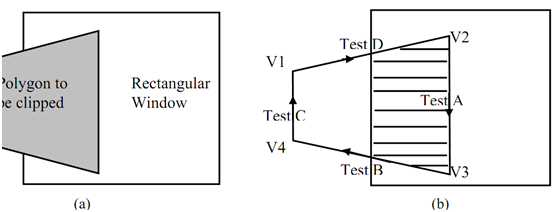
801_Application of Sutherland Hodgman Polygon Clipping.png

Figure: Sutherland-Hodgman Polygon Clipping

Pseudo code for Sutherland - Hodgman Algorithm

Define variables

In VertexArray is the array of input polygon vertices

outVerteArray is the array of output polygon vertices

Nin is the number of entries in inVertexArray

Nout is the number of entries in outVertexArray

n is the number of edges of the clip polygon

ClipEdge[x] is the xth edge of clip polygon defined by a pair of vertices

s, p are the start and end point respectively of current polygon edge

i is the intersection point with a clip boundary

j is the vertex loop counter

Define Functions

AddNewVertex(newVertex, Nout, outVertexArray)

: Adds newVertex to outVertexArray and then updates Nout

InsideTest(testVertex, clipEdge[x])

: Checks whether the vertex lies inside the clip edge or not;

  retures         TRUE is inside else returns FALSE

Intersect (first, second, clipEdge[x])

: Clip polygon edge (first, second) against clipEdge[x], outputs the intersection point

{                                        :  begin main

x = 1

while (x ≤ n)                     : Loop through all the n clip edges

{

Nout = 0                            : Flush the outVertexArray

s = inVertexArray[Nin] : Start with the last vertex in inVertexArray

for j = 1 to Nin do             : Loop through Nin number of polygon vertices (edges)

{

p = inVertexArrray[j]

if InsideTest(p, clipEdge[x] = = TRUE then                     : Case A

and D

if InsideTest(s, clipEdge[x] = = TRUE then

AddNewVertex(p, Nout, outVertexArray)                        : Case A

else

i = Intersect(s, p, clipEdge[x])                           :  Case D

AddNewVertex(i, Nout, outVertexArray)

AddNewVertex(p, Nout, outVertexArray)

end if

else      :  i.e. if InsideTest(p, clipEdge[x] = = FALSE

(Cases 2 and 3)

if InsideTest(s, clipEdge[x]) = =TRUE then                     : Case B

{

 Intersect(s, p, clipEdge[x])

AddNewVertex(i, Nout, outVertexArray)

end if                                        : No action for case C


s = p                                         : Advance to next pair of vertices j = j + 1

end if                                         :  end {for}

}

x = x + 1                                     : Proceed to the next ClipEdge[x +1]

Nin = Nout

inVertexArray = outVertexArray            :  The output vertex array for the current clip edge becomes the input vertex array for the next clip edge

}                                        : end while

}                                        : end main


Related Discussions:- Application of sutherland hodgman polygon clipping

Explain vector data model with examples, Question 1 How does GIS differ fr...

Question 1 How does GIS differ from traditional Maps? Explain Question 2 Explain vector data model with examples Question 3 What is spatial analysis? explain

Compression methods utilized for digital video, Compression methods utilize...

Compression methods utilized for digital video can be categorized in three major groups: General reason compression techniques can be utilized for any type of data. Intr

Image processing process, Image Processing Process Images are the last ...

Image Processing Process Images are the last product of most processes in computer graphics. The ISO that is International Standards Organization explains computer graphics as

Graphic primitives, Graphic Primitives In previous section, we have di...

Graphic Primitives In previous section, we have discussed refreshing display devices and its categories which are Raster and Random Scan display devices. We have also discusse

What is resolution, What is resolution? Ans. The maximum number of poin...

What is resolution? Ans. The maximum number of points that can be shown without an overlap on a CRT is known as resolution.

Low level techniques (motion specific), Low level techniques (motion specif...

Low level techniques (motion specific) Techniques utilized to fully control the motion of any graphic object in any type of animation scene, these techniques are also considere

Combined consequence of ambient and diffused reflection, Combined consequen...

Combined consequence of ambient and diffused reflection At this time the resulting intensity I will be the total sum of the intensities in case 8.3.2 and 8.3.3 we find that:

Describe and explain four features of firewire, QUESTION 1. Describe an...

QUESTION 1. Describe and explain four features of Firewire. 2. Explain clearly what is sampling rate and how does it influences the quality of video produced. 4. In Adobe

Differentiate between a raster image and vector image, Question: (a) D...

Question: (a) Describe in details the meaning of the following terms often available in drawing tools: (i) Welding objects; (ii) Trimming objects; (iii) Intersecting obje

Write Your Message!

Captcha
Free Assignment Quote

Assured A++ Grade

Get guaranteed satisfaction & time on delivery in every assignment order you paid with us! We ensure premium quality solution document along with free turntin report!

All rights reserved! Copyrights ©2019-2020 ExpertsMind IT Educational Pvt Ltd