Gui for plotting functions, Computer Graphics

Assignment Help:

For this assignment you will write a GUI for plotting functions. The user will supply the de?nition of a function in the variable x, the range of x and y values to be plotted and the number of steps in the plot. The GUI will then display the function. The user can enter any number of functions. Each will be plotted in the chosen colour. The plot information can also be changed - i.e. the x and y ranges and the number of steps. All the functions can then be redrawn using the new setup.

One way to plot a function is to construct a sequence

< (x1, y1), (x2, y2), . . . , (xn, yn) >

where x1 is the smallest value of x, xn is the largest value of x, n is the number of steps, each yi is the result of applying the function to xi and all the xi are equally spaced. The lines from (xi, yi) to (xi+1, yi+1) are then drawn to produce an approximation to the function. The larger the number of steps, the better the approximation.

Typically though, the sequence is not really constructed. All that is needed is the pairs of adjacent points so that a line can be drawn between them. The assignment support ?le de?nes an iterator that generates the required sequence.

Below is an example of plotting the function x2 from -5 to 5 in 6 steps. First a line from (-5, 25) to (-3, 9) is drawn followed by the line from (-3, 9) to (-1, 1), followed by the line from (-1, 1) to (1, 1), followed by the line from (1, 1) to (3, 9), followed by the line from (3, 9) to (5, 25).
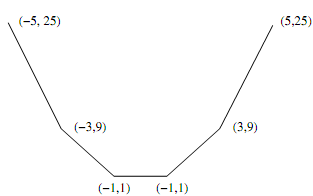
931_GUI for Plotting Functions.png

For the actual plotting you will be using a canvas widget. The canvas has a given width and height while the plotting parameters specify ranges for x and y. Therefore a conversion is required that map 'real world' coordinates (i.e. the x,y values) to screen (canvas) coordinates. Remember that in the 'real world' y values increase as you move up while on a canvas they decrease as you move up. The assignment support ?le de?nes a coordinates conversion class that does this job.

Assignment Tasks

For each class and method that you write you need to provide a suitable comment giving a description and where necessary the type and any preconditions. You should use the triple-quote commenting style.


Related Discussions:- Gui for plotting functions

Traditional animation techniques , Traditional Animation techniques as: ...

Traditional Animation techniques as: 1) Key Frames                        2) Cel Animation Formula: Required Key frames for a film = {[Time(in seconds)]

Representation schemes used in three dimensional object, What are the vario...

What are the various representation schemes used in three dimensional objects?  Boundary representation (B-res) - explain the 3 dimensional objects as a set of surfaces that se

Assumptions for area subdivision method, Assumptions for Area Subdivision M...

Assumptions for Area Subdivision Method a) ¾   Plane of projection is z=0 plane b) ¾ Orthographic parallel projections c) ¾   Direction of projection as d= (0,0,-1) d

What is translation, What is translation?  Translation is the process o...

What is translation?  Translation is the process of changing the position of an object in a straight-line path from one coordinate location to another. Each point (x, y) in the

Object space - approaches for visible surface determination, Object Space -...

Object Space - approaches for visible surface determination The second approach as object-space that compares all objects directly along with each other inside the scene defin

Important points about the frame buffers - graphics hardware, Important Poi...

Important Points about the Frame Buffers 1) Within a frame buffer, information storage starts from top left corner and goes until the bottom right corner. 2) By using this

Polygon filling algorithm - raster graphics and clipping, Polygon Filling A...

Polygon Filling Algorithm - Raster Graphics and Clipping In several graphics displays, this becomes essential to differentiate between different regions by filling them along

What are the utilizations of inverse transformation, What are the utilizati...

What are the utilizations of Inverse transformation? Provide the Inverse transformation for translation, shearing, reflection, scaling and rotation. Solution: We have observed

Convert the intensity value of the current pixel, Step1:  Read a text file ...

Step1:  Read a text file which we want to hide. Step2:  Transform it into an array of its binary value. Step3: Transform this array into its equivalent one dimensional array

Write Your Message!

Captcha
Free Assignment Quote

Assured A++ Grade

Get guaranteed satisfaction & time on delivery in every assignment order you paid with us! We ensure premium quality solution document along with free turntin report!

All rights reserved! Copyrights ©2019-2020 ExpertsMind IT Educational Pvt Ltd