Assembling a program
Microsoft Assembler MASM is one of the simple to use and famous assemblers. All the references and discussions in this section are belonging to the MASM. As already described, the major task of any assembler program is to accept the text assembly language program file as input and arrange an object file. The text assembly language program file is prepared by using any editor programs. The MASM accepts the file names only with the extension .ASM. Even if a filename which not have any extension is given as input, it provides .ASM extension to it. For instance, to assemble the program in above Figure, one may enter the given command options-
A> MASM KMB or
C --->A> MASM KMB. ASM
If any of the command choice is entered as above, the programmer gets the display on the screen, as described in given Figure. Another command option is also available in MASM that does not require any filename in the command line, is given along with the equivalent result display in Figure.
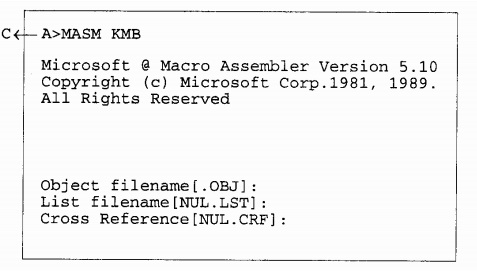
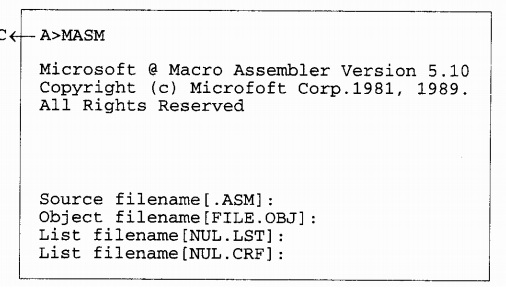
If you do not enter the filename to be assembled at the command line as describe in above figure MA.SM Screen display, then you can enter it as a source filename as shown in Figure MASM Alternative Screen Display.The source filename is to be typed in the source filename line with/ without the extension .ASM. The legal filename entry is received with a pressure of enter key. On the next line, the expected .OBJ filename is to be entered. The object file of the assembly language program is formed with the .OBJ extension. The .OBJ file is formed with the entered name and.OBJ extension the coded filename is entered for the .OBJ file prior to press enter key, the new .OBJ file is formed with the similar name as source file and extension.OBJ. The .OBJ file has the coded object modules of the program to be assembled. In the next line, a filename is entered expected listing file of the source file, in the similar way as the object filename was entered. The listing file is automatically produced in the assembly process. The listing file is recognized by the entered or source filename and an extension .LST. The listing file have the entire offset map of the source file by including memory allotment, offset addresses, opcodes, labels, for directives and different labels and relocation information. The cross reference filename is also entered in the same way as discussed for listing file. The cross reference file is utilized for debugging the source program and contains the statistical information size of the file in bytes, list of labels number of labels, routines to be called, etc regarding the source program. After the cross- reference file name is entered, the assembly process begins. If the program contains syntax errors, they are displayed by using error code number and the equivalent line number at which they seem. After these syntax errors and warnings are taken care of by the programmer, the assembly process is finished successfully. The successful assembly process may produce the, .LST, .OBJ and .CRF files. Further those may be utilized by the linker programmer to link the object modules and produce an executable (.EXE) file from .OBJ file. From All the above files may not be produced during the assembling of each program. The generation of some of them can be suppressed by using the particular command line options of MASM. The files produced by the MASM are further used by the program LINK.EXE to produce an executable file of the source program.