Package specification in pl/sql , PL-SQL Programming

Assignment Help:

Package Specification

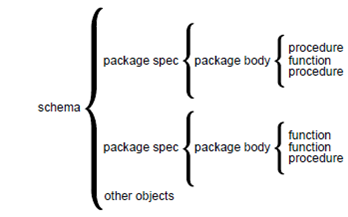
The package specifications contain the public declarations. The scopes of these declarations are local to your database representation and global to the package. Therefore, the declared items are available from your application and from anyplace in the package. The figure describes the scoping.
1759_package defination in pl-sql.png

Figure: Package Scope

The specification lists the package resources accessible to the applications. All the information that your application require to use the resources is in the specification. For illustration, the declaration below shows that the function named the fac takes one argument of the type INTEGER and returns a value of type INTEGER:

FUNCTION fac (n INTEGER) RETURN INTEGER; -- returns n!

That is all the information you require to call the function. You do not require to consider its underlying implementation (whether it is recursive or iterative for illustration). The subprograms and cursors only have an underlying implementation or definition. Therefore, if a specification declares only the constants, types, variables, exceptions, and call specifications, the package body is unessential. Consider the bodiless package which is as shown below: 

-- a bodiless package

CREATE PACKAGE trans_data AS

TYPE TimeRec IS RECORD (

minutes SMALLINT,

hours SMALLINT);

TYPE TransRec IS RECORD (

category VARCHAR2,

account INTEGER,

amount REAL,

time_of TimeRec);

minimum_balance CONSTANT REAL := 10.00;

number_processed INTEGER;

insufficient_funds EXCEPTION;

END trans_data;

The package trans_data requires no body as the constants, types, variables, and the exceptions do not have an underlying implementation. These packages define the global variables-usable by the subprograms and database triggers-that persist throughout a session.


Related Discussions:- Package specification in pl/sql

Interesting properties of cross join - sql, Interesting properties of CROSS...

Interesting properties of CROSS JOIN - SQL Compare these with the "interesting properties of JOIN", CROSS JOIN is associative but not commutative. Unlike JOIN and NATURAL JOI

Avoiding collection exceptions, Avoiding Collection Exceptions   In ma...

Avoiding Collection Exceptions   In many cases, if you reference a nonexistent collection element, then PL/SQL raises a predefined exception. Consider the illustration shown b

Exception handling, Exception handling In the PL/SQL, a warning or erro...

Exception handling In the PL/SQL, a warning or error condition is known as an exception. The Exceptions can be internally defined (by the run-time system) or user defined. The

Components of an object type in pl/sql, Components of an Object Type: A...

Components of an Object Type: An object type encapsulates the operations and data. Therefore, you can declare the methods and attributes in an object type specification, but no

Restriction and and - sql, Restriction and AND - SQL Restriction is av...

Restriction and AND - SQL Restriction is available via the WHERE operator, and so it is in SQL. However, by Example showing how a certain simple restriction can be expressed u

Transaction visibility, Transaction Visibility As the figure shows, th...

Transaction Visibility As the figure shows, the changes made by an autonomous transaction become visible to another transaction whenever the autonomous transaction commits. Th

Merge and truncate in sql, MERGE and TRUNCATE in SQL SQL has two more ...

MERGE and TRUNCATE in SQL SQL has two more table update operators, MERGE and TRUNCATE. MERGE, like INSERT, takes a source table s and uses it to update a target table t. Brief

Implicit rollbacks, Implicit Rollbacks Before execute the INSERT, UPDA...

Implicit Rollbacks Before execute the INSERT, UPDATE, or DELETE statement, the Oracle marks an implicit savepoint . When the statement fails, the Oracle rolls back to the save

Adding table constraints, Adding Table Constraints ALTER TABLE ENROL...

Adding Table Constraints ALTER TABLE ENROLMENT ADD CONSTRAINT NameNotNull CHECK (Name IS NOT NULL) ; ALTER TABLE ENROLMENT ADD CONSTRAINT PK_StudentId_CourseId PRIM

Creating a sql file, Creating a SQL file 1. Open a new file in Notepad...

Creating a SQL file 1. Open a new file in Notepad++ and save it to the location c:\mysql\bin, with the name lab8script.sql (the file extension should be .sql ). Add a MySQL co

Write Your Message!

Captcha
Free Assignment Quote

Assured A++ Grade

Get guaranteed satisfaction & time on delivery in every assignment order you paid with us! We ensure premium quality solution document along with free turntin report!

All rights reserved! Copyrights ©2019-2020 ExpertsMind IT Educational Pvt Ltd