Text graphic function - graphics objects, MATLAB in Engineering

Assignment Help:

Text graphic function - Graphics objects:

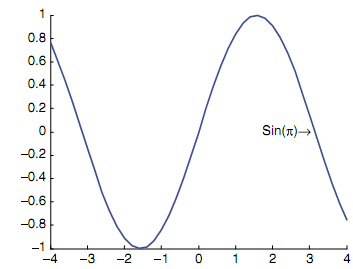
The text graphic function permits text to be printed in a Figure Window, involving special characters which are printed by using \specchar, where specchar is the real name of the special character. The format of the call to text function is as shown below:

text(x,y,'text string')

where x & y are coordinates on the graph of the starting of the text box in which the text string appears.

To see the options for special characters, under the Contents tab in Help, click the Handle Graphics Property Browser, then click Core Objects, and then select Text. The special characters are shown in a table under the String property. The special characters involve letters of the Greek alphabet, arrows, and characters often used in equations. For illustration, figure shows the Greek symbol for pi and a right arrow in the text box.

>> x = -4:0.2:4;

>> y = sin(x);

>> hp = line(x,y,'LineWidth',3);

>> thand = text(2,0,'Sin(\pi)\rightarrow')
25_Text graphic function - Graphics objects.png


Related Discussions:- Text graphic function - graphics objects

Illustration of sorting strings, Illustration of Sorting strings: To s...

Illustration of Sorting strings: To sort on the rows rather than second dimension should be specified. >> sort(words,2) ans = Hello Hdowy Hi Gbdeo

Num2str function - string, num2str function: The num2str function, tha...

num2str function: The num2str function, that converts real numbers, can be called in many ways. If only the real number is passed to the num2str function, it will generate a s

Forward substitution, Forward substitution: The Forward substitution (...

Forward substitution: The Forward substitution (done methodically by first getting a 0 in the a 21 place, and then a 31 , and lastly a 32 ): For the Gauss technique,

Illustration of initializing the data structure, Illustration of initializi...

Illustration of initializing the data structure: illustration of initializing the data structure by preallocating is here as shown: >> cyls(3) = struct('code', 'c', 'dimen

Defined a variable in work space, Defined a variable in work space: Th...

Defined a variable in work space: The variables defined in the script will become a part of the workspace: >> clear >> who >> mysummfile    15 >> who

Finding sums by for loop, Finding sums and products: A very general ap...

Finding sums and products: A very general application of a for loop is to compute sums and products. For illustration, rather than of just printing the integers 1 through 5, w

Function iscellstr - string, Function iscellstr - string function: The...

Function iscellstr - string function: The function iscellstr will return the logical true when a cell array is a cell array of all the strings, or logical false if not. >>

Plotting from a function, Plotting from a Function: The following func...

Plotting from a Function: The following function creates a Figure Window as shown in figure, which shows various types of plots for similar y vector. The vector is passed as a

Program to counting in a while loop, Program to Counting in a while loop: ...

Program to Counting in a while loop: The script initializes variable counter to 0. Then, in the while loop action, each and every time the user successfully enter a number, th

Example to change the line width from the default, Example to change the li...

Example to change the line width from the default: For illustration, to change the line width from the default of 0.5 to 1.5: >> set(hl,'LineWidth',1.5) As long as the

Write Your Message!

Captcha
Free Assignment Quote

Assured A++ Grade

Get guaranteed satisfaction & time on delivery in every assignment order you paid with us! We ensure premium quality solution document along with free turntin report!

All rights reserved! Copyrights ©2019-2020 ExpertsMind IT Educational Pvt Ltd