Unix and linux commands, Operating System

Assignment Help:

To explore the UNIX file system, use basic UNIX commands and use a text editor.

Task:

 1.      Logon to Linux.
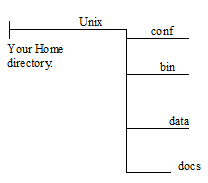
909_Unix.png

2.      Create a directory "Unix" under your home directory.

Command(s): .................................................

3.      Create four sub-directories bin, conf, docs and data under the directory "Unix" created by you in step 2. See the directory diagram below:

Command(s): .................................................

4.      Create the document called "sed-info" in your "Unix" directory using touch command.

Command: .................................................

5.      Create the document called "join-info" in your "Unix" directory using touch command.

Command: .................................................

6.      While in the Unix directory, move the files "sed-info" and "join-info" to directory "docs" using a single UNIX command.

Command: .................................................

7.      Change to your home directory.

Command: .................................................

8.      Use a single command to rename and move the "sed-info" from the "docs" directory to the "bin" directory.

Command: .................................................

9.      Change to the data directory.

Command: .................................................

10.  While in the data directory create a command that would copy the "sed-info" from the "bin" directory and "join-info" from the docs directory to the "conf" directory using a) absolute paths and b) relative paths.

Command (relative path): .................................................

Command (absolute path): .................................................

11.  Move to your home directory. Create a single command that would delete the Unix directory and all the files and subdirectories of the Unix directory.

Command: .................................................


Related Discussions:- Unix and linux commands

Process destruction, Most process abstractions support processes being dest...

Most process abstractions support processes being destroyed when the program terminates, or in response to a specific kill directive. There are two common implementations, one a "p

Explain the main functions of an operating system, Question: a) What sp...

Question: a) What special measures must be taken to ensure the reliability, availability, and security of electronic commerce and digital business process? b) What are the c

What are the necessary conditions for deadlocks?, What are the necessary co...

What are the necessary conditions for deadlocks? 1. Mutual exclusion :  Only one process at a time is able to use the resource. 2. Hold and wait :  A process should be holdi

What is a two state process model?, What is a two state process model? ...

What is a two state process model?   At any time a process is being implementing by a processor or not. Therefore a process may be in Running or not running state. When an Ope

Cpu, Some CPUs provide for more than two modes of operation. What are two p...

Some CPUs provide for more than two modes of operation. What are two possible uses of these multiple modes?

Explain time-sharing environment, In a multiprogramming and time-sharing en...

In a multiprogramming and time-sharing environment, several users share the system simultaneously. This situation can result in various security problems. a

What is the output level at which 5z company break even, The 5Z Company is ...

The 5Z Company is selling pens to the local market. It is planning to maximize sales and profit by analyzing few conditions using the break-even analysis formula. Below is the data

Explain the os/2 operating system, Explain the OS/2 Operating System Li...

Explain the OS/2 Operating System Like NetWare, OS/2 manage resources at three levels, as shown in Figure 4.5 Resources may be maintained at the session, process, and thread le

Define caching, Define caching. A cache is a region of fast memory that...

Define caching. A cache is a region of fast memory that holds copies of data. Access to the cached copy is well-organized than access to the original. Caching and buffering are

Starvation, what do you mean by starvation?explain in detail

what do you mean by starvation?explain in detail

Write Your Message!

Captcha
Free Assignment Quote

Assured A++ Grade

Get guaranteed satisfaction & time on delivery in every assignment order you paid with us! We ensure premium quality solution document along with free turntin report!

All rights reserved! Copyrights ©2019-2020 ExpertsMind IT Educational Pvt Ltd