Thead - tbody - tfoot, PHP Web Programming

Assignment Help:

<THEAD> mentions that a group of rows are the header rows at the top of the table. <TBODY> specify that a group of rows are body rows. <TFOOT> specify that a group of rows are the footer rows at the bottom of the table.

The most popular use for these three tags, that are currently only identified by MSIE 4 and up, is to put borders among groups of rows rather than between every two rows. For instance, assume you have a table wherein you want borders around the top row, the bottom row, and around the whole block of rows in between. You could do that along the following code. Note down that in addition to <THEAD>, <TBODY>, and <TFOOT> you also should use <TABLE RULES=GROUPS>. The following instance illustrates the use of these tags:

<HTML>

<BODY>

<TABLE CELLPADDING=6 RULES=GROUPS FRAME=BOX>

<THEAD>

<TR> <TH>Weekday</TH> <TH>Date</TH> <TH>Manager</TH>

<TH>Qty</TH> </TR>

</THEAD>

<TBODY>

<TR> <TD>Mon</TD> <TD>09/11</TD> <TD> Komal </TD> <TD>639</TD>

</TR>

<TR> <TD>Tue</TD> <TD>09/12</TD> <TD>Lovely</TD> <TD>596</TD>

</TR>

<TR> <TD>Wed</TD> <TD>09/13</TD> <TD>Rohan</TD>  <TD>1135</TD>

</TR>

<TR> <TD>Thu</TD> <TD>09/14</TD> <TD>Suresh</TD> <TD>1002</TD>

</TR>

<TR> <TD>Fri</TD> <TD>09/15</TD> <TD> Rohan </TD>   <TD>908</TD>

</TR>

<TR> <TD>Sat</TD> <TD>09/16</TD> <TD>Lovely</TD> <TD>371</TD>

</TR>

<TR> <TD>Sun</TD> <TD>09/17</TD> <TD>Suresh</TD>   <TD>272</TD>

</TR>

</TBODY>

<TFOOT><TR> <TH ALIGN=LEFT COLSPAN=3>Total</TH> <TH>4923</TH>

</TR></TFOOT>

</TABLE>

</HTML>
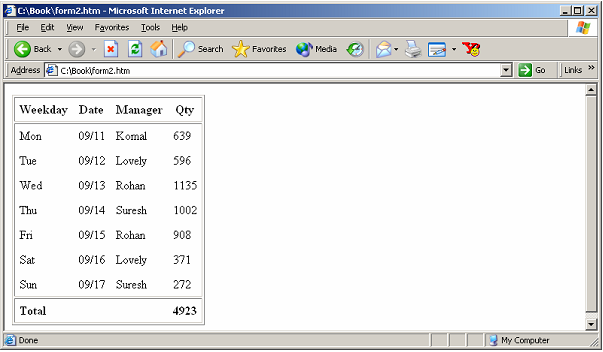
2385_THEAD - TBODY - TFOOT.png

Figure: Using THEAD, TBODY & TFOOT Tags


Related Discussions:- Thead - tbody - tfoot

We need help to create web for marketing, We need help to create web for Ma...

We need help to create web for Marketing Hi, we are a web agency working on the entire range of marketing requirements - be it websites, mobile applications, Facebook applicatio

We need to fix broken links in wordpress, We Need to fix broken links in Wo...

We Need to fix broken links in WordPress Looking to wordpress expert for fix links errors. I found it in mysite on wordpress afterward scanned Xenu program. Desired Skills ar

Move a layout cell, If you have to line up the cells next to each other you...

If you have to line up the cells next to each other you can resize & move the layout cells as you required. You can alter the size of a layout cell using one of its resize handles.

Network layer of osi model, This layer is responsible for routing a packet ...

This layer is responsible for routing a packet in the subnet i.e., from source to destination nodes across multiple nodes in the similar network or across multiple networks. This l

Authenticate the name and password, Keep a list of allowed reporters and th...

Keep a list of allowed reporters and their passwords in a database table Authentication .  Define and populate the table beforehand manually using the phpMyAdmin interface to MySQ

Selecting a table, After that you will adjust the space within the navigati...

After that you will adjust the space within the navigation button table. The simplest way to choose a table in Standard view is using the tag selector that displays HTML tags of el

Need ajax experienced expert as well as expert developer, PrestaShop | PHP ...

PrestaShop | PHP | JavaScript | jQuery Developer needed Want a PrestaShop | PHP | JavaScript | jQuery | Ajax experienced as well as expert developer. Following things want to be

Hypertext transfer protocol, HTTP is a connectionless text depend protocol....

HTTP is a connectionless text depend protocol. Clients (web browsers) send requests to web servers for web elements like web pages and images. After the request is serviced through

Design a preliminary homepage , A. Design a preliminary homepage called "c...

A. Design a preliminary homepage called "cssprelimI.htm". It should be similar in layout to the example below, but you may use your own content. 1) Have a banner across the to

Draw layer from common toolbar, Step 1:  Select Layer from Common toolbar &...

Step 1:  Select Layer from Common toolbar & draw a layer. Step 2:  Write the text within the Layer. Step 3:  Click on Modify button (when the layer is selected) Step 4:  C

Write Your Message!

Captcha
Free Assignment Quote

Assured A++ Grade

Get guaranteed satisfaction & time on delivery in every assignment order you paid with us! We ensure premium quality solution document along with free turntin report!

All rights reserved! Copyrights ©2019-2020 ExpertsMind IT Educational Pvt Ltd