Steps for clip a line segment-pq, Computer Graphics

Assignment Help:

Steps for clip a line segment-PQ

  • Initially, find all the points of intersections of the line segment PQ along with the edges of the polygonal window and describe them either as PE and PL points. Also find out the value of parameter t, by using equation (2) for respective PE's and PL's.

                                                            Or

If value of the normal to particular edges is not specified then, determine the value of normal to every edge of the window, then find out the value of parameter t, by using equation (2) for particular point of intersection among line segment and window edge then on the basis of the value of parameter t mark them like PE and PL given the value of t lies from 0 to 1 in magnitude.

  • Secondly, out of the diverse values of t for PE's find out the maximum value of t say it is tmax. Likewise, out of the diverse values of t for PL's find out the minimum value of t say it be tmin . Remember here that for clipping to be possible tmin > tmax.
  • at last, vary the parameter t from tmax to tmin and find out the clipped line as outcome.

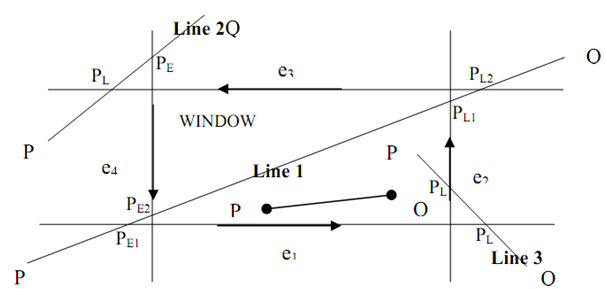
For well understanding of steps here figure is shown below:
2071_Steps for clip a line segment-PQ.png

Figure: Steps of Cyrus Beck Clipping

During in case of Line 1: (PQ)

1) Point 1 is potentially entering (PE1) since as we move along PQ, the LHS of e1 is window and hence, it seems that we are entering the window.

2) Point 2 is again PE2 same as point 1.

3) Point 3 is potentially leaving (P4) ? as we move along PQ, the LHS of e2 is window and hence, it seems that we are leaving the window.

4) As the same, point 4 is also PL2.

Line 2 and 3 (PQ):

By using similar logic as for line 1 we determine p‾L and PE. Here, it is to be noted that for all points of intersection we have several value of t.

Say t1 is value of t for PE1

Say t2 is value of t for PE2

Say t3 is value of t for PL1

Say t4 is value of t for PL2


Related Discussions:- Steps for clip a line segment-pq

What is a dot size, What is a dot size? Dot size may be explained as th...

What is a dot size? Dot size may be explained as the diameter of a single dot on the devices output. Dot size is also known as the Spot size.

Raster & Vector display, what is refresh buffer/ identify the content and o...

what is refresh buffer/ identify the content and organisation of the refresh buffer for the case of raster display and vector display.

Single point perspective transformation, Single Point Perspective Transform...

Single Point Perspective Transformation - Viewing Transformations In order to derive the particular point perspective transformations beside the x and y-axes, we construct fi

Convex shaped window and concave or non convex shaped window, Well you migh...

Well you might surprise to what a convex window? In common, on the basis of the shapes the windows are categorized into two classes: i) A Convex shaped windows: Windows of a s

Polygon filling algorithm - raster graphics and clipping, Polygon Filling A...

Polygon Filling Algorithm - Raster Graphics and Clipping In several graphics displays, this becomes essential to differentiate between different regions by filling them along

Explain difference between impact and non-impact printers, What is the diff...

What is the difference between impact and non-impact printers?  Impact printer press produced character faces against an inked ribbon on to the paper. A line printer and dot-ma

Relationships between scaling and wavelet function spaces, QUESTION (a)...

QUESTION (a) Median filters do not cater for a dynamic range of pixels in a given area, S. Thus to ensure that no loss of image details occur in S, adaptive median filters coul

Low level techniques or motion specific, Low Level Techniques or Motion Spe...

Low Level Techniques or Motion Specific These techniques are utilized to control the motion of any graphic element in any animation scene completely. These techniques are also

Properties of perspective projections - transformation, Properties of Persp...

Properties of Perspective projections - Transformation 1) Faraway objects seem smaller. 2) Straight lines are projected to straight lines. 3) Let line 1 and 2 is two s

Write Your Message!

Captcha
Free Assignment Quote

Assured A++ Grade

Get guaranteed satisfaction & time on delivery in every assignment order you paid with us! We ensure premium quality solution document along with free turntin report!

All rights reserved! Copyrights ©2019-2020 ExpertsMind IT Educational Pvt Ltd