Gareth's Gardens is a small firm that specialises in planning and laying new gardens. A particularly popular garden plan consists of a patio and lawn, together with a circular pond. Gareth's Gardens want to use a spreadsheet to calculate the cost of new gardens constructed to this design.
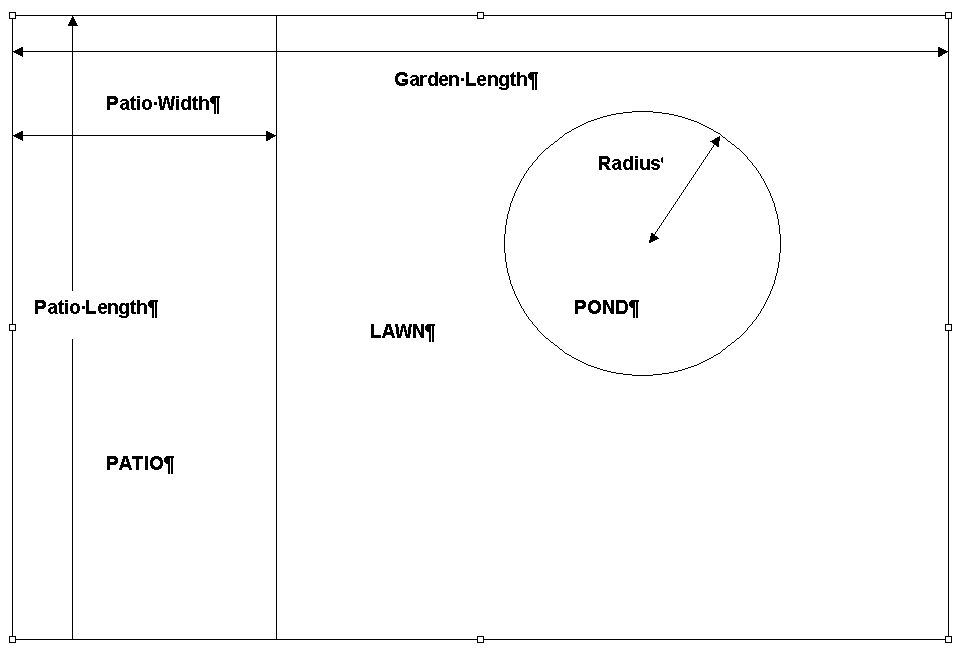
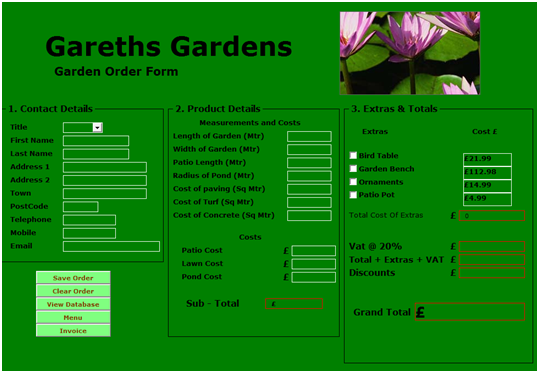
Turf for the lawn, paving for the patio and concrete for the pond will be required at a specified price per square metre and will depend on the dimensions input for each individual garden. The overall cost for the garden will be the addition of all three costs plus VAT @ 20%. The customer should also have the opportunity to buy extras for their garden (eg. bird table, garden bench, ornaments, patio pot plants etc). If the customer spends £1000 or more a discount of 2% is allowed.
Example:
Note: Include an Order Date field which is not shown in this example.
Task 1
You have been asked to do a presentation about the uses of spreadsheets to aid the day to day running of processes within the different areas of their business, to solve complex problems and to analyze data.
Give 3 examples of how spreadsheets can be used to solve problems within the business. Include an explanation of the current process and how will a spreadsheet solution will make the process more efficient. Presentation must come with complaining text to every page.
Task 2
Start a new workbook and develop a spreadsheet solution for Gareth's Gardens in order for him to efficiently record his garden orders and produce his customer invoices. The solution must take into consideration all the requirements noted in the above scenario.
Create an Order Form suitable for the recording of new orders for gardens with the date of order set to today's date.
Submit:
1. Screenshot of the Order sheet in Normal View
2. Screenshot of the Order sheet in Formula View
Task 3
Refine your complex spreadsheet model to improve efficiency.
a) The user needs to enter at least one of the following contact details: Home Phone, Mobile or E-mail address. If all of these have been left blank, then the user needs to receive feedback to ensure that they enter one value.
The maximum garden length, width and radius, Gareth can cater for are:
Length 1000m
Width 750m
Radius 200m
Implement validation to ensure that user entry does not exceed these values.
b) Implement password protection into you workbook to ensure that no unauthorised persons can access the data.
c) Add two additional sheets to your workbook - one named Invoice and the other named Menu.
d) Add macro buttons to each of the four worksheets to enable the user to fully navigate around the workbook. Include a Quit button on the menu.
Task 4
a) Implement conditional formatting to show that if the total spent before VAT is £1000 or more, the cell will be highlighted in red to show that discount has been earned.
b) In addition, implement conditional formatting in one more suitable location in your worksheet.
c) Create an Invoice from the data entered onto the Order sheet using cell linking techniques. Then include a button on your Order Sheet to view the invoice and one on the Invoice sheet to print it.
d) The spreadsheet model must now demonstrate professional, formal layout and be user friendly. Ensure it is suitably formatted.
Task 5
a) Copy the sales data provided on the VLE into a separate worksheet within your Garden workbook and call it Sales Database. Sort this data into sales for each month in 2010 and show a subtotal of the sales for each month. Use these subtotals to produce a bar chart for total monthly sales during 2010.
b) Sort the data into Sales by Product and create a sub total for quantity of each sold. Produce a pie chart to represent the sales of each garden extra.
c) Add a filter to show the sales for a particular product selected by the user.
d) You should be able to see which product has sold the most and which the least, Use the MIN and Max functions to confirm your view, and to display which product has sold the most and which the least. (VLOOKUP will be required)
Submit:
1. Screenshot of data sort for monthly sales showing subtotals
2. Screenshot or print out of bar chart
3. Screenshot of the data sort for sales by product showing subtotals
4. Screenshot or print out of pie chart
Task 6
Use VBA code that will be triggered on the click of a button on the order sheet, to add the order for each garden to the Sales Database sheet.
Produce a written comparison of spreadsheet automation using VBA Code and the manual recording of Macros using the Macro tool provided within Excel.
Submit:
1. VBA Code Print out
2. Written comparison (250 words minimum)