Show the noframes tag, Computer Engineering

Assignment Help:

Q. Show the Noframes Tag?

<NOFRAMES> tag can be used for those browsers which aren't able to interpret <FRAME> tags. Even though most, if not all, of your visitors would be able to see frames, there is still a small number of such browsers and there still are a number of users around who don't have latest in equipment. To address as wide an audience as possible, you can write a no-frames version of your page.

<HTML>

<HEAD>

<TITLE>My Frame Page- The Master Page</TITLE>

</HEAD>

<FRAMESET COLS="50,*, 2*">

<FRAMESET ROWS="50,*,*">

<FRAME SRC="One.htm">

<FRAME SRC="Five.htm">

<FRAME SRC="Six.htm">

</FRAMESET>

<FRAME SRC="Two.htm">

<FRAMESET ROWS="50%, 50 %">

<FRAME SRC="Three.htm">

<FRAME SRC="Four.htm">

</FRAMESET>

</FRAMESET>

<BODY><NOFRAMES> your browser does not handle frames! </NOFRAMES>

</BODY>

</HTML>
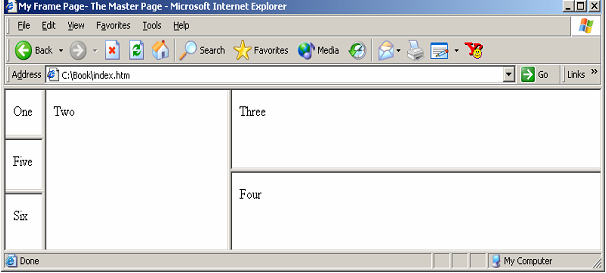
1602_Show the Noframes Tag.png

Figure: Putting in a NOFRAMES Version

Put your non-frames page down between <NOFRAMES> tags. If someone is using an old browser, it would skip everything above and come straight down here. Frames-capable browsers will ignore what is between <NOFRAMES> tags. We can also put images in frames. Let's see how to put in "world.gif"as an example.

<FRAME SRC="world.gif" WIDTH=146 HEIGHT=162 SCROLLING=NO> FRAME SRC="world.gif" WIDTH=146 HEIGHT=162>

Scrollbars that you see can be specified as YES, NO or AUTO. YES means window gets scrollbars - whether they are needed or not. NO means there would be no scrollbars. AUTO is the default. If scrollbars are required, they appear while if they aren't needed they stay conveniently out of the way. So let's see how to get rid of our scrollbars.

<FRAME SRC="world.gif" WIDTH=146 HEIGHT=162 SCROLLING=NO>

You would notice a problem with this code. The image isn't in the right frame. The subsequent two attributes deal with margins. Browser automatically gives each frame some empty space around its contents. This is normally useful for aesthetic purposes. You can control the size of these margins by using MARGINWIDTH and MARGINHEIGHT. They control the left and right and top and bottom margins respectively. We will set them both to 1. (1 is the minimum).

<HTML>

<HEAD>

<TITLE>My Frame Page- The Master Page</TITLE>

</HEAD>

<FRAMESET COLS="146,*">

<FRAMESET ROWS="162,*">

<FRAME SRC="world.gif" WIDTH=146 HEIGHT=162 SCROLLING=NO

MARGINWIDTH=1 MARGINHEIGHT=1>

<FRAME SRC="One.htm">

</FRAMESET>

<FRAME SRC="Two.htm">

</FRAMESET>


Related Discussions:- Show the noframes tag

Illustrate working of magnetic bubble memories, Q. Illustrate working of Ma...

Q. Illustrate working of Magnetic Bubble Memories? In many materials like garnets on applying magnetic fields certain cylindrical areas whose direction of magnetization is oppo

What is task gantt, Task Gantt   Task Gantt shows different tasks being...

Task Gantt   Task Gantt shows different tasks being performed it implies that numerous kind of activities by set of processors connected to parallel computer as displayed in Fi

What is ram bus technology, What is RAM Bus technology? The key feature...

What is RAM Bus technology? The key feature of RAM bus technology is a fast signalling method used to transfer information among chips. Instead of using signals that have volta

Explain about different types of mice, Q. Explain about different types of ...

Q. Explain about different types of Mice? Mice can be classified on the foundation of numbers of buttons, position sensing technology or type of Interface:  Sensing Technol

Cutoff search - artificial intelligence, Cutoff Search : To require a ...

Cutoff Search : To require a mini and max search in a game on stage situation is, in which all we have is just do that programme our agent to look at the intact that search tr

Functionality of hyper thread processor, Hyper-threading works by duplicati...

Hyper-threading works by duplicating those sections of processor that kept the architectural state-but not duplicates the main implementation resources. This allows a Hyper-threadi

Define polling, Define Polling. A Polling process is used to recognize...

Define Polling. A Polling process is used to recognize the highest priority source by software means. In this process there is one common branch address for all interrupts.

What is bus arbitration, Q. What is Bus arbitration? In this technique,...

Q. What is Bus arbitration? In this technique, I/O interface first needs to control bus and only after that it can request for an interrupt. In this technique because only one

Basic working of network layer, Q. Basic working of Network layer? Net...

Q. Basic working of Network layer? Network layer: Network layer is responsible for routing a packet within the subnet that is, from source to destination nodes across numerou

Write Your Message!

Captcha
Free Assignment Quote

Assured A++ Grade

Get guaranteed satisfaction & time on delivery in every assignment order you paid with us! We ensure premium quality solution document along with free turntin report!

All rights reserved! Copyrights ©2019-2020 ExpertsMind IT Educational Pvt Ltd