Program translation sequence, Assembly Language

Assignment Help:

Program Translation Sequence

Developing a software program to accomplish a particular task, the implementer chooses an appropriate language, develops the algorithm (a sequence of steps, which when carried out in the order prescribed, achieve the desired result), implements this algorithm in the chosen language (coding), then tests and debugs the final result. Here is also a probable maintenance phase also associated.

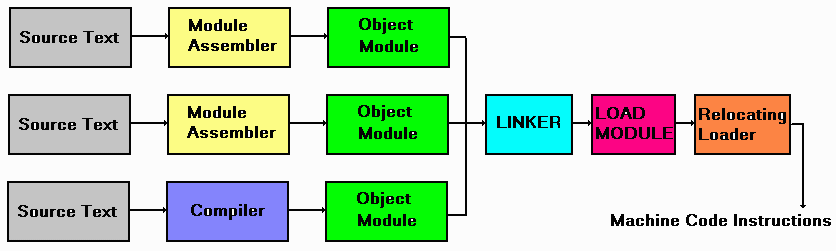
The chosen language will undoubtedly need to be converted into the appropriate binary bit-patterns which make sense to the target processor (the processor on which the software will be run). This process of conversion is called translation.

The following diagram illustrates the translation sequence necessary to generate machine code
 

1755_The Program Translation Sequence.png


from specific languages.

I propose you to see a very short program in C and Assembly language.

Program written in C Language

/*         HELLO.C -- Hello and welcome.*/


#include


main()

{

            printf("Hello and welcome.\n");

}

Program written in Assembly Language for '86 family machine(Personal Computer with INTEL Microprocessor)

/*     HELLO.ASM --Hello and welcome*/

               TITLE    Hello.asm                              ;Hello.asm source file 
               .MODEL                SMALL
               CR          equ          0ah          ;carriage return
               LF           equ          0dh         ;line feed
               EOSTR   equ          '$' 
 
               .stack 200h 
               .data
               message  db           'Hello and welcome.' 
                               db           CR, LF, EOSTR 
               .code
               print        proc        near 
                               mov        ah,9h                      ;PCDOS print function 
                               int           21h 
                               ret
               print endp 
               start:       mov        ax, @data
                               mov        ds, ax 
                               mov        dx, offset message 
                               call          print 
                               mov        ax, 4c00h 
                               int           21h 
                               end         start

The program is assembled by typing

                               > TASM HELLO.asm
                               Turbo Assembler V1.0 Copyright(c)1988 by Borland International 
                               Assembling file: HELLO.ASM 
                               Error messages: None 
                               Warning messages: None
                               Remaining memory: 257k 
                               >

This produces an object file named HELLO.OBJ which must be linked to create an executable file which can run under PCDOS.

                               > TLINK HELLO.obj 
                               Turbo LinkV2.0 Copyright (c) 1987, 1988 Borland International 
                               >

The program when run, produces the following output.

                               > HELLO 
                               Hello and welcome. 
                               >


Related Discussions:- Program translation sequence

Convert from C to 8086 assembly language, Trying to convert small programs ...

Trying to convert small programs from C to 8086 assembly language using emu 8086 emulator. I converted to low level C, but struggling with converting to the Assembly language.

Arm assembly language code, You will need to upload your main.c and factori...

You will need to upload your main.c and factorial.s files and a .jpg photo of the output on your board using the Vista assignment upload features.  It must be submitted by the dead

Declare a constant in assembly language, Declare 1 constant. This can be do...

Declare 1 constant. This can be done just below the prototype section. Put the following divider above the constant section. ;************************ Constants ****************

Program on virtual learning environment, Task One Produce a menu such a...

Task One Produce a menu such as the one below (remember to keep to this specification). M E N U 1, Enter Number 1 2, Enter Number 2 3, Display num1 and num2 4, D

Develop a schematic circuit diagram of system, Develop a suitable schematic...

Develop a suitable schematic circuit diagram of your system showing the interface between the PIC16F84 and the existing mains light & switch, including 5V derivation from the 240V

8086, to separate positive and negative numbers

to separate positive and negative numbers

Relocate program and data, ) What is the difference between re-locatable pr...

) What is the difference between re-locatable program and re-locatable data?

FIRE ALARM PROGRAMMING, PLEASE MAY YOU ASSIST ME WITH SAMPLE CODES FOR PROG...

PLEASE MAY YOU ASSIST ME WITH SAMPLE CODES FOR PROGRAMING A FIRE ALARM MINI PROJECT

Project ideas, can u please give me ideas on Assembly Language Projects usi...

can u please give me ideas on Assembly Language Projects using Nasm

Write Your Message!

Captcha
Free Assignment Quote

Assured A++ Grade

Get guaranteed satisfaction & time on delivery in every assignment order you paid with us! We ensure premium quality solution document along with free turntin report!

All rights reserved! Copyrights ©2019-2020 ExpertsMind IT Educational Pvt Ltd