Task
Your task is to write a Java program that allows users to play the game of Brickles. (note: it is up to you whether to use the skeleton). The program uses a predefined component, named BrickWall (provided in BrickWall.jar), to implement the game field. Consult the file javadoc/index.html for API information about BrickWall and its associated listener and event classes (CollisionEvent and CollisionListener).
Background
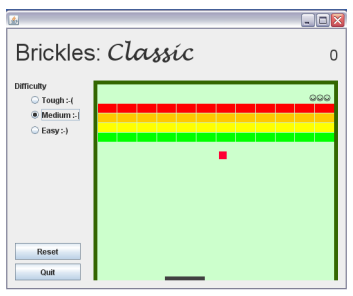
Games usually have relatively simple interfaces but need to be designed with considerable attention to appearance and aesthetics. The player will want to have the current state of the game clearly displayed during play, but will not want the screen cluttered up with less important information that is only needed occasionally. There are no hard and fast rules; you're welcome to implement the interface any way you think appropriate. Your goal here is to make a game that is "playable". Without going overboard, try to make the game something that people might actually want to pay money for. A sample user interface is shown below and you may also view a video clip.
Function
1. Provide a way to reset the game and a way to quit the program. The operations should be subject to confirmation; if the operation is not confirmed, the action is abandoned
2. Add scoring to the game. The count of the number of bricks removed since reset should be displayed. If all bricks are removed, the game field is restored and the score continues.
3. Make the game interesting by giving it a more complex scoring scheme. For example, bricks in the topmost row (coloured red) might be worth 10 points each; with subsequent rows worth 5 points (yellow), 2 points (green) and 1 point (blue).
4. Give the game a definite endpoint. For example, you might begin with a fixed number of balls (3, say), and have the game stop when all balls have been lost. You could perhaps make it more rewarding by adding extra balls when the score reaches certain milestones, but don't make it so easy that it never ends!
5. Provide a way to set the difficulty level of the game so that it is suitable for a variety of skill levels. For example, you might be able to change the ball speed, bat size, or the number of bricks in the wall. A game with a higher ball speed, a smaller bat size, and more bricks in the wall is more difficult to play.
6. Make the game get progressively more challenging as the score increases. For example, you could have the ball move faster, or the bat get smaller, or the bricks start from lower down. You'll have to experiment with the various factors to strike a balance. You want it to be hard enough to be challenging, but not so hard as to be over too quickly.
7. Keep a list of the high scores for each game. When a new high score is posted, prompt for a player name and add the new score to the list. You'll also need a way to reset the list
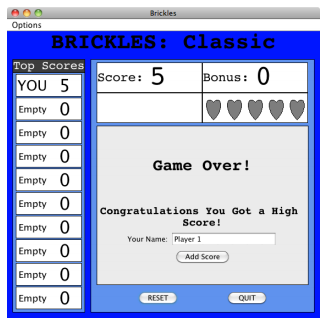
8. Add the ability to save and restore the high scores list and the state of any unfinished game. On shut down, the program should ask if the state should be saved. On start up, it should load the saved information so that the state of the program is restored.
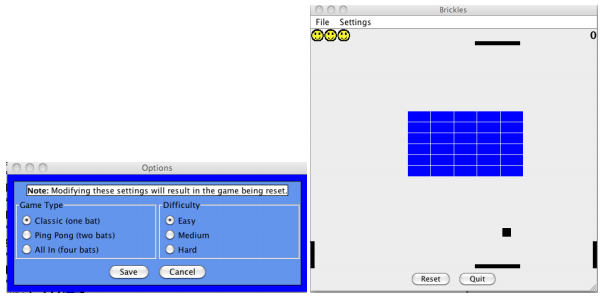
9. Provide an interface that allows the user to choose between several games. For example, you might offer the basic game with a single bat, a game with bat at both top and bottom, and a game with bats on all 4 sides.
10. Make the program runnable as both an application and an applet. Bear in mind that an applet cannot rely on a menu bar or pop-up windows, so capabilities that would have been provided through such means (and that still make sense) will have to be provided in other ways. Provide a suitable HTML page that embeds your applet.