Passing structures to functions, MATLAB in Engineering

Assignment Help:

Passing Structures to Functions:

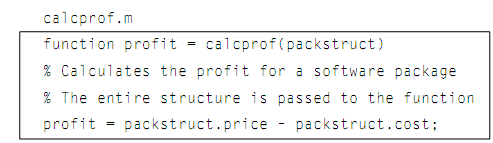
The whole structure can be passed to a function, or separate fields can be passed. For illustration, here are the two distinct versions of a function which computes the profit on a software package. The profit is then defined as the price minus the cost.

In the first version, the whole structure variable is passed to the function, therefore the function should use the dot operator to refer to the price and cost fields of the input argument.
653_Passing Structures to Functions.png

>> calcprof(package)

ans =

19.9600

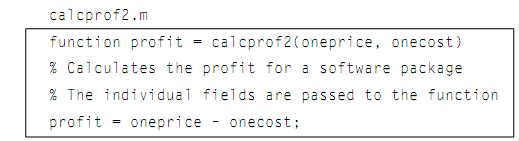
In the second version, merely the price and cost fields are passed to the function by using the dot operator in the function call. These are passed to the two scalar input arguments in function header; therefore there is no reference to a structure variable in the function itself, and the dot operator is not required in the function.
2117_Passing Structures to Functions1.png

>> calcprof2(package.price, package.cost)

ans =

19.9600


It is significant, as always with the functions, to make sure that the arguments in the function call correspond one-to-one with the input arguments in the function header. In case of calcprof, the structure variable is passed to an input argument that is a structure. For second function calcprof2, the two individual fields, that is double values, and is passed to two double arguments.


Related Discussions:- Passing structures to functions

Displaying the cell arrays, Displaying the cell arrays: There are seve...

Displaying the cell arrays: There are several techniques of displaying the cell arrays. The celldisp function shows all elements of the cell array:   >> celldisp(cellro

Matrix operations, Matrix operations: There are some common operations...

Matrix operations: There are some common operations on matrices. The operators which are applied term by term, implying that the matrices should be of similar size, sometimes

Creating the structure variables, Creating the structure Variables: Cr...

Creating the structure Variables: Creating a structure variable can be accomplished by simply storing the values in fields by using assignment statements, or by using the stru

Illustration of subfunctions, Illustration of Subfunctions: This is an...

Illustration of Subfunctions: This is an illustration of running this program: >> rectarea Please enter the length: 6 Please enter the width: 3 For a rectan

Inverse of square matrix, Inverse of square matrix: The inverse is, he...

Inverse of square matrix: The inverse is, hence the result of multiplying the scalar 1/D by each and every element in the preceding matrix. Note that this is not the matrix A,

Image processing, Image Processing: The Images are represented as grid...

Image Processing: The Images are represented as grids, or matrices, of picture elements (known as pixels). In MATLAB an image usually is represented as a matrix in which each

Vectors of structures, Vectors of Structures: In numerous applications...

Vectors of Structures: In numerous applications, involving database applications, information generally would be stored in the vector of structures, instead of in individual s

Example of image processing, Example of image processing: The other il...

Example of image processing: The other illustration generates a 5 × 5 matrix of arbitrary integers in the range from 1 to the number of colors; the resultant image is as shown

Filter, A matlab function to calculate filter order

A matlab function to calculate filter order

Use of built-in colormaps - image processing, Use of built-in colormaps: ...

Use of built-in colormaps: MATLAB has built-in colormaps, it is also possible to generate others by using combinations of any colors. For illustration, the following generates

Write Your Message!

Captcha
Free Assignment Quote

Assured A++ Grade

Get guaranteed satisfaction & time on delivery in every assignment order you paid with us! We ensure premium quality solution document along with free turntin report!

All rights reserved! Copyrights ©2019-2020 ExpertsMind IT Educational Pvt Ltd