Illustrate jdbc, JAVA Programming

Assignment Help:


JDBC stands for Java Database Connectivity:

It is an API which gives easy connection to a wide range of databases. To connect to a database we have to load the appropriate driver and then request for a connection object. The Class.forName(....) will prepare the driver and register it with the DriverManager.

Class.forName("oracle.jdbc.driver.OracleDriver"); //dynamic class loading

String url = jdbc:oracle:thin:@hostname:1526:myDB;

Connection myConnection = DriverManager.getConnection(url, "username", "password");


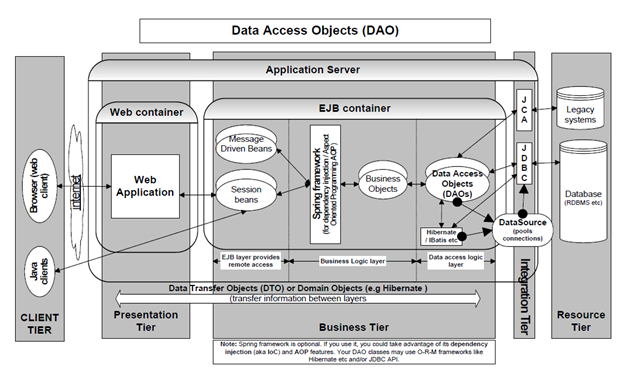
The DataSource interface gives an alternative to the DriverManager for building a connection. DataSource builds the code more portable than DriverManager because it works with JNDI and it is prepared, managed and deployed separately from the application that uses it. If the DataSource location modifies, then there is no need to modify the code but change the configuration properties in the server. This gives your application code easier to maintain. DataSource allows the need of connection pooling and support for distributed transactions. A DataSource is not only a database but also may be a spreadsheet or a file. A DataSource object may be bound to JNDI and an application can find and use it to prepare a connection to the database. J2EE application servers give tools to describe your DataSource with a JNDI name. When the server initialize it loads all the DataSources into the application server's JNDI service.

DataSource configuration properties are given below:

1. JNDI Name  jdbc/myDataSource

2. URL jdbc:oracle:thin:@hostname:1526:myDB

3. Password, serName

4. Implementation classname  oracle.jdbc.pool.OracleConnectionPoolDataSource

5. Classpath  ora_jdbc.jar

6. Connection pooling settings as illustrate maximum pool size, minimum pool size, connection timeout, statement cache size etc.

Once the DataSource has been set up, then you may get the connection object as given:

Context ctx = new InitialContext();

DataSource ds = (DataSource)ctx.lookup("jdbc/myDataSource"); Connection myConnection = ds.getConnection("username","password");


1995_Illustrate JDBC.png


Related Discussions:- Illustrate jdbc

A service locator, J2EE prepares use of the JNDI interface to access differ...

J2EE prepares use of the JNDI interface to access different resources like JMS, JDBC, EJB etc. The client finds up for these resources through the JNDI look-up. The JNDI look like

How to wrapping your own packages in java, How to Wrapping Your Own Package...

How to Wrapping Your Own Packages in java? Java does not limit you to using just the system supplied packages. You can write your own as well. You write packages just such as

How to begin a variable name with a number, How to Begin a Variable Name wi...

How to Begin a Variable Name with a Number? If you need to starts a variable name along with a digit, prefix the name you'd like to have (e.g. 8ball) along with an underscore,

I want customize tumblr theme, I need Customize Tumblr theme Project Des...

I need Customize Tumblr theme Project Description: I have a blog here I would like to customize it as follows; 1) Modify the horizontal navigation from the bottom of th

Catch clause should be used to handle the exception, How does a try statem...

How does a try statement determine which catch clause should be used to handle the exception?

What are the basic components of jsp?, There are two different types of dat...

There are two different types of data in a JSP page. 1. Static part which occurs copied directly to the response by the JSP Engine. 2. Dynamic part, which have anything that

Medical services referral system - websphere administrator, Medical Service...

Medical Services Referral System:       Role : Websphere Administrator       Involved in Exposure to load balancing tools (BigIP, WAS plug-ins) and Siteminder.

What is the role of fonts in java explain with example, What is the role of...

What is the role of fonts in java explain with example? You've already seen one instance of drawing text in the HelloWorldApplet program of the last chapter. You call the drawS

Program to insert item in tree, public class TreeTest {     public static v...

public class TreeTest {     public static void main(String args[])     {         Tree t = new Tree ();         System.out.println("Populating");         t.insertItem(1);         t

Write Your Message!

Captcha
Free Assignment Quote

Assured A++ Grade

Get guaranteed satisfaction & time on delivery in every assignment order you paid with us! We ensure premium quality solution document along with free turntin report!

All rights reserved! Copyrights ©2019-2020 ExpertsMind IT Educational Pvt Ltd