How does intranet work, Computer Networking

Assignment Help:

How does Intranet Work?

An Intranet can be defined as a private network which uses Internet tools. The principal tool is the Web browser, but there are other Internet tools such as ftp and telnet that are useful. The resources defined as private maybe protected physically (with a firewall or a separate physical network), geographically (by restricting access to computers with a network address on the local network), or personally (by username and password).

Typically, resources will be private either because they are confidential to the organisation (for example, an internal telephone directory), or because they are covered by restrictive licenses (for example, if the Library subscribes to a bibliography whose license restricts tissue to members of the University).
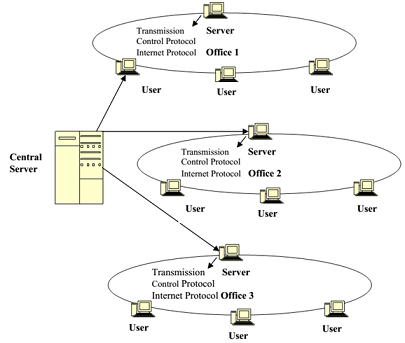
1639_intranet.png

For an Intranet to work, all computers connected together in a network (as shown in Figure) must speak and understand the same language, or protocol. The language used is Hyper Text Mark-up Language (HTML) and the protocol that both Intranets and the Internet use are called Transmission Control Protocol/Internet Protocol or TCP/IP. A network server supports all the activities of an Intranet. On the clients' side, a software, known as a browser, is used. (The browser is usually either Netscape Navigator or Internet Explorer.)

The browser, when invoked, seeks a server computer through the communication medium that has the first page or Home Page of the Intranet, which is usually seen in the folders as 'index.htm'. This is the default page for accessing the Intranet from any computer attached to an internal network. This is what automatically appears on the screen when a user logs in and clicks on the browser icon on the desktop for accessing the Internet also. The hyperlinks to specific files or databases requests for files send the control from anywhere on the network to the browser. The server accesses the file and sends back a copy of what it contains tothe computer or client that has requested for it.

It is the simplicity of TCP/IP that makes Intranets so easy to set-up. Web browsers can be used to connect to virtually any information source, from Structured Query Language (SQL) databases to highly proprietary information systems.


Related Discussions:- How does intranet work

Network Fundamentals BTech Telecommunication, Write a report on your chosen...

Write a report on your chosen topic that has been approved by your Lecturer. Your report should include appropriate figures, about 2000 words. Topics: 1 MAN- Metro Ethernet 2 Inte

What are tp-lite, What are TP-Lite and TP-Heavy Monitors? TP-Lite is si...

What are TP-Lite and TP-Heavy Monitors? TP-Lite is simply the integration of TP Monitor functions in the database engines. TP-Heavy is TP Monitors which handles the Client/S

Illustrate the bus backbone network, Q. Illustrate the Bus Backbone network...

Q. Illustrate the Bus Backbone network? - Topology is a bus - Utilized in networks such as 10Base5 or 10Base2 - Normally utilized to connect different buildings or to con

What is project 802, What is Project 802? It is a project begins by IEE...

What is Project 802? It is a project begins by IEEE to set standards that enable intercommunication among equipment from a variety of manufacturers. It is a way for specifying

Difference among flow control and error control, What is the difference am...

What is the difference among  flow control and error control?    Ans) Flow control: adjust and confirm data flow rate for successful transmission. Error Control: a method to

Define v - 32 modem, Q. Define V - 32 modem? - ITU-T's V.32 standard w...

Q. Define V - 32 modem? - ITU-T's V.32 standard was issued in 1989 for asynchronous and full-duplex operation at 9600 bps. - Even though designed for asynchronous DTEs two

What are three ways to give login access to router, The three ways to give ...

The three ways to give login access to the router are by the Console port, auxiliary port, and virtual terminal (Telnet)

What are the characteristics of client, What are the characteristics of Cli...

What are the characteristics of Client/Server? Service Encapsulation of services Shared resources Asymmetrical protocols Mix-and-match Transparency of location

Configure spanning tree- ccna, Configure Spanning Tree Step 1: Ex...

Configure Spanning Tree Step 1: Examine the default configuration of 802.1D STP. On each switch, display the spanning tree table with the show spanning-tree command. R

Write Your Message!

Captcha
Free Assignment Quote

Assured A++ Grade

Get guaranteed satisfaction & time on delivery in every assignment order you paid with us! We ensure premium quality solution document along with free turntin report!

All rights reserved! Copyrights ©2019-2020 ExpertsMind IT Educational Pvt Ltd