Function functions, MATLAB Programming

Assignment Help:

Function Functions:

The one reason for using function handles is to be able to pass functions to the other functions-these are known as function functions.

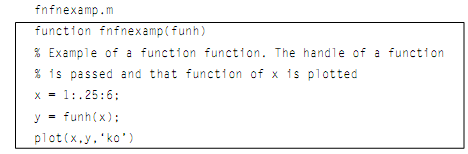
For illustration, let's say we have a function which generates an x vector. The y vector is generated by computing a function at each of the x points, and then such points are plotted.
 

1114_Function Functions.png

What we want is to be able to pass the function to be the value of funh, such as sin, cos, tan, and so forth. It doesn't work to merely pass the name of the function:

>> fnfnexamp(sin)

??? Error using ==> sin

Not enough input arguments.


Rather than, we have to pass the handle of the function:

>> fnfnexamp(@sin)

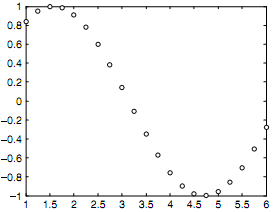
which generates the y vector as sin(x) and then brings up the plot as shown in figure.
 

753_Function Functions1.png

Passing rather the handle to the cos function would graph cosine rather than of sine:

>> fnfnexamp(@cos)

We can also pass the handle of any user-defined or anonymous function to the fnfnexamp function.

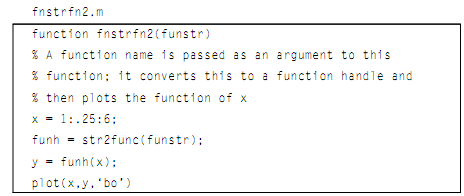
The other way of doing this is to use the built-in function str2func which will convert a string into a function handle:
 

2434_Function Functions2.png

This would also be called by passing a string to the function, and again would generate the similar plot:

>> fnstrfn2('sin')

There is also a function func2str which will convert a function handle into a string. This can be used to put the name of the function in the plot as shown in above figure.

Though these techniques also work, it seems easier and cleaner to merely pass the function handle to the function.

The MATLAB has few built-in function functions. The one built-in function is fplot that plots a function between the limits which are specified. The format of the call for fplot is:

fplot(fnhandle, [xmin xmax])


Related Discussions:- Function functions

Find divergence of the 2-d vector field, 1. Assume that there exists a surf...

1. Assume that there exists a surface that can be modeled with the equation:  z = e-(x 2 + y 2 ).  a) Calculate ∇z at the point (x = 0, y = 0). b) In addition, use MATLAB to

Image and video compression, Read in any non jpeg image (any image will do)...

Read in any non jpeg image (any image will do) . Save it as a jpeg at quality levels (70, 60,50,40, 30) Get the MSE for each quality level as compared to the orignal file Get the

Input function, Input Function: The Input statements read in values fr...

Input Function: The Input statements read in values from the default or standard input device. In most of the systems, the default input device is the keyboard; therefore the

Matlab scripts, Matlab Scripts: Once a problem has been examined, and ...

Matlab Scripts: Once a problem has been examined, and the algorithm for its answer has been refined and written, the algorithm then is translated into the specific programming

Estimate the sample mean and sample standard deviation, The fuel consumptio...

The fuel consumption of a certain make of car may not be exactly that rated by the manufacturer. Suppose ten cars of the same model were tested for combined city and highway fuel c

Plot the poles and zeros of the filter using zplane, A filter described by ...

A filter described by the equation:    y(n) = x(n) + x(n-1) + 0.9 y(n-1) - 0.81 y(n-2) (a) Find the transfer function H(z) for the filter and find the poles and zeros of the fil

Show the output - algorithms, Show the output - algorithms: Where does...

Show the output - algorithms: Where does the output go? The two possibilities are (i) to an external file, or (ii) to a window on the screen. Based on system, one of these wil

Write Your Message!

Captcha
Free Assignment Quote

Assured A++ Grade

Get guaranteed satisfaction & time on delivery in every assignment order you paid with us! We ensure premium quality solution document along with free turntin report!

All rights reserved! Copyrights ©2019-2020 ExpertsMind IT Educational Pvt Ltd