The Concept of Process
Unofficially a process is a program in execution subsequent to the program has been loaded in the main memory. Though a process is more than just a program code. A process has its threads, return addresses, value of program counter, temporary variables, file handles, security attributes, own address space etc.
Every process has a life cycle that consists of execution, creation and termination phases. A process can create various new processes that in turn can also create a new process. In UNIX OS (Operating System) environment a new process is created by fork system call. Process creation requires the subsequent four actions:
i) Setting up the process explanation: Setting up the process explanation requires the creation of a Process Control Block (PCB). A PCB encloses basic data like description of the allocated address space, owner, process status, process identification number and other execution dependent process specific information needed for process management.
ii) Allocating an address space: There are two methods to allocate address space to processes: sharing the address space between the created processes or allocating separate space to every process.
iii) Loading the program into allocated address space: The executable program file is loaded in allocated memory space.
iv) Passing the process explanation to process scheduler: once, the three steps of process creation as stated above are finished, the information collected through the above-stated steps is sent to the process scheduler, that allocates processor(s) resources to several competing to be executed processes queue.
The process execution phase is managed by the process scheduler. Process scheduling may be for each process or for each thread. The process scheduling involves three concepts: scheduling policy, state transition and process state.
A process may be in one of the subsequent states:
(a) New: The process is being created.
(b) Waiting: The process is waiting for an event to occur.
(c) Ready: The process is ready to be executed if processor is available.
(d) Running: The process is being executed on a single processor or multiple processors.
(e) Terminated: The process has finished execution.
At a specific time, a process may be in any one of the above stated states. As soon as process is admitted into job queue, it goes in the ready state. Whenever process scheduler dispatches process, program turns into running state. If process is entirely executed then it's terminated and we would say that it's in terminated state. However, the process can return to ready state due to some interrupts or can go to waiting state due to any I/O activity. And when I/O activity is over it can go to ready state. The state transition diagram is shown in figure below:
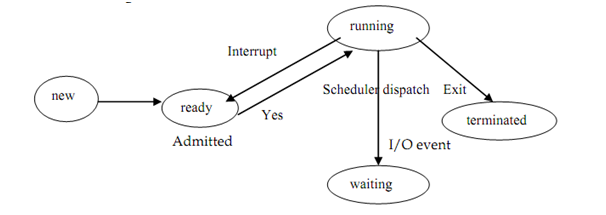
Figure: Process state transition diagram
The scheduling rule can be either preemptive or non preemptive. In preemptive policy, the processes can be interrupted. Operating systems have various scheduling strategies. E.g. to select a process to be executed, one of the scheduling strategy may be: (FIFO) which is First In First Out.
When the process completes execution it's terminated by system calls such as abort, releasing all the allocated resources.