Explain about layout cells, Computer Engineering

Assignment Help:

Q. Explain about Layout Cells?

In Layout view you can draw layout cells and layout tables to define design areas of a document. This task is easier to accomplish if you prepare a sample of the page you're creating before you begin laying out a page.

Look at the below sample layout to get an idea of the page layout you're creating in this section of tutorial. There's a cell for Compass logo, a table with three cells for site navigation buttons, a cell for another graphic as well as a table for three cells which will hold text.
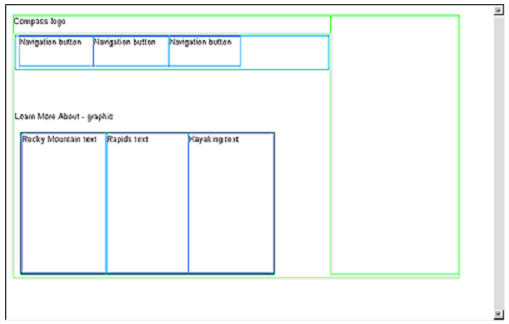
662_Explain about Layout Cells.png

You will draw cells and tables similar to this layout like you work in your document. First, you will draw a layout cell in which you would insert Compass logo.

1.  Click in Document window of the my_CompassHome document to make document active.

2.  If they aren't already open, open following work area tools:

  • Objects panel (choose Window > Objects), which you'll use to add objects to your document.
  • Property inspector (choose Window > Properties), which you would use to set properties or attributes for objects in your document. If Property inspector isn't already expanded, click expander arrow in the lower right corner so you can see all property options.

3.  In Objects panel, click the Draw Layout Cell icon.

4.  Move the pointer to Document window; the mouse pointer changes to a drawing tool (looks like a small cross). Click in upper left corner of the document then drag to draw a layout cell.

When you release mouse, a layout cell appears in a layout table.
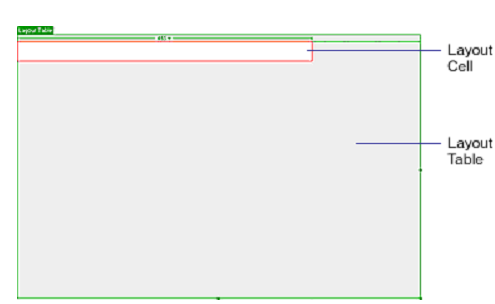
1417_Explain about Layout Cells1.png

Layout table expands to fill the Document window and defines page layout area. White rectangle is the layout cell you just drew. You can place extra layout cells in gray area of the layout table.


Related Discussions:- Explain about layout cells

Link your documents to site, Images in the top area of Compass home page gu...

Images in the top area of Compass home page guide visitors to specific pages on the site. Now you will add links for navigation buttons. You will see that there are some ways to

Define the aims of program generation activity, Program generation activity...

Program generation activity aims at? Ans. At automatic generation of program the program generation activity aims.

What is the use of status command, What is the use of status command, data ...

What is the use of status command, data output command, and data input command. A status command is used to test a variety of status conditions in the interface and the periphe

Why should i use cgi, CGI is significant whenever you require to retain sta...

CGI is significant whenever you require to retain state information about a user, or run an application which communicates with the server. Things like guestbook's, Chat clients, d

What is partition, What is partition? Partitions divide a system into s...

What is partition? Partitions divide a system into several independent or weakly coupled subsystems, each giving one kind of service. Partitions use peer-peer subsystems.

Explain extended binary coded decimal interchange code, Q. Explain Extended...

Q. Explain Extended Binary Coded Decimal Interchange Code? Extended Binary Coded Decimal Interchange Code (EBCDIC) is a character-encoding format employed by IBM mainframes. It

State disadvantages of object oriented analysis design, State Disadvantages...

State Disadvantages of object oriented analysis design You know that OO methods only create functional models within objects. There is no place in methodology to design a compl

How to pass data from list to report, How to pass data from list to report?...

How to pass data from list to report? ABAP/4 gives three ways of passing data: ---Passing data automatically using system fields ---Using statements in the program to tak

Write the html code to web page to insert an image, Write the HTML code to ...

Write the HTML code to accomplish the web page to insert an image onto a page using good.gif as image and having "welcome" as the ALT text. The HTML code to accomplish the web

Illustrate about object oriented development, Illustrate about object orien...

Illustrate about object oriented development object oriented development is not direct way of system development as in this approach a holistic view of application domain is co

Write Your Message!

Captcha
Free Assignment Quote

Assured A++ Grade

Get guaranteed satisfaction & time on delivery in every assignment order you paid with us! We ensure premium quality solution document along with free turntin report!

All rights reserved! Copyrights ©2019-2020 ExpertsMind IT Educational Pvt Ltd