Example of an attack against a windows, Computer Network Security

Assignment Help:

The objective of this example is to demonstrate the steps required for a successful attack against a vulnerable Windows XP SP2 system. It will show: a) how Nessus can be used to discover vulnerabilities in a system,

b) how a vulnerability can be exploited using Metasploit, c) the Meterpreter functionality d) a password

cracking example, e) the Netcat functionality, f) how an attacker can gain GUI access into a remote system. In the discussion below Bt4 and WinXP refer to virtual machines Backtrack4-Final and Windows XP SP2, respectively; although Bt4 is used here, similar steps will be used in the case of Bt5. Note that red color is used for the commands. In this example, I discuss the steps that I followed. It is strongly recommended that you use your own virtual machines and follow the same steps as you go over this example; in this case you have to replace my settings such as last name, IP address, etc. with your settings.
212_Example of an Attack against a Windows.png

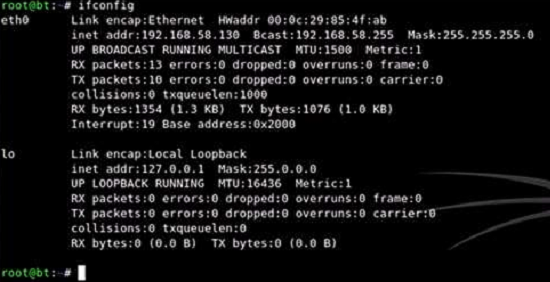
As you can see above, my Bt4 has address 192.168.58.130; your Bt4 will have a different IP address. Note that WinXP should be on the same subnet with Bt4. This means that, in my case, the leftmost three bytes of the WinXP address must be "192.168.58". Thus, I can find its IP address by using an Nmap SYN scan. Before I proceed, I disconnected from the Internet and disabled all firewalls, antivirus software, and access controls that were running on my laptop. I did that because these tools will interfere with the Bt4, WinXP interaction and prevent me from analyzing correctly as well as exploiting the vulnerabilities of WinXP. After I had finished with this exercise, I re-enabled all these security tools before I connected back to the Internet.


Related Discussions:- Example of an attack against a windows

Log file monitors-information security, LOG FILE MONITORS Log file monit...

LOG FILE MONITORS Log file monitor (LFM) is similar to NIDS. It reviews log files generated by servers, network devices, and even other IDSs for patterns and signatures. Pattern

Plaintext, how to encryt the data in plaintext cipher

how to encryt the data in plaintext cipher

Firewall analysis tools-information security, FIREWALL ANALYSIS TOOLS Th...

FIREWALL ANALYSIS TOOLS There are a number of tools automate remote discovery of firewall rules and assist the administrator in analyzing rules Administrators who feel wary of u

Ciphertext, Encode the following plaintext, using the Caesar cipher: ...

Encode the following plaintext, using the Caesar cipher: LORD OF THE RINGS b) The following ciphertext jw njbh lxmn cx kanjt has been encoded using a

Network security course work, doing coursework in Network Security to prese...

doing coursework in Network Security to present a possible solution to the problem at hand by creating a prototype of the new network security infrastructure. This new design shou

Illustrate the label switching procedure in an mpls network, QUESTION ...

QUESTION a) Explain the terms traffic engineering, class-based queuing, shaping and grooming in an MPLS network. b) Using an example topology, illustrate the label swi

Develop a completely secure wsn based on the triple key, Q. Develop a compl...

Q. Develop a completely secure WSN based on the triple key? Wireless network is the most vulnerable type of network to security attack. Unauthorized access to wireless network

Nstissc security model, NSTISSC SECURITY MODEL The NSTISSC Security Model ...

NSTISSC SECURITY MODEL The NSTISSC Security Model provides a detailed perspective on security. While the NSTISSC model covers the 3 dimensions of information security, it removes

Wireless security tools, WIRELESS SECURITY TOOLS An organization which s...

WIRELESS SECURITY TOOLS An organization which spends its time securing wired network and leaves wireless networks to operate in any manner is opening itself up for security brea

How will network datagrams be protected at network layer, (a) Consider the...

(a) Consider the subsequent authentication options: A. Using password. B. Using pin and fingerprint Which option A or B provides stronger security and why? (b) Give

Write Your Message!

Captcha
Free Assignment Quote

Assured A++ Grade

Get guaranteed satisfaction & time on delivery in every assignment order you paid with us! We ensure premium quality solution document along with free turntin report!

All rights reserved! Copyrights ©2019-2020 ExpertsMind IT Educational Pvt Ltd