Cursor attributes in pl sql, PL-SQL Programming

Assignment Help:

Cursor Attributes

 The Cursors and cursor variables have 4 attributes which give you helpful information about the execution of a data manipulation statement.

Syntax:
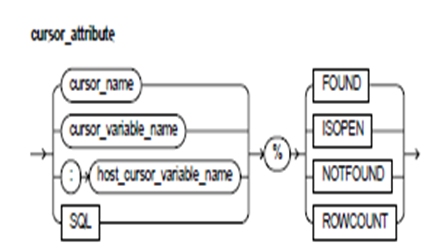
1586_Cursor Attributes.png

Keyword and Parameter Description:

cursor_name:

These identify an explicit cursor formerly declared within the present scope.

cursor_variable_name:

These identify the PL/SQL cursor variable (or parameter) formerly declared within the present scope.

host_cursor_variable_name:

These identify a cursor variable declared in the PL/SQL host atmosphere and passed to the PL/SQL as a bind variable. The host cursor variable datatype is well-suited with the return type of any PL/SQL cursor variable. The host variables should be prefixed with a colon.

SQL:

These are the name of the implicit SQL cursor.

%FOUND:

This is a cursor attribute that can be appended to the name of the cursor or cursor variable. Previous to the first fetch from an open cursor, the cursor_name%FOUND results NULL. Afterward, it results TRUE if the final fetch returned a row, or FALSE if the final fetch failed to return a row. Until the SQL statement is executed, the SQL%FOUND results NULL. Afterward, it results TRUE if the statement affects any rows, or FALSE if it affects no rows.

%ISOPEN:

This is a cursor attribute that can be appended to the name of the cursor or cursor variable. If a cursor is open, the cursor_name%ISOPEN results TRUE; Or else, it results FALSE. The Oracle automatically closes the implicit SQL cursor after executing its related SQL statement, Therefore the SQL%ISOPEN always results FALSE.

%NOTFOUND:

This is a cursor attribute that can be appended to the name of the cursor or cursor variable. Previous to the first fetch from an open cursor, the cursor_name%NOTFOUND results NULL. Afterward, it results FALSE if the last fetch returned a row, or TRUE if the last fetch unsuccessful to return a row.

Until a SQL statement is executed, the SQL%NOTFOUND results NULL. Afterward, it results FALSE if the statement affects any rows, or TRUE if it affects no rows.

%ROWCOUNT:

This is a cursor attribute that can be appended to the name of the cursor or cursor variable. If a cursor is opened, the %ROWCOUNT is zeroed. Before the first fetch, the cursor_name%ROWCOUNT yields to 0. Afterward, it results the number of rows fetch so far. The number is incremented if the newest fetch returned a row. Until the SQL statement is executed, the SQL%ROWCOUNT results NULL. Afterward, it results the number of rows affected by the statement. The SQL%ROWCOUNT results 0 if the statement affect no rows.


Related Discussions:- Cursor attributes in pl sql

Creating a sql file, Creating a SQL file 1. Open a new file in Notepad...

Creating a SQL file 1. Open a new file in Notepad++ and save it to the location c:\mysql\bin, with the name lab8script.sql (the file extension should be .sql ). Add a MySQL co

Is null operator-comparison operators, IS NULL Operator The IS NULL oper...

IS NULL Operator The IS NULL operator returns the Boolean value TRUE whenever its operand is null or FALSE if it is not null. The comparisons including the nulls always yield NU

Advantages of exceptions, Advantages of Exceptions Using the exception...

Advantages of Exceptions Using the exceptions for the error handling has many benefits. Without an exception handling, every time you issue a command, you should ensure for th

Using default-declarations in sql, Using DEFAULT You can use the keyword...

Using DEFAULT You can use the keyword DEFAULT rather than that of the assignment operator to initialize the variables. For e.g. the declaration blood_type CHAR := ’O’; it can b

Nested tables versus index-by tables, Nested Tables versus Index-by Tables ...

Nested Tables versus Index-by Tables The Index-by tables and nested tables are just similar. For e.g.  They have similar structure and their individual elements are accessed in

Example of except operator - sql, Example of EXCEPT Operator - SQL Ex...

Example of EXCEPT Operator - SQL Example, like its counterpart in the theory book, illustrates the convenience of allowing any table expression to be the source for an INSERT

Entering and exiting - autonomous transaction, Entering and Exiting If...

Entering and Exiting If you enter the executable part of an autonomous routine, the major transaction suspends. When you exit the routine, the major transaction resumes. To ex

Usefulness of data type, Usefulness of Data Type In SQL, as in most c...

Usefulness of Data Type In SQL, as in most computer languages, a type can be used for constraining the values that are permitted to be used for some purpose. In particular, i

Cursor for loops, Cursor FOR Loops In most cases that need an explicit ...

Cursor FOR Loops In most cases that need an explicit cursor, you can simplify the coding by using a cursor FOR loop rather of the OPEN, FETCH, and CLOSE statements. A cursor FO

Oracle 10g new features and differences , Oracle 10G new features:- Au...

Oracle 10G new features:- Automatic Database Diagnostic Monitor System Advancements - these methods will provides several methods for extracting reports through the Automatic

Write Your Message!

Captcha
Free Assignment Quote

Assured A++ Grade

Get guaranteed satisfaction & time on delivery in every assignment order you paid with us! We ensure premium quality solution document along with free turntin report!

All rights reserved! Copyrights ©2019-2020 ExpertsMind IT Educational Pvt Ltd