Cohen sutherland line clippings algorithm, Computer Graphics

Assignment Help:

Cohen Sutherland Line Clippings Algorithm

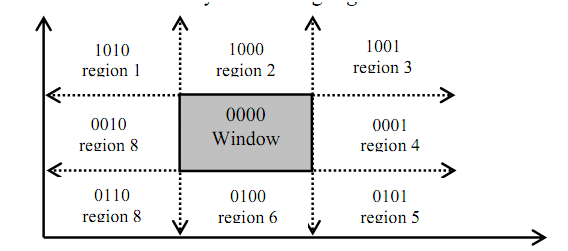
The clipping problem is identified by dividing the region surrounding the window area into four segments Up as U, Down as D, Left as L, Right as R and assignment of number 1 and 0 to respective segments assists in positioning the area surrounding the window. How this positioning of areas is performed can be well determined by understood in following figure.
2465_Cohen Sutherland Line Clippings Algorithm.png

Figure: Positioning of regions surrounding the window

In figure as given above we have noticed that each coding of areas U, D, L and R is done along w.i.t. window region. Since window is neither Left nor Right, neither up nor down so, the respective bits UDLR are 0000; currently see area1 of above figure. The positioning code UDLR is 1010, that is the area1 lying on the position that is upper left side of the window. Hence, area1 has UDLR code 1010 i.e. Up so U=1, not Down so D=0, Left so L=1, not Right so R=0.

The sense of the UDLR code to identify the location of region w.i.t. window is:

1st bit ⇒ Up(U) ; 2nd bit ⇒ Down(D) ;3rd bit ⇒ Left(L) ;  4th bit ⇒ Right(R),

Currently, to perform Line clipping for different line segment that may reside within the window region partially or fully, or may not even lie in the widow area; we utilize the tool of logical ANDing among the UDLR codes of the points lying on the line.

Logical ANDing (^) operation

=>

1 ^ 1 = 1; 1 ^ 0 = 0;

between respective bits implies


Note:


0 ^ 1 = 0; 0 ^ 0 = 0


  • UDLR code of window is 0000 all the time and with respect to this will generate bit codes of other areas.
  • A line segment is observable if both the UDLR codes of the end points of the line segment equal to 0000 that is UDLR code of window area. If the resulting code is not 0000 then, which line segment or section of line segment may or may not be observable

Related Discussions:- Cohen sutherland line clippings algorithm

Specular reflection - polygon rendering & ray tracing method, Specular Refl...

Specular Reflection - Polygon Rendering & Ray Tracing Methods Specular reflection is while the reflection is stronger in one viewing direction that is a bright spot, termed

Interactive computer animation, Interactive Computer Animation Interac...

Interactive Computer Animation Interactive Computer Animation that is interactively utilized by users for example: games. Sprite animation is interactive and utilized broadly

Important points about types of light resources, Important points about Ty...

Important points about Types of light resources - illumination model Note: While we see an opaque non-luminous object, we notice reflected light by one surface of the object

Polygon meshes - modeling and rendering, Polygon Meshes - Modeling and Rend...

Polygon Meshes - Modeling and Rendering A polygonal surface to be sketched may not be easy and may have enormous curls and curves. Illustration: a crushed piece of paper or cr

Draw the letters s, Draw the letters S, P, R or U of English alphabet using...

Draw the letters S, P, R or U of English alphabet using multiple Bézier curves.  A complete code for plotting Bezier curves is given previously. There in the code, control point

Education and training systems multimedia in education, Education and train...

Education and training systems are making with three major objectives as: a) The learning objectives and purpose of the training. b)  Assessment or testing of the students to

What is the advantages of electrostatic plotters, What is the advantages of...

What is the advantages of electrostatic plotters? Advantages of electrostatic plotters: They have very high quality printers and faster than pen plotters. Recent electros

Frame buffers - graphics hardware, Frame Buffers - Graphics Hardware ...

Frame Buffers - Graphics Hardware The storage region in a raster scan display system is set as a two-dimensional table. All row-column entry stores information as brightness

Handling mouse input, When you set up your project, create the class as an ...

When you set up your project, create the class as an "ACM Graphics Program", rather than a plain class. This will perform the necessary preparations for you to use mouse input in y

Write Your Message!

Captcha
Free Assignment Quote

Assured A++ Grade

Get guaranteed satisfaction & time on delivery in every assignment order you paid with us! We ensure premium quality solution document along with free turntin report!

All rights reserved! Copyrights ©2019-2020 ExpertsMind IT Educational Pvt Ltd