Explain the lofting method in maya, Computer Graphics

Assignment Help:

QUESTION 1:

a) Draw a Bezier curve showing the following components

i. hull
ii. curve CV
iii. span
iv. start and end point

b) Maya provides highly effective tools for all three types of modeling - polygons, nurbs and subdivisions. Explain, giving suitable examples when would you use each of the above methods.

c) Briefly explain, with the help of suitable diagrams, the function of the following
tools in Maya.
i. The Add Divisions Tool
ii. The Split Polygon Tool

d) Briefly explain the lofting method in Maya. Give a diagram, whereby four curves are lofted.

QUESTION 2:

a) i) Explain with the help of appropriate diagrams how a profile curve and a path curve are used to create an extruded surface in Maya.

ii) Give a few examples of items that could be made using extruded surface.

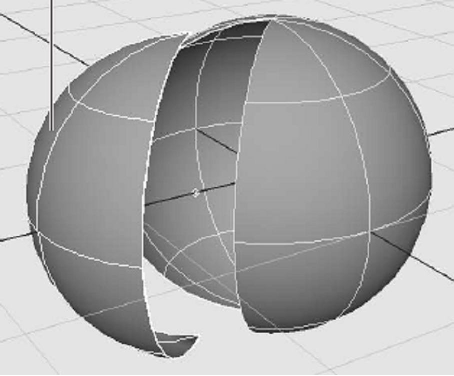
b) Look at the diagram shown below ( Figure Qu 2(b) ). Explain briefly how this can be done using Maya.
                            1811_11.png

                                              Figure Qu 2(b)

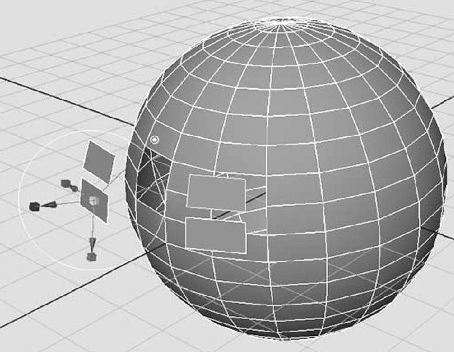
c) Which tool would you use in Maya to modify the sphere as shown in the diagram below ( Figure Qu 2(c) )

d) Which tool is generally used to add details to a face? You can add bumps and depressions to your surface as well as create regions of extra detail. Explain how you use the tool. Illustrate your answer with an appropriate diagram.

e) Explain what is a lattice. Where are lattices especially useful? Give an appropriate diagram to illustrate your answer.
                          458_12.png

                                          Figure Qu 2(c)


QUESTION 3:

a) Briefly expain the basic features of the following shader types in Maya
i. Lambert
ii. Phong
iii. Layered

b) Explain the following terms:
i. Incandescence
ii. Translucence

c) Briefly explain the following animation types:
i. Keyframe Animation
ii. Dynamic or Effects Animation

iii. Path Animation
iv. Motion Capture

QUESTION 4:

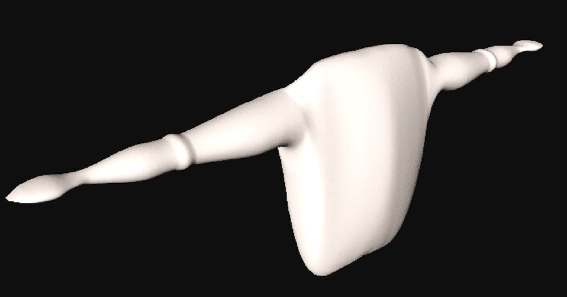
a) Fully explain how you will use NURBS to create a human torso as shown in the Figure Qu 4 (a). Illustrate your answer with appropriate diagrams.
                            2049_13.png

                                             Figure Qu 4 (a)

b) What is a skeleton in CG Animation?

c) Differentiate between Inverse Kinematics (IK) and Forward Kinematics(FK)


Related Discussions:- Explain the lofting method in maya

What is a dot size, What is a dot size? Dot size may be explained as th...

What is a dot size? Dot size may be explained as the diameter of a single dot on the devices output. Dot size is also known as the Spot size.

Briefly describe what you understand by smoothing, Question: (a) List a...

Question: (a) List and explain different types of lights that can be used in After Effects. (b) How is the density of dots between the boxes in a motion path related to th

Zero acceleration (constant speed), Zero Acceleration (Constant Speed ) ...

Zero Acceleration (Constant Speed ) Now, the time spacing for the in-betweens that is: in-between frames is at equal interval; which is if, we want N in-betweens for key frames

Finding where the ball hits a segment, You will write a two-dimensional pre...

You will write a two-dimensional precursor of the three-dimensional bouncing ball simulation that is one of your choices for a ?nal project. This involves adding functions to your

Draw line segment - digital differential analyzer algorithm, Example 1: Dr...

Example 1: Draw line segment from point (2, 4) to (9, 9) by using Digital Differential Analyzer algorithm. Solution: We know usual equation of line is specified via y = mx

Viewing transformation, Viewing Transformation In previous section, we...

Viewing Transformation In previous section, we have discussed about the geometric transformations as Translation, Shearing, Reflection, Scaling and Rotation. Rotation, Reflect

Functioning of input devices - 2d shape primitives, Functioning of Input De...

Functioning of Input Devices Functioning of input devices-Keyboard, mouse, trackball and space ball, Joystick, data glove, digitizer, scanner, touch panel, light pen, voice sys

Types of polygon tables curves and surfaces, Types of Polygon tables curves...

Types of Polygon tables curves and surfaces Attribute tables: This table has object information as transparency, surface reflexivity, texture features of an object in the vi

What is the purpose of saving selections, Question 1: (a) Once a select...

Question 1: (a) Once a selection is made, what area of the image can be edited? (b) What is the purpose of saving selections? (c) How can you move a selection while you a

Write Your Message!

Captcha
Free Assignment Quote

Assured A++ Grade

Get guaranteed satisfaction & time on delivery in every assignment order you paid with us! We ensure premium quality solution document along with free turntin report!

All rights reserved! Copyrights ©2019-2020 ExpertsMind IT Educational Pvt Ltd