Write a computer program using matlab, MATLAB Programming

Assignment Help:

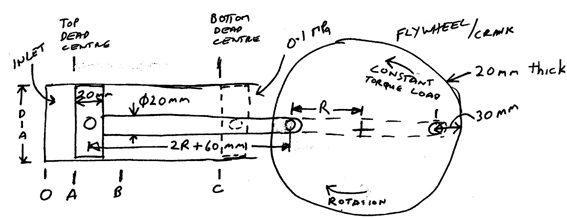
From A to B the inlet valve is open and the steam pressure increases linearly from 0.1000 MPa absolute to 15.00 MPa absolute, 1000°C.

The inlet valve closes and from B to C the steam expands isentropically and adiabatically to the end of the stroke, where the steam pressure is 0.1000 MPa.

The pressure on the crank side of the piston is always 0.1000 MPa.

On the return stroke the exhaust valve is open, so the pressure on both sides of the piston is 0.1000 MPa.

The distance from A to B is 10 + DD/10 mm.

At top dead centre (top of stroke) the distance OA is 10 + BB/10 mm.
2423_write a computer program using MATLAB.png

For the steam engine given in the above diagram determine the forces on each of the components when the engine is running at constant revolutions per minute (angular velocity at the beginning and end of each revolution is the same but varies during the revolution).  Determine these forces at increments of 1 degree of the flywheel position and plot all forces for 1 revolution of the flywheel.  Plot the angular velocity of the flywheel.  Use the steam tables for your steam calculations.

Make the following assumptions:

(a) All components are made of steel with a density of  7800 kg/m3.

(b) Assume the piston and rod are solid steel pieces (not hollow).

(c) Flywheel speed is 500 RPM when the piston is at top dead centre.


Related Discussions:- Write a computer program using matlab

Compute the moments, Show (turn in) similar output images as in part 2 for ...

Show (turn in) similar output images as in part 2 for each of your new images (there is only 1 connected component in this case). Write three functions which compute the moments, c

Script - matlab, Script - MATLAB: The script is a series of MATLAB ins...

Script - MATLAB: The script is a series of MATLAB instructions which is stored in a file and saved. The contents of a script can be showed in the Command Window by using the t

Hold and legend function - plot functions, Hold and legend function: ...

Hold and legend function: hold: is a toggle which freezes the present graph in the figure window, so that the new plots will be superimposed on the present one. Just hold

Error-checking user input in the while loop, Error-Checking user input in t...

Error-Checking user input in the While Loop: In many applications, whenever the user is prompted to enter anything, there is a valid range of values. When the user enters a wr

Find the volume if pyramid, Write a script to determine the volume of a pyr...

Write a script to determine the volume of a pyramid, which is 1/3 * base * height, where the base is length * width. On time the user to enter values for the length, width, and th

Common form of a function definition, Common form of a function definition:...

Common form of a function definition: The common form of a function definition for a function which computes and returns one value looks like this: For illustration, t

Writing data to a file, Writing data to a File: The save function can ...

Writing data to a File: The save function can be used to write a data from the matrix to the data file, or to append a data file. The format is as shown below: save filenam

Write a matlab program, Write a MATLAB program (using/making the necessary ...

Write a MATLAB program (using/making the necessary functions that you deem necessary) that does the two following jobs: It generates the following digital modulation schemes. In

Ots hgi, khdjkafhoi woiruwoi epojrpeo

khdjkafhoi woiruwoi epojrpeo

Passing multiple arguments, Passing Multiple Arguments: In many situai...

Passing Multiple Arguments: In many situaion it is essential to pass more than one argument to the function. For illustration, the volume of a cone is given by here r

Write Your Message!

Captcha
Free Assignment Quote

Assured A++ Grade

Get guaranteed satisfaction & time on delivery in every assignment order you paid with us! We ensure premium quality solution document along with free turntin report!

All rights reserved! Copyrights ©2019-2020 ExpertsMind IT Educational Pvt Ltd