Implementation of binary search, MATLAB in Engineering

Assignment Help:

Implementation of binary search:

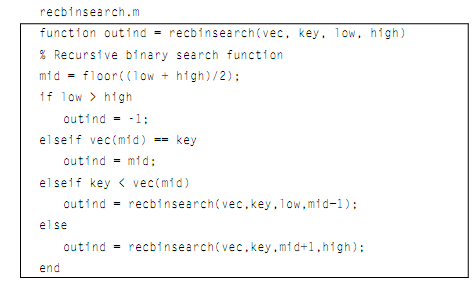
The binary search can be implemented as a recursive function. The recursive function below also implements this binary search algorithm. It receives four arguments: a sorted vector, and a key to search for, and the values of low and high (which, to start, will be 1 and the length of the vector). It will return -1 when the key is not in the vector, or the index of element in which it is found. The base cases in the algorithm are if low > high, that means the key is not in the vector, or whenever it is found. Or else, the common case I to adjust the range and call the binary search function again.
1764_Implementation of binary search.png

The illustrations of calling this function is shown here:

>> recbinsearch(svec, 5,1,length(svec))

ans =

    3

>> recbinsearch(svec, 25,1,length(svec))

ans =

    7

>> recbinsearch(svec, 4,1,length(svec))

ans =

    -1


Related Discussions:- Implementation of binary search

Removing whitespace characters, Removing Whitespace Characters: The MA...

Removing Whitespace Characters: The MATLAB has functions which will eliminate trailing blanks from the end of a string and/or leading blanks from the starting of a string.

Printrectarea function - subfunction, printrectarea function: functio...

printrectarea function: function call: printrectarea(length, width) function header: function printrectarea(len, wid)   In the function call, there are two argume

Variable scope, Variable Scope: The scope of any of variable is the wo...

Variable Scope: The scope of any of variable is the workspace in which it is valid. The workspace generated in the Command Window is known as the base workspace. As we know

Passing arguments to functions, Passing arguments to functions: In all...

Passing arguments to functions: In all these functions examples faraway, at least one of the arguments was passed in the function call to be the value(s) of the equivalent inp

Creating cell arrays, Creating Cell arrays: There are many ways to cre...

Creating Cell arrays: There are many ways to create cell arrays. For illustration, we will create a cell array in which one element will store an integer, one element store ch

Illustration of passing arguments to functions, Illustration of Passing arg...

Illustration of Passing arguments to functions: Here is an illustration of calling this function: >> printrand() The random # is 0.94 As nothing is passed to

Illustration of variable scope, Illustration of Variable scope: Runnin...

Illustration of Variable scope: Running this function does not add any of variables to the workspace, as elaborated: >> clear >> who >> disp(mysum([5 9 1]))

Calcrectarea subfunction, calcrectarea subfunction: function call: ar...

calcrectarea subfunction: function call: area = calcrectarea(len,wid); function header: function area = calcrectarea(len, wid)   In the function call, the two arg

Graphics properties, Graphics Properties: The MATLAB uses the Handle G...

Graphics Properties: The MATLAB uses the Handle Graphics in all its figures. All figures consist of various objects, each of which is assigned a handle. The object handle is a

Use of nested if-else statements, Use of Nested if-else statements: By...

Use of Nested if-else statements: By using the nested if-else to select from among the three possibilities, not all the conditions should be tested. In this situation, if x is

Write Your Message!

Captcha
Free Assignment Quote

Assured A++ Grade

Get guaranteed satisfaction & time on delivery in every assignment order you paid with us! We ensure premium quality solution document along with free turntin report!

All rights reserved! Copyrights ©2019-2020 ExpertsMind IT Educational Pvt Ltd