Convert the rgb values for the colours, Computer Graphics

Assignment Help:

In computers, colours are created by blending different combinations of red, green and blue. These colours are normally specified as three two-digit hexadecimal numbers in html, photoshop, gimp etc. For example, Brown is specified as A62929 to indicate the proportions of red, green and blue required. For grey shades the three proportions will always be equal. Moreover FF indicates that the colour is fully saturated. Thus red is FF0000, green is 00FF00, and blue is 0000FF. This colour system is called RGB.

Other applications, such as MATLAB require the RGB colours to be specified in terms of the fraction of each colour required. In this case, the colour is specified by three numbers between 0 and 1, with 1 representing full colour saturation. For example, Brown in this system is given as (0.65, 0.16, 0.16); while red is (1, 0, 0); green is (0, 1, 0) and blue is (0, 0, 1). This representation is referred as the RGB colour fraction.

Given that different systems are used in different applications, it is important to be able to convert between the two representations. The largest number that can be represented by a two-digit hexadecimal number is 16 FF so we know that there are 255 possible shades that can be represented.  Hence, to convert the hexadecimal colour representation to a colour fraction, the following has to be done:

1.  Convert each hexadecimal colour number to its decimal equivalent.

2.  Divide each decimal by 255.

3.  Record each fraction as the colour fraction required for that colour. Converting from a colour fraction to the hexadecimal version is the reverse of the above.

To illustrate, let us consider Brown. Its shade of red is 16 A6. As a decimal this corresponds to 166. Hence, the fraction amount of red required is 166 255 0.65. Similarly for green the decimal equivalent of 16 29 is 41. Therefore, the green colour fraction is 41 255 0.16
. The blue colour fraction for Brown is also 0.16.

(a) Convert the RGB values for the colours below to their equivalent RGB colour fractions. Round your answers to two decimal places.
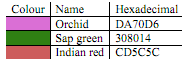
389_Convert the RGB values for the colours.png


Related Discussions:- Convert the rgb values for the colours

Hypertext, Hypertext: it is conceptually very similar as regular text: it ...

Hypertext: it is conceptually very similar as regular text: it can be stored, searched, read, or edited along with a significant difference: hypertext is text along with pointers

Principle vanishing point - perspective projections, Principle Vanishing po...

Principle Vanishing point - Perspective Projections Assume that line 1 and l2 be two straight lines parallel to each other that are also parallel to x-axis. If the projection

Briefly explain the importance of an adjustment layer, Question : (a) W...

Question : (a) What do you meant by "solo a layer " in Adobe After Effects. Explain briefly how would you perform it. (b) Briefly explain the importance of an adjustment lay

Role in education and training, Role in Education and Training:- A multime...

Role in Education and Training:- A multimedia presentation is an important way to introduce new concepts or described a new technology. Individuals determine it easy to understand

Write a c-code that plots an object on the window, Write a C-code that plot...

Write a C-code that plots an object on the window and on the user's click of mouse on the window, the object starts rotating continuously until the user presses the mouse again.

What is homogeneous coordinate, What is homogeneous coordinate? Discuss the...

What is homogeneous coordinate? Discuss the composite transformation matrix for two successive translations and scaling. In design and picture formation process, many times

Derive the common transformation of parallel projection, Derive the common ...

Derive the common transformation of parallel projection into the xy-plane in the direction of projection d=aI+bJ+cK. Solution: The common transformation of parallel projection

Number system, Perform the indicated base conversions 548 to base 5

Perform the indicated base conversions 548 to base 5

CRT, Explain working of CRT

Explain working of CRT

Briefly explain how you could create the gun barrel effect, Question 1: ...

Question 1: (a) Describe what you understand by Rotoscoping in Graphic effects. Give details how Rotoscoping could be achieved in After Effects CS3. (b) Using one algorithm

Write Your Message!

Captcha
Free Assignment Quote

Assured A++ Grade

Get guaranteed satisfaction & time on delivery in every assignment order you paid with us! We ensure premium quality solution document along with free turntin report!

All rights reserved! Copyrights ©2019-2020 ExpertsMind IT Educational Pvt Ltd