Conditionals - sql, PL-SQL Programming

Assignment Help:

Conditionals - SQL

At first sight SQL does not appear to have a single operator for expressing logical implication. In this respect it would be in common with most programming languages, including Tutorial D. However, standard SQL defines a partial ordering for its three truth values, under which false is deemed to precede true. Thus, the comparisons p < q, p > q, p <= q, and p >= q are all supported in standard SQL (in addition to p = q, of course).

it is noted that in 2VL p → q is equivalent to ¬ p ∨ q. Study of Figure 3.5 reveals that ¬ p ∨ q does indeed equate to p → q when neither operand is unknown, and the same is true of p <= q! (It is the pronunciation, "is less than or equal to", rather than "implies", that led to my observation that SQL appears to include direct support for a 3VL form of implication by accident.)
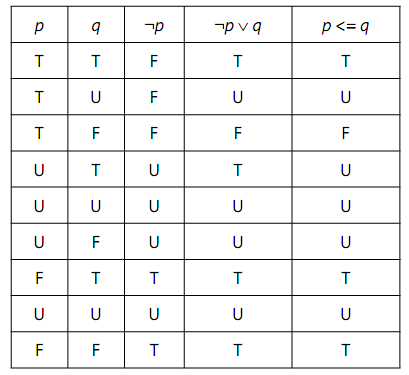
1570_Conditionals - SQL.png

Figure: The SQL Truth Tables for ¬ p∨ q and p <= q

Note, however, that p <= q is not equivalent to ¬ p ∨ q. Intuitively, we understand that "p implies q" is true whenever q is true. This holds for ¬ p ∨ q but not for p <= q, as the row for p = U and q = T shows. The U in the last column for that row arises from SQL's general rule that whenever an operand of a comparison is NULL, the result is unknown-and NULL, when it is the result of evaluating a Boolean expression, is considered synonymous with unknown. In fact, Figure gives a demonstration of the fact that SQL is not always faithful to its own concept, that NULL represents "a value exists here but we don't know which value". What U really means when it appears in the column for p <= q is that <= is undefined for that particular pair of truth values.


Related Discussions:- Conditionals - sql

If statement - syntax, IF Statement The IF statement executes a series ...

IF Statement The IF statement executes a series of statement conditionally. Whether the series is executed or not depends on the value of the Boolean expression. Syntax:

Data types in sql - timestamp, Data Types in SQL - Timestamp TIMESTAMP...

Data Types in SQL - Timestamp TIMESTAMP for values representing points in time on a specified uniform scale. DATE is used for timestamps on a scale of one day, such as DATE '2

Calculate the total shopper spending, Many of the reports generated from th...

Many of the reports generated from the system calculate the total dollars in purchases for a shopper. Complete the following steps to create a function named TOT_PURCH_SF that acce

Package standard in pl/sql, Package STANDARD package named STANDARD d...

Package STANDARD package named STANDARD defines the PL/SQL atmosphere. The package specification globally declares the exceptions, types, and subprograms that are available a

Delete statement - syntax, DELETE Statement The DELETE statement elimin...

DELETE Statement The DELETE statement eliminates whole rows of data from the specified table or view. Syntax:

Solve the business problems using sql, Use the MASCOT tables CREDITRS, PORD...

Use the MASCOT tables CREDITRS, PORDS and PAYMENTS to write SQL queries to solve the following business problems. These tables / data are available to you via the USQ Oracle server

Join query, Using a join on 3 tables, select 5 columns and 10 rows from the...

Using a join on 3 tables, select 5 columns and 10 rows from the 3 tables without the use of a Cartesian product Query: SELECT E.LAST_NAME, E.FIRST_NAME, S.BUILDING, S.BRAN

Using rollback - , Using ROLLBACK The ROLLBACK statements end the pres...

Using ROLLBACK The ROLLBACK statements end the present transaction and undo any change made during the transaction. The Rolling back is helpful for two reasons. Firstly, if yo

Case sensitivity-naming conventions, Case Sensitivity Similar to all the...

Case Sensitivity Similar to all the identifiers, the variables, the names of constants, and parameters are not case sensitive. For illustration, PL/SQL considers the following n

Running the pl/sql wrapper, Running the PL/SQL Wrapper To run the PL/SQ...

Running the PL/SQL Wrapper To run the PL/SQL Wrapper, go through the wrap command at your operating system prompt by using the syntax as shown: wrap iname=input_file [oname=

Write Your Message!

Captcha
Free Assignment Quote

Assured A++ Grade

Get guaranteed satisfaction & time on delivery in every assignment order you paid with us! We ensure premium quality solution document along with free turntin report!

All rights reserved! Copyrights ©2019-2020 ExpertsMind IT Educational Pvt Ltd