What are race conditions?, Operating System

Assignment Help:

What are race conditions?

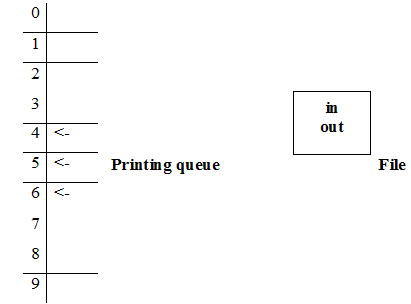
Race conditions are problems that take place due to the sharing of the same file by several processes. In such a case none of the processes is able to use the shared file. Consider the illustration of a printing queue that maintains the list of all files to be printed. As well consider a file shared by two processes PA and PB.
1266_What are race conditions.png

The file has obtained two variables:

                    ‘in’ pointing to the next free slot (N.F.S)                     

and

          ‘out’ pointing to the next job to be executed.       


   Primarily in the file, in=7 and out=4. Let PA be the first process that uses the file. Then PA sets its local variable N.F.S=7. However before placing into the queue, an interrupt occurs. At present PB comes. PB also sets its local variable N.F.S=7 and is placed in the queue.

Then N.F.S=N.F.S+1 which sets in=8. In such a case while implementing PA overwrites the slot 7 that is already occupied by PB. Thus nothing will be printed. Such a condition is an example for race condition.


The file has obtained two variables:

                        'in' pointing to the next free slot (N.F.S)                     

and

          'out' pointing to the next job to be executed.     


Primarily in the file, in=7 and out=4. Let PA be the first process that uses the file. Then PA sets its local variable N.F.S=7. However before placing into the queue, an interrupt occurs. At present PB comes. PB also sets its local variable N.F.S=7 and is placed in the queue.

Then N.F.S=N.F.S+1 which sets in=8. In such a case while implementing PA overwrites the slot 7 that is already occupied by PB. Thus nothing will be printed. Such a condition is an example for race condition.


Related Discussions:- What are race conditions?

Explain the entry-sequenced file organization, Entry-sequenced file organiz...

Entry-sequenced file organization The records in an entry-sequenced file are store up in the order they are written into the file. New records are for all time appended to

Explain lru second chance algorithm, Second chance Algorithm When the p...

Second chance Algorithm When the page is chosen the reference bit is checked to see whether it has been referenced before. If that is the case after that it is given a second c

Explain about system software, An operating system act as an intermediary b...

An operating system act as an intermediary between user of a computer and computer hardware. The objective of an operating system is to provide an environment in that a user can ex

Explain multi-user based operating system, Multi-user - A multi-user Opera...

Multi-user - A multi-user Operating System permits for multiple users to use the same computer at the same time and/or different times. Below are some instances of multi-user Op

Most-recently used algorithm, Evicting the most-recently used (MRU) page do...

Evicting the most-recently used (MRU) page does very well on LRU's worst case. In general, however, MRU is a bad idea, since many programs exhibit temporal locality in their memory

Linux, how to find ncr value in shell script

how to find ncr value in shell script

What resources are utilized when a thread is created, Q. What resources are...

Q. What resources are utilized when a thread is created? How do they vary from those used when a process is created? Answer: For the reason that a thread is smaller than a pr

Explain the steps in deadlock recovery, Explain the steps in deadlock recov...

Explain the steps in deadlock recovery. a)      Exterminate off all processes involved - drastic. b)      Exterminate off one at a time till deadlock gone - select a victim.

What is the use of system calls, Q. What is the use of system calls? A...

Q. What is the use of system calls? Answer: System calls permit user-level processes to request services of the operating system.

Describes responsibilities of the I/O manager, Q. Describes responsibilitie...

Q. Describes responsibilities of the I/O manager? Answer: The I/O manager is responsible for file systems and device drivers and network drivers. The I/O manager keeps follow

Write Your Message!

Captcha
Free Assignment Quote

Assured A++ Grade

Get guaranteed satisfaction & time on delivery in every assignment order you paid with us! We ensure premium quality solution document along with free turntin report!

All rights reserved! Copyrights ©2019-2020 ExpertsMind IT Educational Pvt Ltd