View the site files, Computer Engineering

Assignment Help:

To see a high-level representation of the structure of a local site, you use Dreamweaver's Site Map view. You can also use site map to add new files to the site, to add, remove and change links and to create a graphic file of the site that you can export to and print from an image-editing application.

Site map always displays the home page for a site at the top of the map; below home page you can see which files the home page links to.

There are some ways to define a site's home page. The easiest way to set a home page is by using context menu within the Site window.

1.  Click title bar of the Site window to make it active. (If Site window is not visible, choose Window > Site Files.)

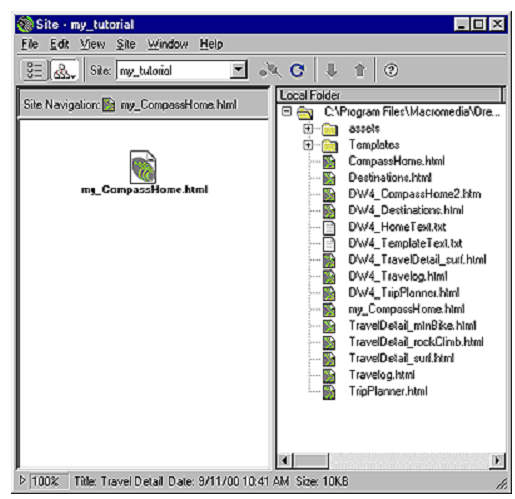
2.  In Site window's Local Folder list, right-click (Windows) or Control-click (Macintosh) the my_CompassHome.html document; then in context menu, choose Set as Home Page.

3.  Click Site Map icon in the top left area of the Site window; then in Site Map pop-up menu, select Map and Files.

1578_VIEW THE SITE FILES.png

Site window now appears with two views of your local site: on the left is a site map which graphically represents current structure of Compass site (with my_CompassHome.html as the home page) and on the right is a list of local folder's contents.
1450_VIEW THE SITE FILES1.png

Leave the Site window open for now, so that you can see how the site map gets updated as you add links to the home page.


Related Discussions:- View the site files

Choosing a micro-controller, There are many different forms of micro-contro...

There are many different forms of micro-controller and a manufacturer, selecting the proper micro-controller for your application is one of the critical decisions which controls th

How can we use ordered lists, Q. How can we use Ordered Lists? Lists ha...

Q. How can we use Ordered Lists? Lists having numbered items are termed as ordered lists. They are used when items in the list have a natural order. They can also be used when

Explain about the network security, Explain about the network security. ...

Explain about the network security. Network security implies the protection of networks and their services through unauthorized access, destruction or disclosure, modificati

Explain topology method used in lan technology in detail, Explain topology ...

Explain topology method used in LAN technology in detail. LAN Topologies: Network topology is a physical schematic that shows interconnection of the various users. There are

Explain data rates in public switched telephone network, Explain data rates...

Explain data rates in public switched telephone network. Data rates in PSTNs : A voice channel in a public switched telephone network is band restricted with a nominal bandwid

Find the nyquist rate, Find the Nyquist rate for the following signals: (a)...

Find the Nyquist rate for the following signals: (a) x(t) = 5 sin 3000πt cos 4000πt (b) A binary channel with bit rate 36000 bps is available for PCM voice transmission. Fi

Explain variable-partition contiguous storage allocation, Explain the conce...

Explain the concept of variable-partition contiguous storage allocation. Suppose that we have 1024K main memory available in that 128K is occupied through operating system pro

Explain the main characteristics of semiconductor memory, Explain the Main ...

Explain the Main characteristics of semiconductor memory Memory, with regard to computers, most commonly signifies to semiconductor devices whose contents can be accessed (whic

Write Your Message!

Captcha
Free Assignment Quote

Assured A++ Grade

Get guaranteed satisfaction & time on delivery in every assignment order you paid with us! We ensure premium quality solution document along with free turntin report!

All rights reserved! Copyrights ©2019-2020 ExpertsMind IT Educational Pvt Ltd