User-defined function, MATLAB Programming

Assignment Help:

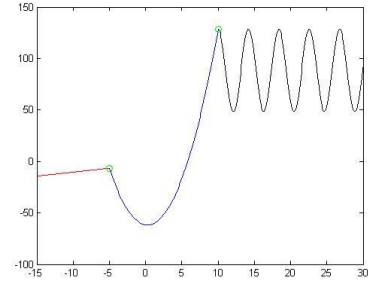
Your functions will allow you to create the following graph, which contains a piecewise function where a line exists in the first interval, a parabola in the second interval, and the sine function in the third interval. Notice that where each interval meets, points with an ‘o' marker are located. Each one of the 4 functions you create will plot something on a single figure.

Create a function called cs151f11assn5first. The purpose of this function is to plot the line of the first interval. This function has four input arguments (in this order): 

the x and y coordinates of a point on the line (matrix of two values: x and y)

the x and y coordinates of a point the line (matrix of two values: x and y)

a scalar of the beginning of the interval of the x-domain on the figure

a scalar of the end of the interval of the x-domain on the figure

This function does not return any values, meaning it has no output arguments.  This function will first calculate the slope of the line using the two points. To do this, calculate the change in y divided by the change in x, aka the rise over run equation.  You will also need to find the y-intercept. To do this, use the x and y values of one of the points and solve for b in the equation b mx y (remember, m is the slope you just calculated).  A vector of x-values will need to be created using the beginning and ending values of interval of the x-domain, with an increment of 0.1.  Then, create the y-values using the equation mx + b Finally, plot the line in red.
924_user-defined function.png


Related Discussions:- User-defined function

Mass and stiffness matrices, Model the three degree of freedom system shown...

Model the three degree of freedom system shown in Figure Q5 and solve for the displacements of the three masses due to a force of 10 N applied to the bottom mass at a frequency of

Function definitions, Function definitions: There are various ways to ...

Function definitions: There are various ways to organize the scripts and functions, but for now every function which we write will be stored in a separate M-file, that is why

Option pricing, Barrier Option pricing in Matlab using MC simulation or fin...

Barrier Option pricing in Matlab using MC simulation or finite difference methods

Illustration of switch statement, Illustration of switch statement: He...

Illustration of switch statement: Here are the two illustrations of calling this function: >> quiz = 22; >> lg = switchletgrade(quiz) lg = X >> quiz = 9; >>

Need help with assignment, Hi I''m wondering if someone can help me with Ma...

Hi I''m wondering if someone can help me with Matlab coursework

Dgdsrgds, Ask question #Mingdfgdfgdfgimum 100 words accepted#

Ask question #Mingdfgdfgdfgimum 100 words accepted#

How to start working with simpower, How to Start Working withSimpower: ...

How to Start Working withSimpower: 1. In the Simulink screen, open a new "Model" (File àNewà Model), name it and save it. 2. Expand the SimPowerSystems library, select and

Write a matlab function, There are many approaches to numerically estimatin...

There are many approaches to numerically estimating the derivative of the function.  The relationship:   is called a forward difference, since the estimate of the derivativ

Convolution, Perform the convolution of following sequences (a) x[n] = [1 2...

Perform the convolution of following sequences (a) x[n] = [1 2 3], N1 = 1 and h[n] = [1 - 1], N2 = 1 (b) x[n] = [1 2 3], N1 = 2 and h[n] = [1 - 1], N2 = 1 (c) x[n] = [1 2 3], N1 =

Write Your Message!

Captcha
Free Assignment Quote

Assured A++ Grade

Get guaranteed satisfaction & time on delivery in every assignment order you paid with us! We ensure premium quality solution document along with free turntin report!

All rights reserved! Copyrights ©2019-2020 ExpertsMind IT Educational Pvt Ltd