Steps to create a rectangle in the client region, Visual Basic Programming

Assignment Help:

STEPS TO CREATE A RECTANGLE IN THE CLIENT REGION

1. Generate a SDI application and name it as a brush.

2. Handle the WM_LBUTTONDOWN message for the CBrushView object id.

3. In answer to Step 2 ON_WM_LBUTTONDOWN member the function would be inserted in the view accomplishment file as shown.

void CBrushView::OnLButtonDown(UINT nFlags, CPoint point)

{ }

4. Type the code below in the ON_WM_LBUTTONDOWN member function

CRect l;

CBrush b(HS_BDIAGONAL,(point.x,point.y));

CClientDC dc(this);

dc.SelectObject(&b);

//BOOL GetClientRect(LPRECT lpRect) const

GetClientRect(&l);

dc.Rectangle(l);

5. Build and then execute the project.

6. A window with lines would be exhibited whenever the left button is pressed

7. Click the left button in various places and note the color change.

8. Transform the brush style as the HS_DIAGONAL, HS_VERTICAL, HS_HORIZONTAL, and HS_CROSS for various executions and examine the output.

The Get Client Rect function imprisons the rectangular window area and stores in m_rdRect object.

Select Stock Object makes a call to the CGdi Object :: From Handle() to verify which CGdiObject to return.
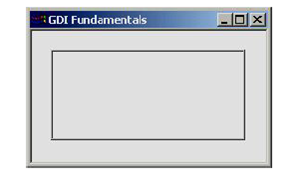
290_affect of rectangle function.png

Figure: Affect of Rectangle Function


Related Discussions:- Steps to create a rectangle in the client region

Do until loop statement , Do Until Loop Statement: The statements with...

Do Until Loop Statement: The statements within the do...until loop block executes till the condition given in until become true. The working of do...until loop is elaborated w

What is meant by dtd?, Question 1 Design a form based applications using l...

Question 1 Design a form based applications using labels, text boxes, and buttons to perform basic arithmetic operations on integers Question 2 Describe the concept of Except

Message box - dialog box in visual basic, Message Box: The Message Box...

Message Box: The Message Box can be specified a title as shown in figure to specify the title for the message box follow by the command given below:  Private Sub Command1_C

Illustration of mdi application using a project, ILLUSTRATION OF MDI APPLIC...

ILLUSTRATION OF MDI APPLICATION USING A PROJECT 1. Choose the MDI option while generating the project by using the Appwizard. 2. Add the WM_LBUTTONDOWN message for the view

Record set - database applications, Record Set: The record set present...

Record Set: The record set presents the records in a base table or the records retrieved due to the query. The record set falls into 3 classes. These are table type record set

Explain Databound Controls, Databound Controls - A controls use to display ...

Databound Controls - A controls use to display the contents of table using Data Control , have to bound each Control to the specific field and the controls are Known as the Data Bo

Class wizard, CLASS WIZARD The Class wizard shown in figure is a tool t...

CLASS WIZARD The Class wizard shown in figure is a tool to handle the message handlers for objects, to define the member variables. Figure: Class Wizard

Account Balance, The user has to enter a starting balance, the dollar amoun...

The user has to enter a starting balance, the dollar amount of deposits, and the dollar amount of withdrawals. the program then has to calculate the balance

Vb code to run various iterations , What I understand from the assignment i...

What I understand from the assignment is I have to make the VB code in file nu1. xlsm generic, and run several iterations for Kc and Ti to find out the optimal combination which wi

Loop statement from inside the loop, You can exit a Do...Loop using the Exi...

You can exit a Do...Loop using the Exit Do statement. Since usually you desire to exit only in certain situations, such as to ignore an endless loop, you should employ the Exit Do

Write Your Message!

Captcha
Free Assignment Quote

Assured A++ Grade

Get guaranteed satisfaction & time on delivery in every assignment order you paid with us! We ensure premium quality solution document along with free turntin report!

All rights reserved! Copyrights ©2019-2020 ExpertsMind IT Educational Pvt Ltd