Spreadsheet software , Basic Computer Science

Assignment Help:

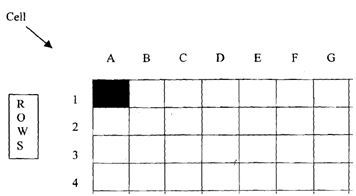
Spreadsheet Software : Consider the grid in Fig. 9.4. It is split into rows and columns and is a pictorial representation of a typical spreadsheet program.
1424_spreed sheet.png

 Figure: Spreadsheet Cells.

You can enter data in any 'cell', e.g. Al, 253, etc. and, for example, perform arithmetic operations on that data and then 'post' the result to another cell. Take the following example. If you wanted to maintain a record of lab expenditure, you could set up a spreadsheet in the following way:

Column A         Column B            Column C                  Column D

Date            Order No.                Item                       Net Cost

Column E        Column F

VAT/Sales      Tax Total Cost

(Value added tax)

If all items in column D had VAT or sales tax chargeable at 17.5%, then

Column G                       Column H

TOTAL of                   Total sales tax

net expenditure                    paid

In a separate cell you could show the balance outstanding on your annual budget.

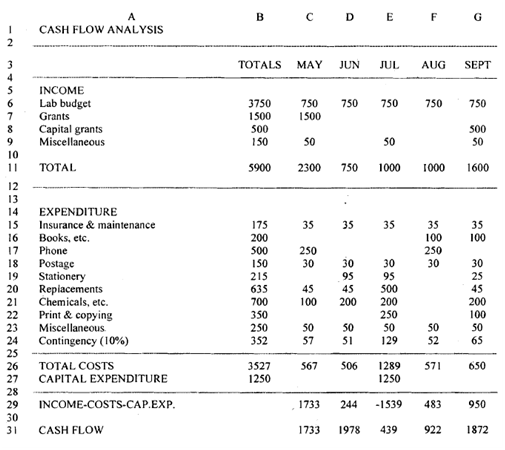
You should be able to see the possibilities of such a program. Figure shows an example of a printout from a spreadsheet.
 2304_cash flow anaylissi.png

Figure: Example Printout from Spreadsheet.

You still need to ask yourself the same general questions as we listed for database as follows:


(I) Performance


For example, can the program:

(a) Carry out all arithmetic functions?

(b) Accept full character data and editing?

(c) Allow title lock and windowing?

(d) Allow easy cursor movement?

(e) Allow copying of blocks of cells?

(f) Allow alternative screen displays of formulae/data?

(2) Size

The size of the spreadsheet May be limited by the program itself or the size of the computer's RAM (Random access memory). A useful working size is 50 columns x 250 rows.

(3) Cost

The same criteria apply as for databases.


Related Discussions:- Spreadsheet software

Computer orgnaization, draw a block diagram to show organization of a compu...

draw a block diagram to show organization of a computer system .explain or a units of computer system

CAI, What is CAI? Explain its pitfalls

What is CAI? Explain its pitfalls

Difference between an html and an xhtml page, QUESTION (a) Define four ...

QUESTION (a) Define four special target names use with the TARGET attribute (b) Explain the main difference between an HTML and an XHTML page (c) Give two merits and two

Programmable rom (prom) , PROGRAMMABLE ROM (PROM): The user can program...

PROGRAMMABLE ROM (PROM): The user can program a PROM after purchase.  Each memory bit element in the PROM contains a nichrome or silicon link that acts as a fuse.  The user can

C, A palindrome is a string that reads the same from both the ends. Given a...

A palindrome is a string that reads the same from both the ends. Given a string S convert it to a palindrome by doing character replacement. Your task is to convert S to palindrome

Describe counting instructions, They are used to reduce or enlarge the cont...

They are used to reduce or enlarge the content of the counters. DEC INC DEC INSTRUCTION Idea: To diminish the operator. Syntax: DEC destiny This action subtracts 1 from the destiny

Explain the different types of addressing modes, Question 1 What are the d...

Question 1 What are the different stages of evolution of Computer Architecture? Explain in detail Question 2 What are the components of Instruction Set architecture? Discu

Java programming, what are the phases of oo progarmming or java?

what are the phases of oo progarmming or java?

Write Your Message!

Captcha
Free Assignment Quote

Assured A++ Grade

Get guaranteed satisfaction & time on delivery in every assignment order you paid with us! We ensure premium quality solution document along with free turntin report!

All rights reserved! Copyrights ©2019-2020 ExpertsMind IT Educational Pvt Ltd