Scan-line method, Computer Graphics

Assignment Help:

In contrast to depth-buffer method, here we identify one surface at one time, scan-line method deals along with multiple surfaces. Since it processes each scan-line at one time, all polygons intersected from that scan-line are examined to find out that surfaces are visible. The visibility test includes the comparison of depths of all overlapping surfaces, to find out that one i.e. closer to the view plane. It is declared like a visible surface and the intensity values at the positions beside the scan- line are entered in the refresh-buffer, if it is determined.

Assumptions:

a)      Plane of projection is Z=0 plane.

b)      Orthographic parallel projection.

c)      Direction of projection as: d = (0,0, -1)

d)      Objects made up of polygon faces.                     

 Scan-line algorithm resolves the hidden-surface issue, one scan-line at one time, generally processing scan lines starting the bottom to the top of the display.

 The scan-line algorithm is a one-dimensional version of the Z-Buffer. We need two arrays, intensity [x] and depth [x] to hold values for a particular scan-line.
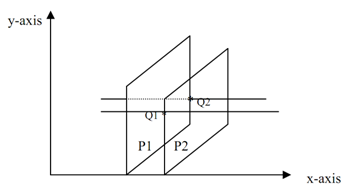
 

                                          1519_Scan-line method.png

This time at Q1and Q2 both polygons are active that called sharing

Compare the z-values at Q1 for both the planes (P1 and P2). Let z1(1),z1(2) be the z-value at Q1 ,consequent to P1and P2 polygon correspondingly.

As the same z2(1), z2(2) be the z-value at Q2, consequent to P1and P2 polygon correspondingly.

Case1: z1(1)< z1(2)                         

             z2(1) < z2(2)  

In this case Q1, Q2 is filled along with the color of P2.

Case2: z1(2) < z1(1)

             z2(2) < z2(1)  

In this case Q1, Q2 is filled along with the color of P2.

Case3: Intersection is taking place.

In this condition we have to return to pixel by pixel and find out which plane is closer. After that choose the color of pixel


Related Discussions:- Scan-line method

Projections - 3d primitive and composite transformations, Projections W...

Projections When all display devices are 2D, you need to devise methods that give a realistic view of a 3D scene onto 2D display. With more and more devices coming in the marke

Languge, what languge do computers speak

what languge do computers speak

Displacement mapping, Implement displacement mapping and bump mapping on a ...

Implement displacement mapping and bump mapping on a sphere. The displacement can be whatever your choice. The bump map can be whatever your choice as well.

X-shear regarding the origin - 2-d and 3-d transformations, X-shear Regardi...

X-shear Regarding the Origin - 2-d and 3-d transformations Suppose an object point P(x,y) be moved to P'(x',y') in the x-direction, via the given scale parameter 'a',that is,

Bezier curve, Q. What is a Bezier Curve? What are blending function? Write ...

Q. What is a Bezier Curve? What are blending function? Write an algorithm for generating Bezier Curves. A curve which has the following properties is called Bezier Curve: 1. A

2-d and 3-d transformations, 2-D and 3-D Transformations Previously, w...

2-D and 3-D Transformations Previously, we have presented approaches for the generation of polygonal regions and lines. We identified that once the objects are produced, the v

Implement the scan line polygon fill algorithm, Implement the Scan line pol...

Implement the Scan line polygon fill algorithm for any arbitrary polygon in C-language and then use your code to fill each of the following type of polygon. i)  Convex polygon

Visible-surface detection, Visible-Surface Detection For the generation...

Visible-Surface Detection For the generation of realistic graphics display you know that hidden surfaces and hidden lines should be identified for removing. For this reason we

Describe transformation, What is Transformation?  Transformation is the...

What is Transformation?  Transformation is the process of introducing changes in the shape size and orientation of the object using scaling rotation reflection shearing & trans

Steps of cohen sutherland line clipping algorithm, Cohen Sutherland line cl...

Cohen Sutherland line clipping algorithm The algorithm uses the following main steps Divide the entire plane into nine disjoint regions using the four window boundaries

Write Your Message!

Captcha
Free Assignment Quote

Assured A++ Grade

Get guaranteed satisfaction & time on delivery in every assignment order you paid with us! We ensure premium quality solution document along with free turntin report!

All rights reserved! Copyrights ©2019-2020 ExpertsMind IT Educational Pvt Ltd