Overview
Create a prototype web site for the "Computer Superstores" company. Your site should use effective navigation features and demonstrate good structure for accessibility.
All the *.htm files (*.shtml) you create must be valid XHTML 1.0 Strict. Partial marks will be given for Transitional XHTML or Transitional HTML.
Folder Structure and File Names
All file names and the folder structure are strictly specified as follows.
Items provided to you by the client
Victoria.jpg image (you need to convert this to a suitable image format)
details.txt
+ Various product images (thumbnail and full size versions)
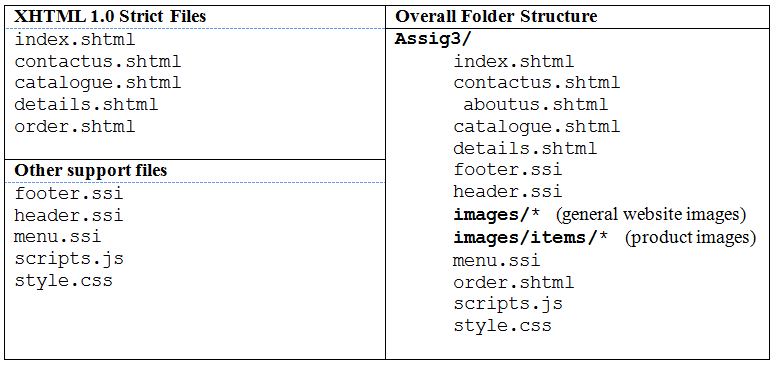
Global Page Structure [#header, #navigation, #footer]
Each of the following sections will be included into all HTML pages using server side include commands. These commands need to be processed by a web server, so your pages will not work unless they are placed on a web server and requested via http with a web browser.
The header section [header.ssi] includes:
- the company logo,
- a major heading - something like "Computer SuperStore"
- a motto like "We drive the Computer nation!" (or whatever - be creative!).
The Navigation section [menu.ssi]
- Menu links to the different pages (positioned as you wish)
A. Home (index.shtml)
B. Our Range (index.shtml#categories)
C. Newsletter (index.shtml#signup)
D. Contact Us (contactus.shtml#details)
E. Store Locations (contactus.shtml#stores)
F. Feedback (contactus.shtml#feedback)
The Footer section [footer.ssi]
- Your "developer" information:
a) your name, student id number, a link to your Swinburne email address (not hotmail or gmail etc).
- You can add other images ("valid XHTML" etc) if you wish.
Specific Page/Section Details
Home page [index.shtml]
Show the required header, navigation and footer sections etc. as required for all ...
Display a welcome message like "Welcome to the web site ..." or similar.
Show the following two content sections:
Our Range [index.shtml#categories]
- Display the 5 categories as boxes with the category title and a representative image from the stock.
- This is a menu to each of the different catalogue pages.
a. We only create one actual catalogue page for this prototype website.
- The 5 categories for cars are: Hard disks, Memory, Monitors, Processors, Peripherals
- Use CSS or JavaScript to create a dynamic "rollover" effect for each of the category boxes.
- Ideally, use div elements and CSS positioning.
- Make all of the categories link to the "calalogue.htm" prototype page.
Newsletter Signup [index.shtml#signup]
- Show the text "Why not sign up for our newsletter and receive the latest computer bargains!" (or similar).
- Show a simple form with an "email address" text field (name="email"),
- Show a checkbox for "Please send me the monthly newsletter" (default as checked) and a "Signup" submit button.
- Using JavaScript, check that the checkbox is "checked" and that the email address is valid before allowing submission.
- Check for a blank or incorrect input field value
- Test for the presence of a "." plus a simple "@" test is okay
- Show an alert box with a message if there is a problem.
- Return true if the value is okay or false if the value is not okay.
- Set the method to GET and the action to https://mercury.it.swin.edu.au/wd000000/signup.php
- Repeat: Use JavaScript to stop the form being sent if the required fields are not valid.
Contact Details [contactus.shtml#details]
- Show the business contact details (see below):
a) A "[email protected]" email address (you can make up any domain name),
b) A toll free telephone number: 1 800 699 669 (make up your own number if you want) that is directed to the appropriate store.
- Show a message and a link to encourage visitors to check out the "product range" or to "send comments" using the online feedback form [contactus.shtml#feedback]
Feedback Form [contactus.shtml#feedback]
a) Show a "feedback form" with the following fields for visitors:
b) First Name, Surname, Phone Number, Email, Subject, Message, Send button.
c) Set the form action to https://mercury.it.swin.edu.au/wd000000/feedback.php
d) Set the form method to POST
e) Use JavaScript to ensure that all the fields are filled in and that the email is valid.
f) Reuse your email validation from the simple signup form.
g) Use JavaScript to ensure the name contains only letters from [a-zA-Z]
Ensure only [a-z,A-Z] characters as in the First Name and Last Name Textbox
Ensure only [0-9] numbers are in the Phone Textbox
Catalogue [catalog.shtml]
This is a single "prototype" catalogue page that contains a table (or tables) of all the product items from one of the categories on offer.
a) For each Computer Peripheral show the thumbnail image and basic details: Peripheral Name and cost.
b) The file details.txt has all the details available. The details are separated by commas.
c) Hint: It may be worth "importing" and then "exporting" the text file with Excel, but make sure you clean up the resulting HTML!
d) There are many products available, but you only need to show the products for your chosen category.
e) If the visitor clicks on an image we would want to show them more details,
f) This is just a prototype site and we don't have all the images and details yet.
g) Make all of the items (the text and/or images) as link to the "details.shtml" prototype page. i.e. no matter which category the user selects the same products will show.
h) You can use a table to present the catalogue data (+CSS), but you must use (heading) elements for heading cells, and provide a suitable caption and summary for the table
Product Details [details.shtml]
For the one category that you have chosen to show the "full" details of, for each item show the:
a) item name
b) item type
c) item price
d) specification
e) stock status ie. "In stock: Yes", (make this up)
f) large image of the item.
g) Offer a link to the order.shtml page as "Buy this item now!" (or similar)
h) This page does not need to show the normal full menu if you wish
i) You can use a table to present the details if you wish (+CSS),
j) Remember to use the most suitable structural elements for the information.
k) Order Form [order.shtml]
Remember, we are not creating a fully functioning web application, but our prototype site can still give an idea of what to expect.
a) Display the item details of the item you presented in the details.shtml page
b) Item name, small picture, colour etc. This is so the user still knows what they are buying!
c) We need the following additional information to be collected from the customer:
d) The quantity of items being ordered.
e) Use the quantity to display an "order total" (calculate the total using JavaScript).
f) Customer Details: Name (First Name and Surname), Address, Suburb, State, Postcode.
g) Payment Details: Card Type, Card Number, Expiry Date,
h) Show an "Order" submit button.
i) Use JavaScript to validate the form information
j) Do not allow the form to be sent if the values are not complete.
k) Send the form data (action), using the POST method
JavaScript Code [scripts.js]
a) Place all the functions you create and use in the common "scripts.js" file.
b) Note: Only use scripts embedded in your HTML files to call the functions you have stored in the external file.
Using Images:
Some images are provided on the subject Blackboard site for you to use. However, you can go to Google Images and use them as long as you provide a reference to the source of your photos.
Make sure the images you use are saved as a suitable format for the web (jpeg, gif or png) and are resized to a suitable size (height and width) for your specific use.
There are specific images for the Computer Store Components and a map of Victoria, also provided on the subject website, which you will need to integrate into your website. You are allowed to alter and reprocess the images to suit your web site design if you want. (For example, change the background colour if you want.)
Coding Standards:
- Use the Swinburne HTML Coding Standards. The standards can be downloaded from the subject Blackboard site. Importantly, all HTML pages must have:
a) an appropriate title in the head element.
b) the required HTML header comments,
c) meta elements for the author, the page description and keywords about the page content.
a) Use CSS and logical markup.
b) Do not use physical markup elements or physical attributes.
c) Use only the external file style.css for your CSS information.
d) Do not use inline or embedded style.
- HTML Validation: All your *.shtml files (after being processed by the web server to include the .ssi files) must be Valid XHTML 1.0 Strict. Partial marks will be given for Transitional XHTML or Transitional HTML.
a) Update the comments of your HTML pages with the date your page was last validated.
b) Use the W3C HTML.