Instructions:
Please make sure your solutions are original, in your own words, expressing your own ideas. Any copying from others' home-works, text books or online sources will be penalized.
IMPORTANT: You can use any IDE for creating your programs. Create the programs and save them. Compile and run the programs. Save the screenshot of the successfully run programs and submit the screenshots with the corresponding source code files on the Blackboard. Any exceptions to this should be pre-approved by the Instructor; Late submissions are liable to be penalized, if permitted.
Programs should be well-commented to make their understanding easy. Variable-names should be so chosen that it is easily to visualize what is going on, inside the program.
It is highly recommended that students keep a soft copy of the assignment files with them.
10.1/366 (The Time class) Design a class named Time. The class contains:
1. Data fields hour, minute and second that represent a time.
2. A no-arg constructor that creates a Time object for the current time. (The values of the data fields will represent the current time.)
3. A constructor that constructs a Time object with a specified elapsed time since midnight, Jan 1, 1970, in milliseconds. (The values of the data fields win represent this time.)
4. A constructor that constructs a Time object with the specified hour, minute, and second.
5. Three get methods for the data fields hour, minute, and second, respectively.
6. A method named setTime(long el apseTime) that sets a new time for the object using the elapsed time.
Draw the UML diagram for the class. Implement the class. Write a test program that creates two Time objects (using new Time() and new Time(555550000)) and display their hour, minute and second. (Hint: The first two constructors will extract hour, minute, and second from the elapsed time. For example, if the elapsed time is 555550 seconds, the hour is 10, the minute is 19, and the second is 9. For the no-arg constructor, the current time can be obtained using System .currentTimeMills(), as shown in Listing 2.6, ShowCurrentTime.java.)
(Geometry: The Circ1e2D class) Define the Circle2D class that contains:
1. Two double data fields named x and y that specify the center of the circle with get methods.
2. A data field radius with a get method.
3. A no-arg constructor that creates a default circle with (0, 0) for (x, y) and 1 for radius.
4. A constructor that creates a circle with the specified x, y, and radius.
5. A method getArea() that returns the area of the circle.
6. A method getPerimeter() that returns the perimeter of the circle.
7. A method contains (double x, double y) that returns true if the specified point (x, y) is inside this circle.
8. A method contains (Circle2D circle) that returns true if the specified circle is inside this circle.
9. A method overlaps(Circle2D circle) that returns true if the specified circle overlaps with this circle.
Draw the UML diagram for the class. Implement the class. Write a test program that creates a Circle2D object c1 (new Circle2D(2 , 2, 5. 5)), displays its area and perimeter, and displays the result of c1.contai ns (3 , 3), c1.contains(new Circle20(4 , 5, 10 . 5)), and c1.overlaps(new Circle2D(3, 5, 2 .3)).
11.2 (The Person, Student, Employee, Faculty, and Staff classes) Design a class named Person and its two subclasses named Student and Employee. Make Faculty and Staff subclasses of Employee. A person has a name, address, phone number and email address. A student has a class status (freshman, sophomore, junior, or senior). Define the status as a constant. An employee has an office, salary, and pay-grade. A faculty member has office hours and a rank. A staff member has a title. Override the toString method in each class to display the class name and the person's name.
Draw the UML diagram for the classes and implement them. Write a test program that creates a Person, Student, Employee, Faculty and Staff, and invokes their toString( ) methods.
11.3 (Subclasses of Account) In programming Exercise 8.7 (given in the last assignment), the Account class was defined to model a bank account. An account has the properties account number, balance, annual interest rate, and date created, and methods to deposit and withdraw funds. Create two subclasses for checking and saving accounts. A checking account has an overdraft limit, but a savings account cannot be overdrawn.
Draw the UML diagram for the classes and then implement them. Write a test program that creates objects of Account, SavingsAccount, and CheckingAccount and invokes their toString( ) methods.
Create a frame and set its layout to FlowLayout.
Create two panels and add them to frame.
Each panel contains three buttons. The panel uses Flowlayout.

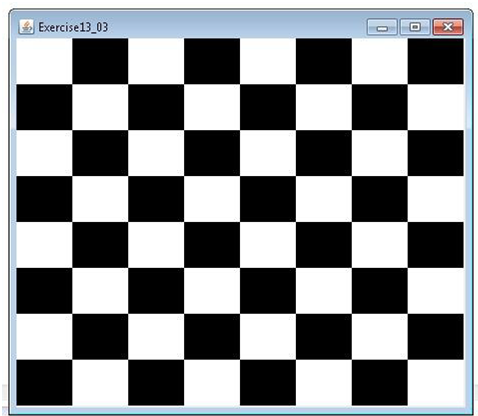
Write a program that draws a checkerboard on a JPanel using the drawing methods in the Graphics class, as shown in the figure. Use the drawRect method to draw each cell in the checkerboard.
PS: Be sure to follow the instructions related to Input/Output, coding conventions, directions on comments, naming conventions, indentation, spacing, block styles and what to turn in - as specified after assignment 1 while writing your programs.