Prepare the network of spanning tree protocol -ccna, Computer Networking

Assignment Help:

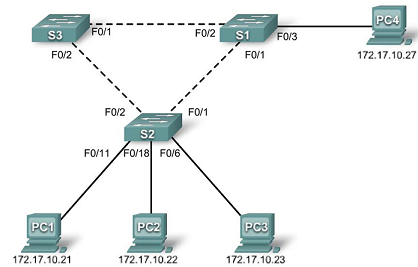
626_CCNA.png

Prepare the Network 

Step 1: Disable all ports by using the shutdown command.

Ensure that the initial switch port states are inactive with the shutdown command. Use the interface-

range command to simplify this task.

S1(config)#interface range fa0/1-24

S1(config-if-range)#shutdown

S1(config-if-range)#interface range gi0/1-2

S1(config-if-range)#shutdown

S2(config)#interface range fa0/1-24

S2(config-if-range)#shutdown

S2(config-if-range)#interface range gi0/1-2

S2(config-if-range)#shutdown

S3(config)#interface range fa0/1-24

S3(config-if-range)#shutdown

S3(config-if-range)#interface range gi0/1-2

S3(config-if-range)#shutdown


Step 2: Re-enable the user ports on S1 and S2 in access mode.

Refer to the topology diagram to determine which switch ports on S2 are activated for end-user device

access. These three ports will be configured for access mode and enabled with the no shutdown

command.

S1(config)#interface fa0/3

S1(config-if)#switchport mode access

S1(config-if)#no shutdown  

S2(config)#interface range fa0/6, fa0/11, fa0/18

S2(config-if-range)#switchport mode access

S2(config-if-range)#no shutdown  


Related Discussions:- Prepare the network of spanning tree protocol -ccna

Distinguish cisc and risc, Question 1 Distinguish CISC and RISC Question ...

Question 1 Distinguish CISC and RISC Question 2 Write a short note on Asynchronous Transfer Mode of transmission Question 3 Explain various client/server applications using Ja

Create and simulate a network - netml system, Create and simulate a network...

Create and simulate a network similar to the one shown here, using the NetML system. The network is a little more complex, as depicted at the right. There is an extra node

System deadlock in shared programme structures, System Deadlock A dead...

System Deadlock A deadlock refers to the situation when simultaneous processes are holding resources and preventing each other from completing their implementation. The fol

Explain typical network topologies, Question: a) Explain briefly three ...

Question: a) Explain briefly three typical network topologies giving one advantage and one disadvantage of each topology. Explain the three topologies with appropriate diagrams

virtual private network - virtual private network vpns, Virtual private ne...

Virtual private network The virtual  private  networks takes the  user data  encrypts them and sends them  to their  destination over  the internet. the sender  and the receiv

What are the various security measures, What are the various security meas...

What are the various security measures A matter of prime concern to companies is the overheads in the form of huge investment on extra hardware and software. It is quite possi

Define osi , OSI= Open System Interconnection.

OSI= Open System Interconnection.

Implication of increasing and decreasing subnet bits, What is the suggestio...

What is the suggestion of increasing and decreasing subnet Bits?

Describe about domain name space, Q. Describe about Domain Name Space ? ...

Q. Describe about Domain Name Space ? - Structure for systematize the name space in which names are defined in an inverted-tree structure with the root at the top - Every l

Explain the changes to the ip stack, After powering up his PC, Bob notices ...

After powering up his PC, Bob notices the PC was not able to properly connect to network devices. He obtained the following information from his workstation: C:\>ipconfig Win

Write Your Message!

Captcha
Free Assignment Quote

Assured A++ Grade

Get guaranteed satisfaction & time on delivery in every assignment order you paid with us! We ensure premium quality solution document along with free turntin report!

All rights reserved! Copyrights ©2019-2020 ExpertsMind IT Educational Pvt Ltd