How do we connect to SQL SERVER, which namespace do we use ?
The code is shown below, after that i will give the explanation for it. For this sample we will also require a SQL Table setup which I have imported using the DTS wizard.
Private Sub LoadData()
' note :- with and end with makes your code more readable
Dim strConnectionString As String
Dim objConnection As New SqlConnection
Dim objCommand As New SqlCommand Dim objReader As SqlDataReader Try
file.
' this gets the connectionstring from the app.config
' note if this gives error see where the MDB file is
stored in your pc and point to that strConnectionString =
AppSettings.Item("ConnectionString")
' take the connectiostring and initialize the connection
object
Employees")
With objConnection
.ConnectionString = strConnectionString
.Open() End With
objCommand = New SqlCommand("Select FirstName from
With objCommand
.Connection = objConnection objReader = .ExecuteReader()
End With
' looping through the reader to fill the list box
Do While objReader.Read()
lstData.Items.Add(objReader.Item("FirstName")) Loop
 Catch ex As Exception
Throw ex
Finally objConnection.Close()
End Try
ID=sa;Database=Employees"/>
For setting up the sample of the SQL table we can use the DTS import wizard to import the table. See the figure below which is using a data source as Microsoft Access.While importing the database author had provide the database name as "Employees".
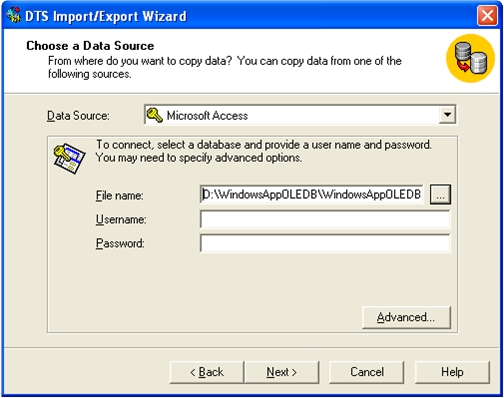
Figure:- Loading "Nwind.mdb" in SQL SERVER for the sample
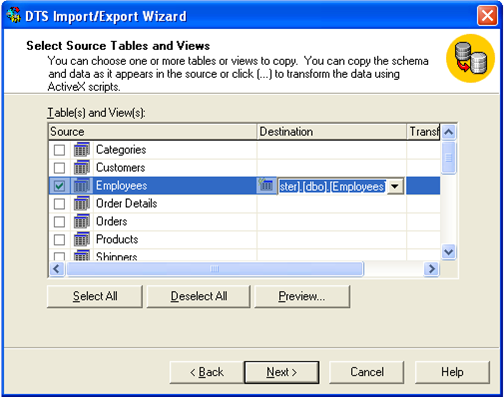
Figure :- Load only the Employee table
To make it easy we will only import the employee table as that is the only thing required in our sample code.
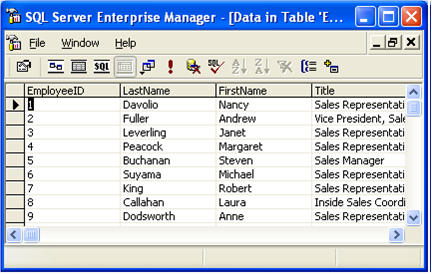
Figure :- View of loaded Employee table
Now from the interview point of view definitely you are not going to say the whole source code. The Interviewer expects only the wide answer of what are the steps required to connect to SQL SERVER. For fundamental the whole source code is explained below. In brief you have to describe the "LoadData" method in a broaderway. The steps to connect to SQL SERVER are shown below:-
1)The very First step is to import the namespace "System.Data.SqlClient".
2)The second step is to Create a connection object as shown in "LoadData" method.
With objConnection
.ConnectionString = strConnectionString
.Open() End With
3)The third step is to Create the command object with the SQL. Also assign the created connection object to the command object & execute the reader.
objCommand = New SqlCommand("Select FirstName from Employees") With objCommand
.Connection = objConnection objReader = .ExecuteReader()
End With
4)Finally loop through the reader & fill the list box. If old VB programmers are expecting the movenext command it is replaced by Read() which returns true if there is any data to be read. If the .Read() return's false which means that it is the end of datareader and there is no more data to be read.
Do While objReader.Read() lstData.Items.Add(objReader.Item("FirstName")) Loop
5) Do not neglect to close the connection object.