Gui-based event-driven application program, JAVA Programming

Assignment Help:

GUI-Based Application

Objectives:  

(1)   Learning how to write a GUI-based application in Java.

(2) Learning how to write an event driven application program in Java. 

(3) Develop further understanding of object-oriented programming.  

Description:  In this programming assignment, you will write a GUI-based event-driven application program.   In  this GUI-based application you will implement a program that determines heart-rate based aerobic and anaerobic  training zones for endurance athletes.  Racing cyclists, for example, will maintain heart rates just below their anaerobic threshold  for hours at a time.  This capability comes from training in various zones which are based upon an individual's maximum heart rate (MHR).  Most high-level training regimes classify five different training zones.  These zones are classified as follows:

    Zone 1 = 50% - 60% of MHR 

    Zone 2 = 60% - 70% of MHR

    Zone 3 = 70% - 80% of MHR

     Zone 4 = 80% - 90% of MHR

    Zone 5 = 90% - 100% of MHR  

While an exact value for MHR requires controlled laboratory testing, an individual's theoretical MHR can be fairly accurately approximated according to the following formula:  

  MHR = 210 - (half_your_age) - (5% x weight_in_pounds) + SF

 where SF = 0 if female and 4 if male  

Your GUI-based  application should ask the user to input the three necessary pieces of information (age, weight in pounds, sex) and produce as output the recommended heart rates for  each of the five training zones as well as the calculated theoretical maximum heart rate for the user.  

For this program your GUI should look exactly like the one shown below:
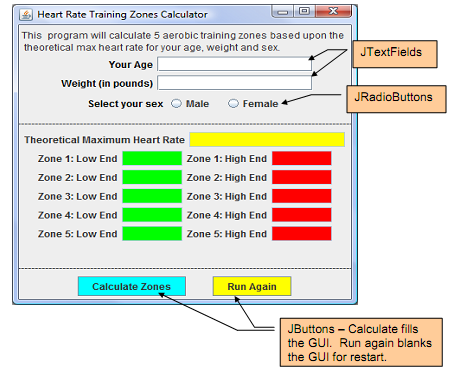
1230_GUI-based application in Java.png

Restrictions:

Your .java file shall begin with header comments containing the following information: 

/*  Name: 

     COP 3330 - Summer 2011

     Assignment title: Program  #4: GUI-based Even-driven Application

     Date:   July 17, 2011

*/  

Your GUI window must be properly sized by your code to receive full-credit on the  program.  Do not resize/reshape  your GUI-window by dragging it with the mouse. You must use a FlowLayout manager for this assignment.  

The UML class diagram for the HeartRateZones class looks like the one shown below.  Note that this diagram is incomplete...you will add more class variables, instance variables, and methods  that are not shown here.


Related Discussions:- Gui-based event-driven application program

Arrays, 1. Arrays and working with arrays

1. Arrays and working with arrays

Describe importing classes in java, Describe Importing Classes in java? ...

Describe Importing Classes in java? Fully qualified names such as java.net.URL are not the most convenient thing to have to type. You can use the shorter class names like URL w

Describe the ? operator in java langauge, Describe The ? operator in Java l...

Describe The ? operator in Java langauge? The conditional operator just works for assigning a value to a variable, using a value within a method invocation, or in a few other w

Want an experienced ios and android expert, Want an Experienced iOS and And...

Want an Experienced iOS and Android expert Project Description: I am seeking a super talented team or Individual for a Real Estate app. The project wants to get done in a ver

Area of the curve, program t ofind area under the curve y=f(x) between x=a ...

program t ofind area under the curve y=f(x) between x=a and x=b integrate y=f(x) between the limits a and b

Java developer with spring framework needed, Java developer with spring fra...

Java developer with spring framework needed I need an experienced person in java with spring frame work. Desired Skills are Java

Describe member variables vs. local variables, Describe Member Variables vs...

Describe Member Variables vs. Local Variables ? class Car { String licensePlate = ""; // member variable double speed; = 0.0; // member variable double maxSp

Create an interface with a method concatenation, a)  Using Java, create an ...

a)  Using Java, create an interface with a method called concatenation which will be implemented in the class patient in part b. b)  Using Java, write the class patient with the

Write Your Message!

Captcha
Free Assignment Quote

Assured A++ Grade

Get guaranteed satisfaction & time on delivery in every assignment order you paid with us! We ensure premium quality solution document along with free turntin report!

All rights reserved! Copyrights ©2019-2020 ExpertsMind IT Educational Pvt Ltd