Frame tag, PHP Web Programming

Assignment Help:

As you can supposition, this tag is utilized for placing an HTML file in the frame created. We have to now tell the browser what to put in each of frame.

Check out the code for all the FRAM ES associated examples. Do we need a <BODY> tag?

<HTML>

<HEAD>

<TITLE>My Frame Page- Master Page</TITLE>

</HEAD>

<FRAMESET COLS="50%,50%">

<FRAME SRC="One.htm">

<FRAME SRC="Two.htm">

</FRAMESET>

</HTML>

You also have to note here that <FRAMESET> is a container tag, and <FRAME> is not. A container tag contain an opening <TAG> and a closing </TAG>.  Thus notice that the <FRAME> tag has no delimiter to terminate it.  Everything is in its attributes.

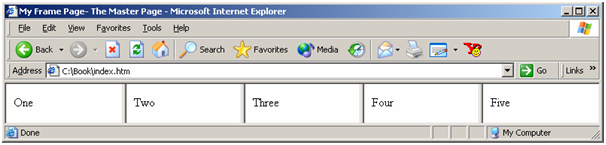
The <FRAMESET> tag does all the splitting of the page into distinct windows. It also has attributes which indicate how to divide them up. Can we split the page into more than two pieces? Yes, just ensure that you indicate a page to occupy each of the section or the browser will get confused. Look at the code & the output in Figure

<HTML>

<HEAD>

<TITLE>My Frame Page- The Master Page</TITLE>

</HEAD>

<FRAMESET COLS="20%, 20%,20%,20%,20%">

<FRAME SRC="One.htm">

<FRAME SRC="Two.htm">

<FRAME SRC="Three.htm">

<FRAME SRC="Four.htm">

<FRAME SRC="Five.htm">

</FRAMESET>

</HTML>
817_Frame Tag.png

Figure: A Web Page with Five Frames

It is just a small step to making the frames all of distinct sizes. Just ensure your arithmetic is correct and that the percentages you indicate add up to 100 or the browser will come up along with its own interpretation.

If we spilt the page into ROWS rather than COLS we get a distinct layout.

<HTML>

<HEAD>

<TITLE>My Frame Page- Master Page</TITLE>

</HEAD>

<FRAMESET ROWS="10%,20%,30%,15%,25%">

<FRAME SRC="One.htm">

<FRAME SRC="Two.htm">

<FRAME SRC="Three.htm">

<FRAME SRC="Four.htm">

<FRAME SRC="Five.htm">

</FRAMESET>

</HTML>

Now Let us take another example with only 2 frames. We can specify 50 to indicate that number of pixels instead of 50 percent. We can also use * instead of a number. The * means whatever is left over.      

<HTML>

<HEAD>

<TITLE>My Frame Page- The Master Page</TITLE>

</HEAD>

<FRAMESET COLS="50,*">

<FRAME SRC="One.htm">

<FRAME SRC="Two.htm">

</FRAMESET>

</HTML>


Related Discussions:- Frame tag

We need a reasonably simple documentation website, We need a reasonably sim...

We need a reasonably simple documentation website The website will be hosted on a Microsoft SharePoint for in-company use only. The determination of this website is to create

Web design required for graphic company, Web Design A digital media as w...

Web Design A digital media as well as graphic company is seeking an individual with web experience to work with the company to update as well as manage its four web sites. De

We need help to create web for marketing, We need help to create web for Ma...

We need help to create web for Marketing Hi, we are a web agency working on the entire range of marketing requirements - be it websites, mobile applications, Facebook applicatio

Use of meta tag, In this unit we have learnt how to create simple HTML page...

In this unit we have learnt how to create simple HTML pages. The contents of the page have to be written within the BODY tag. The HEAD tag includes the title of the document. An im

Test links in dreamweaver, In Dreamweaver you cannot test your links; you s...

In Dreamweaver you cannot test your links; you should check your links in a browser to make sure the pages operate as you expect. 1. Press F12 to preview the page in a brow

Websites to create real time user conversations, Prototype-WebRTC widget fo...

Prototype-WebRTC widget for websites to create real time user conversations The project comprise a server side built using node.js and a client side widget using webRTC. Users u

Make lightbox (js) form that captures client information, Make lightbox (js...

Make lightbox (js) form that captures client information in Zoho We have three websites that have lightbox popups on them. Subsequently 120 seconds on the website the lightbox c

View the site files, To see a high-level representation of the structure of...

To see a high-level representation of the structure of a local site, you use Dreamweaver's Site Map view. You can also employ the site map to insert new files to the site, to add,

App developer needed, App Developer Needed a) Excellent coding skills fo...

App Developer Needed a) Excellent coding skills for developing an app that can work for IPhone and/ or Android. b) Creative and team player. c) Hardworking and passionate.

Need help in html5 mobile app with php & mysql admin site, HTML5 mobile app...

HTML5 mobile app with php & mysql admin site We would like a HTML5 app which users are capable to record locations and upload photo's, other users can rate it, geolocation, Goog

Write Your Message!

Captcha
Free Assignment Quote

Assured A++ Grade

Get guaranteed satisfaction & time on delivery in every assignment order you paid with us! We ensure premium quality solution document along with free turntin report!

All rights reserved! Copyrights ©2019-2020 ExpertsMind IT Educational Pvt Ltd