Form and input tag, PHP Web Programming

Assignment Help:

A good way to learn regarding forms is to employ your notepad editor & create a new HTML document. In some folder, save it as form1.htm. You might wish to create a separate folder for learning this tag. Begin your browser. Use it to open form1.html and run Notepad & the browser side by side. This way you can build your pages and almost instantaneously view the results of your work. Bear in mind to hit the refresh button on your browser.

Next we should tell the browser where to send the data we collect and how to send it. There are two methods via you can do this.

1) You can send the data to a cgi script or employ some other mechanism for processing, or

2) You can have the data emailed to you. The first choice is outside the scope of discussion of this unit.

The second, or mailto, form must have the following attributes in the <FORM> tag.

Note: Microsoft's Internet Explorer 3.0 does not support mailto forms. While you attempt to submit the information, the new mail message window pops up. This does support forms sent to a CGI script.

<HTML>

<HEAD>

<TITLE> Welcome </TITLE>

</HEAD>

<BODY>

<FORM METHOD=POST ACTION="mailto:xy@expertsmind" ENCTYPE="application/y-www-form-urlencoded">

</FORM>

</BODY>

</HTML>

The line containing the mailto keyword is extremely important. The only thing you ought to do is indicate your email address after mailto: The rest have to be written exactly as illustrated. The words METHOD, FORM, POST and ACTION do not need to be capitalized but there should be a space among every two attributes, between METHOD & FORM, between ACTION and POST, and among the e- mail address and ENCTYPE.

Some mail programs are able of converting the data without needing a separate program. You may wish to try this method first. Just delete the instruction

ENCTYPE="application/y-www-form-urlencoded" and in its place use

ENCTYPE="text/plain".

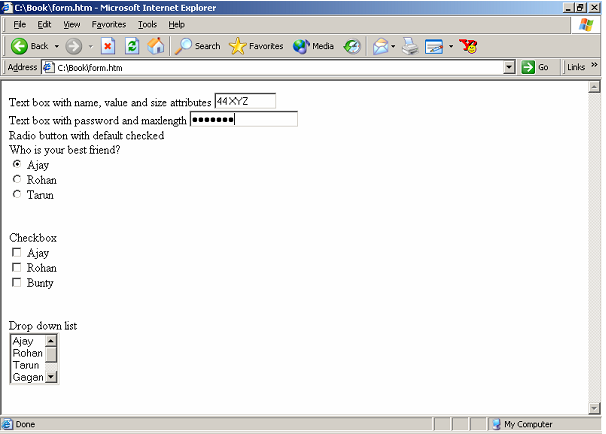
The following instance illustrates a general form that includes some of the commonly used controls.

<HTML>

<HEAD>

<TITLE> Welcome </TITLE>

</HEAD>

<BODY>

<FORM METHOD=POST>

Text box having name, value and size attributes

<INPUT TYPE=TEXT NAME="ADDRESS" VALUE="44 XYZ" SIZE=10>

<BR>Text box having password and maxlength

<INPUT TYPE=PASSWORD MAXLENGTH=10>

<BR>Radio button having default checked<BR> Who is your best friend?<BR>

<INPUT TYPE=RADIO NAME="BEST FRIEND" VALUE="Ajay" CHECKED> Ajay <BR>

<INPUT TYPE=RADIO NAME="BEST FRIEND" VALUE="Rohan"> Rohan

<BR>

<INPUT TYPE=RADIO NAME="BEST FRIEND" VALUE="Tarun"> Tarun<P>

<BR>Checkbox<BR>

<INPUT TYPE=CHECKBOX NAME="AJAY" VALUE="YES"> Ajay <BR>

<INPUT TYPE=CHECKBOX NAME="Rohan" VALUE="YES"> Rohan <BR>

<INPUT TYPE=CHECKBOX NAME="BU" VALUE="YES"> Bunty<P>

<BR>Drop down list<BR>

<SELECT NAME="BEST FRIEND" SIZE=4>

<OPTION VALUE="Ajay">Ajay

<OPTION VALUE="Rohan">Rohan

<OPTION VALUE="Tarun">Tarun

<OPTION VALUE="Gagan">Gagan

<OPTION VALUE="Harish">Harish

<OPTION VALUE="Manjit">Manjit

</SELECT>

</FORM>

</HTML>
1346_FORM and INPUT Tag.png

Figure: A Web Page with a Form


Related Discussions:- Form and input tag

Set table properties, Now you will employ the table Property inspector to r...

Now you will employ the table Property inspector to remove the extra space within the navigation buttons table & to insert a background color in the table. 1. In the Property in

Internet connection, Before we can employ the Internet, we need to gain acc...

Before we can employ the Internet, we need to gain access to it.  This access is attained in one of many ways, which will be discussed in this section. Above all, the Internet is c

Date, Returns the current date comprising date, month, & year. Note that th...

Returns the current date comprising date, month, & year. Note that the getMonth method returns 0 in December, 1 in January etc. thus add 1 to the getMonth method to display the cor

Want a web developer who can create an interactive web, Web Developer I ...

Web Developer I want a web developer who can create an interactive web experiment by integrating contests which can tally votes to find a winner. The votes must tally daily, and

I need help to create splash page with paypal, I need help to Create splash...

I need help to Create splash page with paypal and aweber integration Create splash page with PayPal as well as aweber integration which has YouTube video auto playing at top the

Advanced web services developer for phpcake, Advanced Web Services Develope...

Advanced Web Services Developer for PHPCAKE -> XCODE XCODE, CAKEPHP Job Description- We're looking for a Web Developer. Your responsibilities: a) Review business requir

Want help of seo for existing website, SEO FOR EXISTING WEBSITE We are i...

SEO FOR EXISTING WEBSITE We are in search of an expert who will do the SEO for an existing website. The website is hosted in a third party server not ours. The client wants his

Need help to make checkout page customisation, Checkout Page Customisation ...

Checkout Page Customisation 1) Clone process need to be exact same as the reference checkout site 2) Final product must be responsive to all devices Desired Skills are MyS

I want you to build a small google script, 200-1019 Rapportive API Google D...

200-1019 Rapportive API Google Doc Script I want you to build a small Google script that can be run inside of a Google doc. The script will do the following: 1) Read an em

Label, , an HTML 4.0 element supported through MSIE & Netscape 6, describe ...

, an HTML 4.0 element supported through MSIE & Netscape 6, describe a set of text that is linked with a specific form element. For instance, the code below specifies t

Write Your Message!

Captcha
Free Assignment Quote

Assured A++ Grade

Get guaranteed satisfaction & time on delivery in every assignment order you paid with us! We ensure premium quality solution document along with free turntin report!

All rights reserved! Copyrights ©2019-2020 ExpertsMind IT Educational Pvt Ltd