Develop a windows forms application, Programming Languages

Assignment Help:

Develop a Windows Forms Application by creating a new project named "xxxxxxxx" in a new folder named "xxxxxxxxas3" where xxxxxxxx is your student id. You should delete file(s) with extension ".sdf" and compressed the folder before submission.  

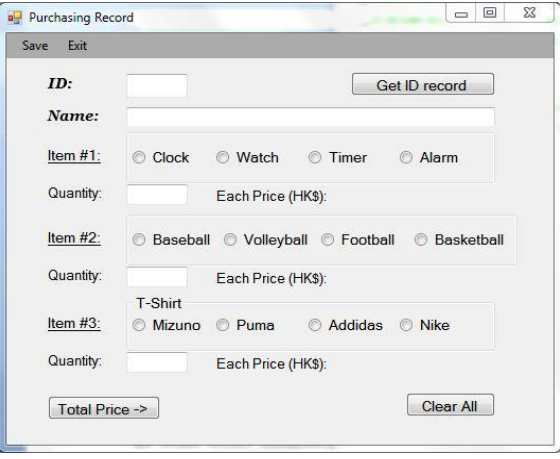
1.  Create a Form as follows:
31_Develop a Windows Forms Application 1.png

2.  Implement the actions:

1453_Develop a Windows Forms Application 2.png

  •  Save (on menu-bar): Save the input information and the selected item(s) to file(s). You may design the file format but the information should be readable (e.g. contains the item names). Before saving, check: 

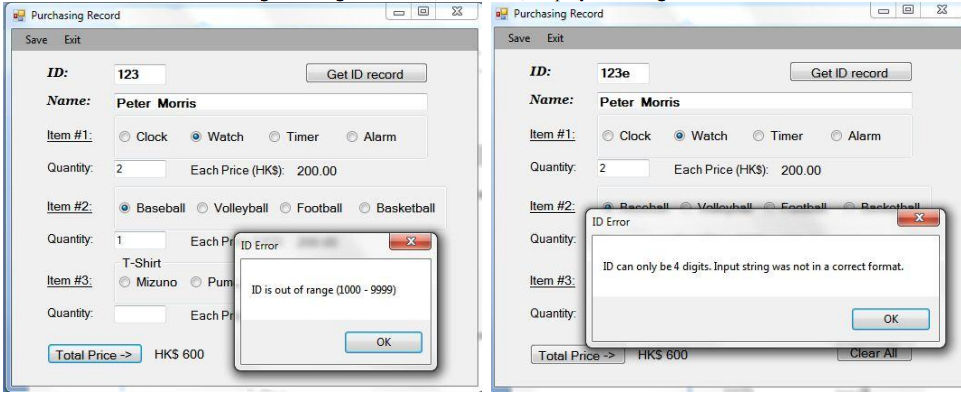
o The ID has four digit starting from 1000, otherwise, display a message box:

o Once the OK button clicked, the text of ID should be cleared

o If the quantity of a item is not entered or not greater than zero, this item will be ignored  (you may put "none" as the item and quantity to be zero in the file)

o You must use native C++ unmanaged code to manipulate the file

o After successfully save the file, display a message box with the input Name:

o Once the OK button clicked, all entered information should be cleared

  • Exit (on menu-bar): Close the form/window
  • "Get ID record" button:  Retrieve the purchasing information of the ID entered, like:(hint:  radioButton1->Checked = true; //this changes the radio-button 1 being selected)
  • Space in the input text for Name field should be allowed
  • Only ONE radio-button can be selected for each row of item. Once a radio-button is selected, the corresponding price shouldbe shown  after  "Each Price (HK$)"  label  and the  price after  "Total Price  ->"  button  should be  hidden  (e.g.  in the above diagram, HK$ 1400 will be disappeared when radio-button "Clock" is clicked). The each price is as follows:

o  Clock: 180.00,  Watch: 200.00,  Timer: 220.00,  Alarm: 250.00

o  Baseball: 200.00,  Volleyball: 250.00,  Football: 300.00,  Basketball: 350.00

o  Mizuno: 150.00,  Puma: 180.00, Addidas: 200.00, Nike: 250.00

  • "Total Price ->" button: Calculate the sum of all item(s) price and display the sum. If the number for the Quantity field is not greater than zero or not entered, just neglect the item.
  • "Clear All" button: Clear all entered information (display the form as Figure 1)

Related Discussions:- Develop a windows forms application

Decision table, If it is a weekday and it is not a holiday, then you go to ...

If it is a weekday and it is not a holiday, then you go to work. However, if it is a weekday and it is a holiday, then what you do depends on the weather. If it is raining, you pla

Explain the while statement - computer programming, Explain the While State...

Explain the While Statement - Computer Programming? A 'while statement' is an entry controlled loop statement. When the expression is calculated and the condition is not satisf

Find the dual - duality theory and complementary slackness, Linear Programm...

Linear Programming Consider the following optimization problem: min x s.t. x ≥ max{a1, a2, . . . , an} Rewrite this problem as a Linear Programming Problem. What is the

Silver light uses wpf to provide included web handles, Silver light uses WP...

Silver light uses WPF to provide included web handles Microsoft Technologies Silverlight uses WPF to provide included web handles similar to Adobe Display, but with more focus on a

To print total no.of ordinary files, Normal 0 false false f...

Normal 0 false false false EN-US X-NONE X-NONE MicrosoftInternetExplorer4

Write an application to assign seats for each flight, ( Airline Reservation...

( Airline Reservations System ) A small airline has just purchased a computer for its new automated reservations system. You have been asked to develop the new system. You are to w

Program to finds central individuals in arbitrary networks, Identifying the...

Identifying the Central Individual in a Social Network 1. Introduction You have just been hired by a social networking company! The division you are working in is particul

Difference between CMP and SUB, 1. CMP and SUB CMP is used for comparing 2 ...

1. CMP and SUB CMP is used for comparing 2 registers by subtraction them from one another, but answer is not saved, whereas SUB subtracts 2 registers and saves the answer.

Namererror, how do u define a letter in python "NameError: name ''r'' is n...

how do u define a letter in python "NameError: name ''r'' is not defined"

E-R diagram, can you give me online education system E-R daigram..

can you give me online education system E-R daigram..

Write Your Message!

Captcha
Free Assignment Quote

Assured A++ Grade

Get guaranteed satisfaction & time on delivery in every assignment order you paid with us! We ensure premium quality solution document along with free turntin report!

All rights reserved! Copyrights ©2019-2020 ExpertsMind IT Educational Pvt Ltd