Data types - visual basic, Visual Basic Programming

Assignment Help:

DATA TYPES 

The different primitive data types are Boolean, Char, Byte, Date, Decimal, Uinteger, Double, Integer, Long, Sbyte, Short, Single, String, Ulong & Ushort. To declare the variables the DIM statement is used. For illustration to say a variable sum is of integer type, either of the below statements can be used.

Dim sum As Integer

Dim sum%

The common syntax for declaring a variable is Dim followed by the variable followed by As keyword followed by the datatype that is again a keyword. The table gives an idea of the other data types.
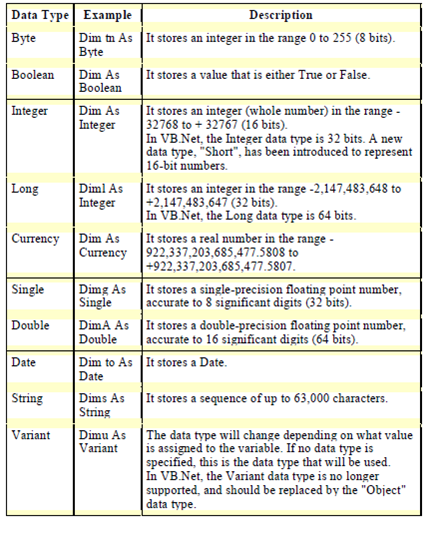
846_data types.png

Table: The various data types in visual basic

Dim is used for declaring the variables in procedures. Every time the procedure is called, the data stored in the variables declared with this keyword are reset. The Static is used to declare the variables in procedures. Every time the procedure is called, the data stored in the static variables are retained.

Public is used to declare the variables within a module. The variable is accessible to all process in the project.

Private is used to declare the variables within a module. The variable is only accessible to process within the project.

ReDim: The keyword ReDim is used to re-dimension an array.


Related Discussions:- Data types - visual basic

Account Balance, The user has to enter a starting balance, the dollar amoun...

The user has to enter a starting balance, the dollar amount of deposits, and the dollar amount of withdrawals. the program then has to calculate the balance

Develop a web page for accepting information regarding stock, Develop a web...

Develop a web page that is used for accepting information regarding stocks. Make sure the form carry out the possible validations. The simple instance code below merely illustrates

Dialog based application, Dialog Based Application: (A) Dialog Based ...

Dialog Based Application: (A) Dialog Based Application to demonstrate Animate Control: 1. Build a dialog based application. 2. Design the dialog as shown. 3. Place

Adding handlers with class wizard, Adding Handlers With Class Wizard: ...

Adding Handlers With Class Wizard: Whenever a handler is added, the class wizard places the prototype for the message handler in the header (.H) file. It gives a skeleton hand

Making decisions with select case, The Select Case structure provides an op...

The Select Case structure provides an option to If...Then...Else If for selectively executing one block of statements from amongst multiple blocks of statements. Any Select Case st

Displaying the file without scrolling - document class, Displaying the file...

Displaying the file Without Scrolling: To display a file follow the steps as shown below: 1. Generate a SDI application. 2. Type the coding as shown in the Serialize els

Default values for gdi objects, Default Values for GDI Objects: The de...

Default Values for GDI Objects: The default color for the brush is white, pen is black, and default bitmap is null and the default font is system.

Introduction to gui design and file handling, INTRODUCTION TO GUI DESIGN AN...

INTRODUCTION TO GUI DESIGN AND FILE HANDLING   The aim of the user interface design is to attain the user's goals. When the user's goals are met, the user is satisfied and the

Descriptive variable and procedure names, The body of variable or procedure...

The body of variable or procedure name must use mixed case and complete as essential to define its purpose. Additionally, procedure names must begin with a verb, such as CloseDialo

To calculate rectangle, two sides are given of a sheet e.g 23*36 i want hal...

two sides are given of a sheet e.g 23*36 i want half or 1/2 of this sheet next i want 1/4(one fourth) of this sheet if sheet size is 23*36 next i want 1/8 similary as above

Write Your Message!

Captcha
Free Assignment Quote

Assured A++ Grade

Get guaranteed satisfaction & time on delivery in every assignment order you paid with us! We ensure premium quality solution document along with free turntin report!

All rights reserved! Copyrights ©2019-2020 ExpertsMind IT Educational Pvt Ltd