Built in recursive function in matlab, MATLAB in Mathematics

Assignment Help:

Built in recursive function in MATLAB:

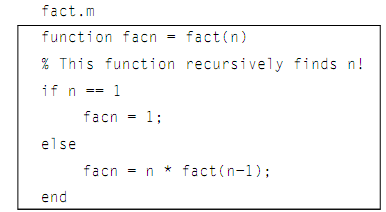
We have seen that the built-in function in MATLAB to compute factorials, termed as the factorial and we know how to implement the iterative definition by using a running product. Now we will rather than write a recursive function known as the fact. The function will receive an integer n, which for ease will suppose is a positive integer, and will compute n! just by using the recursive definition given:
 

1287_Built in recursive function in matlab.png

The function computes one value, by using an if-else statement to select between the base and general cases. When the value passed to the function is 1, the function returns 1 as1! become equal to 1. Or else, the common case applies. According to definition, the factorial of n, that is what this function is computing, is defined as n multiplied by the factorial of (n-1). Therefore, the function assigns   n * fact(n-1) to the output argument.

How does this work? Precisely the way the illustration was sketched for 3!. Let's trace what would take place if the integer 3 is passed to the function:

fact(3) tries to assign 3 * fact(2)

fact(2) tries to assign 2 * fact(1)

fact(1) assigns 1

fact(2) assigns 2

fact(3) assigns 6

Whenever the function is initially called, 3 is not equivalent to 1, therefore the statement

facn = n * fact(n-1);

is executed. This will try to assign the value of 3 * fact(2) to  facn, but this expression cannot be computed yet and hence value cannot be assigned yet as first the value of fact(2) should be found. Therefore, the assignment statement has been interrupted by a recursive call to the fact function. The call to the function fact (2) answers in a try to assign 2 * fact(1), but again this expression cannot so far be computed. Later, the call to the function fact(1) answers in a complete execution of an assignment statement as it just assigns 1. The base case has been reached once, and then the assignment statements which were interrupted can be computed, in the reverse order.


Related Discussions:- Built in recursive function in matlab

Built-in functions for complex numbers, Built-in functions for Complex numb...

Built-in functions for Complex numbers:   We know that in MATLAB both i and j are built-in functions which return √-1 (therefore, they can be thought of as built-in constants).

Empty vectors, Empty Vectors: An empty vector or in another words, a v...

Empty Vectors: An empty vector or in another words, a vector which stores no values, can be generated using the empty square brackets: >> evec = [] evec = [] >> lengt

Counting in a while loop, Counting in a While Loop: Whenever it is not...

Counting in a While Loop: Whenever it is not known ahead of the time how many values will be entered into the script, it is often essential to count the number of values which

Illustration of minimum and maximum value, Illustration of Minimum and Maxi...

Illustration of Minimum and Maximum Value Both of these functions also return the index of the minimum or maximum value; when there is more than one occurrence, it returns the

Strvcat function - concatenation, strvcat function - concatenation: Th...

strvcat function - concatenation: The function strvcat will concatenate it vertically, that means that it will generate a column vector of the strings.   >> strvcat(fir

Rational function, Give the formula for a rational function that has a hole...

Give the formula for a rational function that has a hole at x=7 & vertical asmptote at x=-3/2

Example of minimum and maximum value, Example of Minimum and Maximum Value ...

Example of Minimum and Maximum Value For matrices, the functions min and max operate column wise by the default: >> mat = randint(2,4,[1 20]) mat =    9   10   1

Animation, Animation: In this part we will observe a couple of ways to...

Animation: In this part we will observe a couple of ways to animate a plot. These are visuals, therefore the outcomes can't really be shown here; it is essential to type these

Three-dimensional plots, Three-Dimensional Plots: The MATLAB has many ...

Three-Dimensional Plots: The MATLAB has many functions which will display three-dimensional plots. Most of these functions have similar name as corresponding two-dimensional p

Naive Gauss Reduction, Write a MATLAB function [d1, u1, l1, c1, r1] = Naive...

Write a MATLAB function [d1, u1, l1, c1, r1] = NaiveGaussArrow(d, u, l, c, r) that takes as input the 5 vectors de ned above representing A. This function performs Naive Gauss redu

Write Your Message!

Captcha
Free Assignment Quote

Assured A++ Grade

Get guaranteed satisfaction & time on delivery in every assignment order you paid with us! We ensure premium quality solution document along with free turntin report!

All rights reserved! Copyrights ©2019-2020 ExpertsMind IT Educational Pvt Ltd