Analogue to digital converter, Basic Computer Science

Assignment Help:

Analogue to digital converter:

In an ADC a range of input values must correspond to a unique digital word.  The type of code used depends on the system but here only binary coding will be considered. 

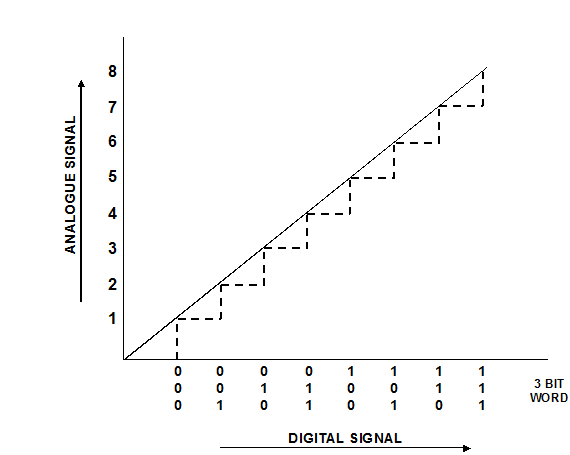
Consider an analogue signal, which can take on any value between 0 and 7 volts.  For any particular voltage there is a corresponding binary code word. For example, using 3-bit words, the voltage analogue value between 4 and 5 volts would be represented in binary code by the word 100, which would change to 101, when the analogue value passed through 5 volts. 

Figure shows digital representation of an analogue input signals.
14_analog to digital converter.png

The levels at which the code changes are known as quantisation levels, and the intervals between them as quantisation intervals.  In the example given in Figure 5.3.3, the quantisation levels are 0, 1, 2, 3, 4, 5, 6 and 7 volts, and the quantisation interval is 1 volt. 

Using a 3-bit word gives 23 = 8 different quantisation levels.  With a 4-bit word we would have 24 = 16 quantisation levels with 0.5 volt quantisation intervals giving improved resolution over the same range of input voltage. 

Thus the more bits available the greater the resolution for a given range of analogue signal input.  It can be seen from the above that an ADC using an n-bit word would have a resolution of one part in 2n.  


Related Discussions:- Analogue to digital converter

Write a note on dect, Question 1 Explain Tropospheric Refraction Qu...

Question 1 Explain Tropospheric Refraction Question 2 Write a note on DECT Question 3 Explain mobile integrated radio systems (MIRS) Question 4 What are ap

Importance of good database design , Importance of Good Database Design Poo...

Importance of Good Database Design Poor database design may have results in unwanted data redundancy Poor database design keeps errors leading to bad decisions and results Practica

System software, System software: System software helps run the  compu...

System software: System software helps run the  computer hardware and system. It is designed to control the operations of a computer and coordinate all external devices like c

Explain how cpu responses to an interrupts, Problem 1. Explain the diff...

Problem 1. Explain the different categories of instructions. Explanation of 4 categories 2. Explain the steps to be followed for the addition of floating point numb

Visual basics, Assume that s is a string variable  that is supposed to con...

Assume that s is a string variable  that is supposed to contain a value to be converted to integer. Write a fragment of code that converts the value to integer variable  and displ

Microprocessor, what is computer? explaine the block diagram of a general p...

what is computer? explaine the block diagram of a general purpose digital computer.

Briefly explain the types of textures, Question 1 Describe the four compon...

Question 1 Describe the four components of light source Question 2 Briefly explain the types of textures Question 3 Explain the standard settings used to adjust th

Basic, WAP TO ACCEPT MARKS OF THREE SUBJECT FOR STUDENT & CALCULATE TOTAL M...

WAP TO ACCEPT MARKS OF THREE SUBJECT FOR STUDENT & CALCULATE TOTAL MARKS AND PERCENTAGE

Describe Priority Scheduling algorithm of operating system?, Priority Sched...

Priority Scheduling • The fundamental idea is straightforward: each process is assigned a priority, and priority is permitted to run. Equal-Priority processes are scheduled in FCF

Write Your Message!

Captcha
Free Assignment Quote

Assured A++ Grade

Get guaranteed satisfaction & time on delivery in every assignment order you paid with us! We ensure premium quality solution document along with free turntin report!

All rights reserved! Copyrights ©2019-2020 ExpertsMind IT Educational Pvt Ltd