Reference no: EM133997652
Question 1. Show examples of addresses used in CNC part-programming, and their meaning
Mention 4 types of G-code commands and explain briefly what each one does
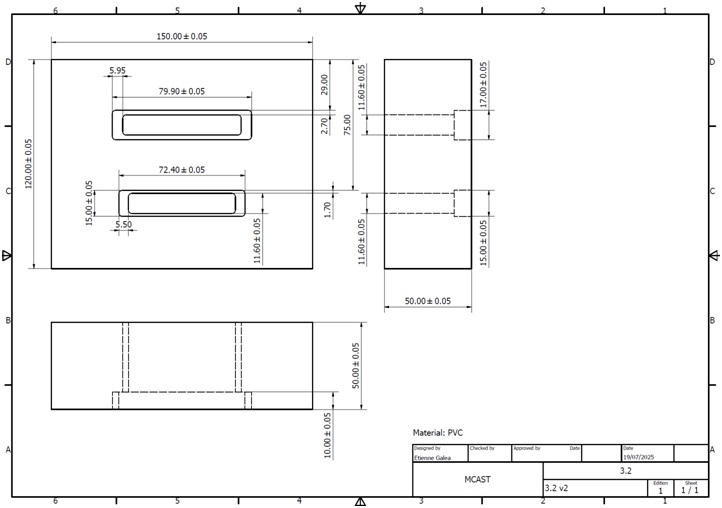
Question 2. Combine different G-codes etc. to machine a component based on the drawing provided
Explain the machining steps required to machine the component below
Write the G-code needed for each machining step. Assume the tool change point = part zero point
Question 3. Manipulate blocks of a CNC part-program via the graphical user interface of the CNC machine control unit
Show the steps required to load a CNC program on the milling machine No AI shortcuts — Only authentic assignment help from real expert tutors.
Show the steps to edit the CNC program
Explain what the change does Editing a CNC program
Question 4. Generate the CNC part-program via the use of a CAM software
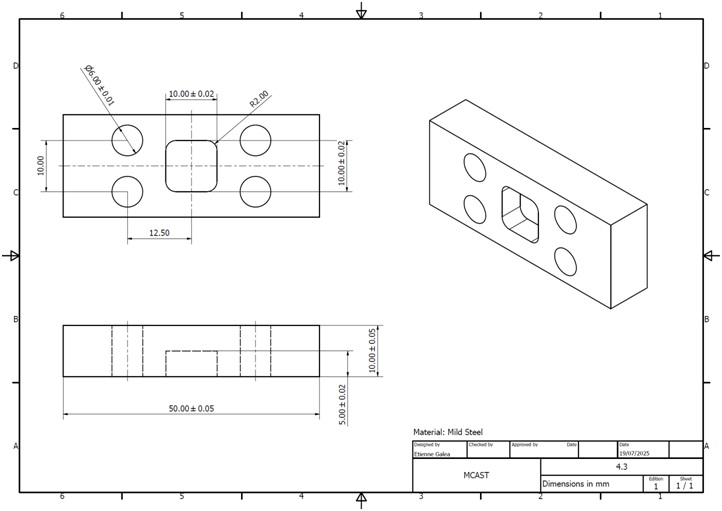
You have been requested to manufacture the assembly jig below:
Draw the jig as a 3D part on Autodesk Inventor ( produce file)
Using Inventor CAM, create the CNC part-program (.nc) file necessary to machine this jig
Use the correct feeds and speeds based on the material
Use the correct cutters/tools based on the feature you are machining
The Cutters/Tools available are:
T01 - Ø6 drill bit
T02 - Ø5 flat endmill
Take screenshots and explain each machining step used to machine this jig
Question 5. Demonstrate understanding on datum setting, the use of tool cutter diameter and length compensation, spindle speeds, feed rates, depth of cut and other parameters
For the same part done on 4.3
Explain what the datum (origin) is, and show how it was set on the part
Show the cutters/tools used and any compensation used (according to cutter dimensions)
Show the spindle speeds and feed rates for each machining step
Explain the importance of choosing the correct depth of cut
Question 6. Indicate ability in using the basic functions of a CAM software package
For the same part done on 4.3
Explain the process of setting the stock size
Explain the process of selecting the cutter/tool.