Database management software, Basic Computer Science

Assignment Help:

Database Management Software: For storage of large amounts of varied data, and rapid retrieval and interpretations of data, the database is the ideal tool. It is most useful for stock control.

Generally it tells a computer to behave just like a card index system. In computing terms the entire card index is called a file, each card is called a record, and each line of information on the card is called a file. Good database software will allow you to store information in exactly the same way as your index card.

A relational database is a type of computer program that allows you to store different information on a similar format for many different items. It also enables you to retrieve that information rapidly in a variety of ways. It can be used for applications like maintaining personnel records or student records, preparation of mailing lists and many other operations of a similar nature.

Figure is an example of how a stock control data file might look for a database program. The concept is similar to a conventional card index system. The master file (your stock control file) contains many 'records'. Each 'record' relates in this case to a different stock item uniquely identified by its stock number. For each record there are several 'fields' or sections of information. In this case, the field descriptions are shown - stock number, description, etc.

The advantage that the computer has over a card index system is space. It can store thousands of records on many master files. That is the equivalent of many large card index systems. Also in a matter of a few seconds, the program could, in the case of the example in Fig. 9.3, list, say, all records for which a re-order was due.

It would do this by comparing the data in the 'requirement' field with the data in the 'current holding' field and list all stock items where the 'current holding' is less than 'requirement'. This program would print the address labels of the supplier for you.
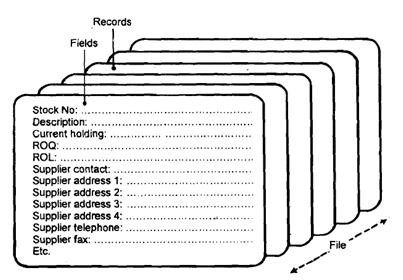
2248_Pictorial representation of a Data File.png


Figure: Pictorial representation of a Data File


Related Discussions:- Database management software

What is evaluating information system investments, 1. What is Evaluating In...

1. What is Evaluating Information System Investments? 2. Is IS evaluation different to evaluation of other investments? 3. What approaches are used to evaluate IS investments

Digital video disks, Digital Video Disks: DVD stands for Digital Video...

Digital Video Disks: DVD stands for Digital Video Disks or Digital Versatile Disks. A DVD stores much more data than a CD-ROM. Its capacities are 4.7GB, 8.5GB, and 20GB etc. T

What are the goals of wap architecture, Question 1 Explain the naming conv...

Question 1 Explain the naming conventions of functions in WML scripts and also explain characteristics of functions in WML Question 2 What is WML input field? Explain WML

Amendments in erp, What is new? ERP, on the other hand begins with a fr...

What is new? ERP, on the other hand begins with a fresh relook at the existing business. In fact it is the result of a happy marriage between Business Process Reengineering (BP

Audio/video applications on network, AUDIO/VIDEO APPLICATIONS ON NETWORK ...

AUDIO/VIDEO APPLICATIONS ON NETWORK Clinical applications of a computer include recording of slit lamp images on a computer. These still images or even videos can be recorde

Microprocessor, what is computer? explaine the block diagram of a general p...

what is computer? explaine the block diagram of a general purpose digital computer.

Explain with diagram the internal components of alu, Problem 1. Explain...

Problem 1. Explain with diagram the internal components of ALU. Diagram Explaining Internal components 2. What is addressing mode? Explain any five addressing mo

Communication networks and local area networks, Communication Networks: ...

Communication Networks: Communication networks are made up of transmission lines, concentrators, switching mechanisms and non-data processing components. Due to increased comp

Explain different types of attacks, Question 1 Explain synchronous and asy...

Question 1 Explain synchronous and asynchronous Data Replication Question 2 Write a short note on Access Time, Latency, Transfer Time, and Streaming Tape Question 3

List and explain different types of media, Question 1 List and explain the...

Question 1 List and explain the ways used to close an MS Word document Question 2 What is MS-Excel? List the steps involved in starting Microsoft Excel Question 3 What i

Write Your Message!

Captcha
Free Assignment Quote

Assured A++ Grade

Get guaranteed satisfaction & time on delivery in every assignment order you paid with us! We ensure premium quality solution document along with free turntin report!

All rights reserved! Copyrights ©2019-2020 ExpertsMind IT Educational Pvt Ltd